Verified against Google Play Console Help, EUR-Lex and legislation.gov.uk on 16 November 2026.
Every active Google Play developer account has to declare whether it is a trader or a non-trader by 1 February 2027. Google says the requirement applies "regardless of where apps are targeted or distributed", so a developer in Dhaka, Lahore, Bengaluru or Ohio is inside its scope even if no European user has installed the app.
It is not a formality with a single safe answer. It is a statement about your legal position under EEA and UK consumer law, and Google attaches public consequences: who is shown as offering the app, what contact details appear, whether a phone number and address become visible, and whether consumers are told consumer-protection rights do not apply.
It also gets confused with work you have already finished. Developer identity verification is a different process. Google's FAQ is direct: "The trader status declaration is separate to the existing developer identity verification process." Verification checks every developer; the declaration is a legal self-assessment that decides which consumer-facing information is shown.
Quick answer
- Deadline: 1 February 2027 for all existing active developer accounts, worldwide. New accounts declare when the account is created.
- A trader is a natural or legal person acting for purposes relating to their trade, business, craft or profession. Google lists four indicators from European Commission guidance: profit-seeking motive, transaction volume, business setup, and legal status.
- Account type does not decide it. A personal account can be a trader; an organization account is not automatically a trader for every purpose.
- If you do not distribute in the EEA or UK, Google says you can declare as a non-trader.
- Declaring trader is visible from 1 March 2027: contact details appear worldwide, individual traders publish a phone number and address, and a D-U-N-S number and Terms of Service link are shown where they exist.
- 1 March 2027 is a different date. It is when Google Play moves to the new marketplace information model in the EEA and UK, not a second deadline.
- Miss the declaration and Google says enforcement "may trigger ... app update blocks and removal from the Play Store globally". Misrepresenting status can lead to account suspension or termination under the Developer Distribution Agreement.
What Google Play trader status actually means
"Trader" comes from European consumer law, not Google. The Digital Services Act defines a trader as "any natural person, or any legal person irrespective of whether it is privately or publicly owned, who is acting ... for purposes relating to his or her trade, business, craft or profession". The Unfair Commercial Practices Directive uses the same idea, and the UK's Digital Markets, Competition and Consumers Act 2024 defines a trader as "a person ('P') acting for purposes relating to P's business".
Three consequences follow.
It is about purpose, not paperwork. A solo developer with no company, VAT number or office is still a trader if the app is published as part of a commercial activity. Conversely, a company publishing a free internal tool with no commercial intent is not automatically a trader in the consumer-law sense, though its disclosures will still be substantial because it is an organization account.
Non-profit status is not decisive. The Commission's guidance says "the fact that an organisation is structured as 'non-profit' is not decisive", and that organisations pursuing charitable or ethical goals "may qualify as traders ... when they engage in commercial activities".
The classification is a judgement, not a threshold. Google calls its four indicators "non-exhaustive". The Commission's fuller list adds turnover, VAT status, whether the activity is organised, and expertise relative to the consumer. None is a pass mark.
Why Google is asking for this now
The framework is the Digital Services Act. Article 30 requires platforms that let consumers conclude distance contracts with traders to obtain, before allowing an offer to consumers in the Union, the trader's name, address, telephone number and email address, identification document, payment account details, trade-register details where applicable, and "a self-certification by the trader committing to only offer products or services that comply with the applicable rules of Union law".
Google's wording mirrors it: developers "self-certify that you commit to only offer products or services that comply with applicable laws" and supply each app's Terms of Service link. The self-certification shown to EEA and UK users from 1 March 2027 is the same concept.
The consumer-protection limb is sharper. Both the UCPD and the UK DMCCA prohibit falsely claiming, or creating the impression, that you are not acting as a trader. The Commission's guidance cites Annex I No 22 of the UCPD, which bans that misrepresentation. Google translates it into a plain warning: doing so "may result in global removal".
So the declaration answers two questions: who is actually selling to the consumer, and is there a business on the other side of the contract?
Who must complete the declaration
The obligation attaches to the developer account, not the app, the country or the listing. Google says "all active developer accounts must declare", and the FAQ adds: "Existing developer accounts must submit the declaration by February 1, 2027", while new accounts declare "immediately upon account creation".
| Account situation | Must declare by 1 Feb 2027? | Likely classification | What to check first |
|---|---|---|---|
| Personal account, monetised app, EEA/UK users | Yes | Usually trader | Public phone number and address ready for display |
| Personal account, free hobby app, no EEA/UK distribution | Yes | Non-trader, if genuinely non-commercial | Whether the app is genuinely outside any business purpose |
| Organization account, any distribution | Yes | Usually trader | Legal name, address and D-U-N-S already match the payments profile |
| New account created after the policy | At creation | Same assessment | Decide before finishing onboarding |
| Account with several apps, mixed monetisation | Yes | Account-level status, then per-app confirmation | Each app's status is confirmed separately |
Two clarifications matter. The deadline is not limited to developers who sell apps; Google's wording covers "all active developer accounts", and the March display change reaches users worldwide. And the declaration is account-level, with per-app confirmation after it. Skipping that step leaves the job half done.
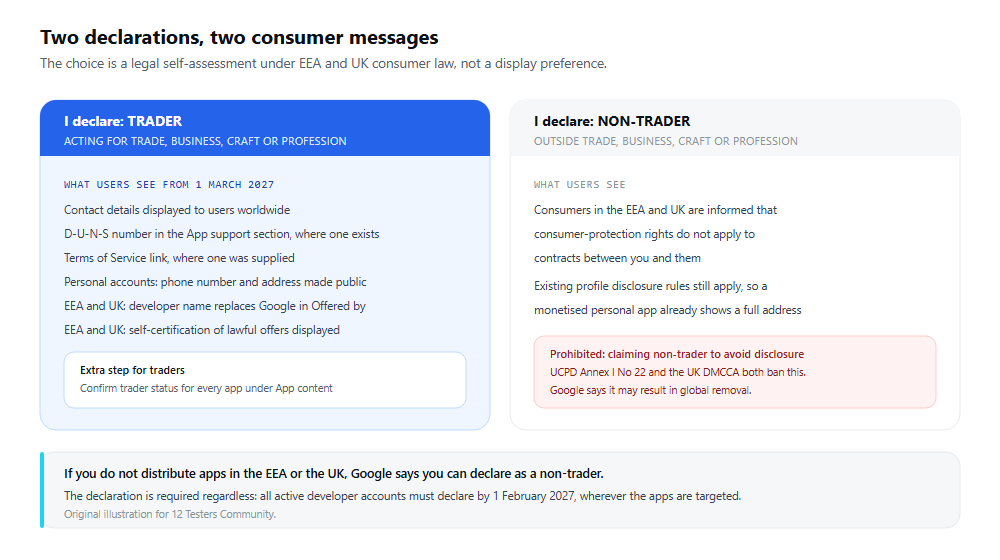
Figure 1 — Two declarations, two different consumer disclosures. Original illustration for 12 Testers Community.
Trader versus non-trader
The practical difference is not a badge; it is what consumers are told. Google says your declaration "will be visible to consumers", and that if you declare non-trader, "we will inform consumers in these regions that consumer rights stemming from consumer protection laws do not apply to contracts between you and them".
| Indicator | Leans trader | Leans non-trader |
|---|---|---|
| Purpose of the activity | Publishing serves a trade, business, craft or profession | Personal hobby with no commercial purpose |
| Remuneration | Paid downloads, subscriptions, in-app purchases, ad revenue on a regular basis | No revenue of any kind |
| Transaction volume | Consistent or high number, amount or frequency of transactions | No transactions to speak of |
| Business setup | Development and publishing are managed as a business | Occasional, unorganised personal project |
| Legal status | Registered entity, trade register entry, VAT registration, D-U-N-S number used commercially | No legal status enabling commercial activity |
| EEA/UK distribution | App is available to consumers there | Not distributed there, which is the case Google names for declaring non-trader |
| Consumer-facing disclosure | Contact details, address, phone, D-U-N-S and ToS link shown | Consumers told consumer-protection rights do not apply |
Three illustrative scenarios show how the indicators combine. They are reasoning examples, not legal determinations; Google states that it "cannot evaluate your business activities or provide legal determinations of your trader status".
- Freelancer with one paid app. Personal account, 2.99 USD, no ads, distributed worldwide including the EEA. The app earns income, the price is commercial and the activity repeats across updates, so a trader declaration with a public phone number and address is the realistic outcome.
- Hobbyist with a free utility used by family. Personal account, free, no ads, never distributed in the EEA or UK. Google's documented non-trader route applies, and the reasoning rests on both limbs, non-commercial purpose and no EEA/UK distribution, not on account type.
- Company publishing an internal field-service app. Organization account with a D-U-N-S number, distributed only to staff in the EEA. The app is not sold to consumers, yet the business already publishes its legal name, address and D-U-N-S. Classification and disclosure are separate questions.
Personal versus organization accounts
Google Play asks you to choose personal or organization at account creation, and that choice drives verification documents, payments profile fields and what the store displays. It does not answer the trader question.
| Dimension | Personal account | Organization account |
|---|---|---|
| Legal identity | An individual, verified with identity documents | A legal entity, verified with organization documents and a D-U-N-S number |
| D-U-N-S | Not a creation requirement | Required, except for known government organizations or agencies |
| Verified contact channels | Developer email; phone only if you have trader status | Developer email and developer phone number |
| What the profile shows | Legal name, country from legal address, developer email; full address if you monetise | Legal name, D-U-N-S number, legal address, developer email and developer phone |
| If declared trader | A contact phone number must be provided for display, and the address is publicly displayed | Business contact details and D-U-N-S already public; ToS link and self-certification added |
| Privacy exposure | Higher: an individual's phone and address become store information | Lower personally, but the registered business address is public |
The asymmetry in that last row is why solo developers should think carefully before attaching a home address to a trader declaration. Google is explicit that a personal trader "must provide a contact phone number to be displayed on Google Play" and that "your address will also be publicly displayed".
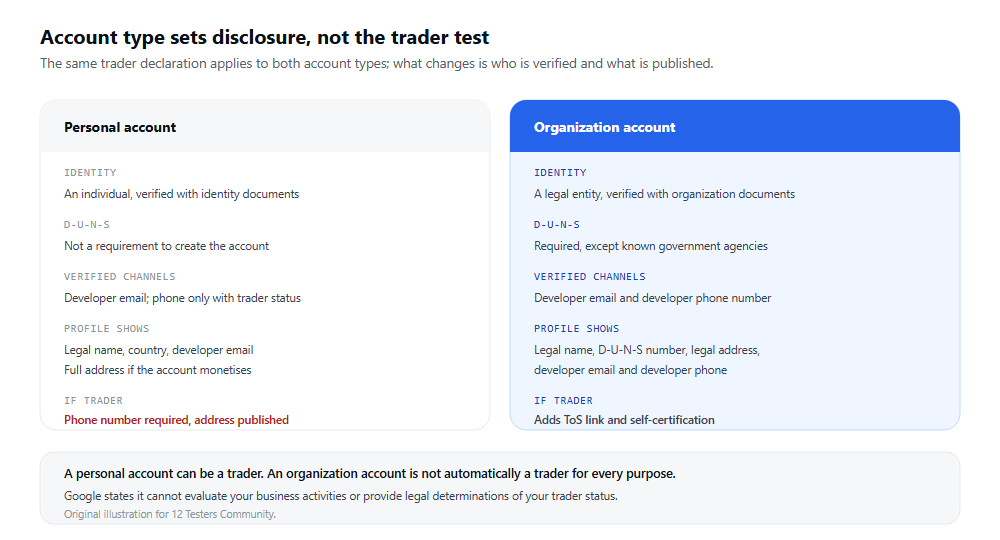
Figure 2 — Account type decides verification and disclosure, not the trader test. Original illustration for 12 Testers Community.
1 February and 1 March 2027 explained
Two dates sit close together and are routinely conflated.
| Date | What happens | What you must do |
|---|---|---|
| 1 February 2027 | Declaration deadline for existing active developer accounts, worldwide | Complete the account-level declaration and confirm status for each app |
| 1 March 2027 | Google Play moves to the marketplace information model in the EEA and UK; new public information begins to display | Nothing new to submit, but the consequences of your earlier answer become visible |
| On account creation | New accounts must declare at setup | Decide before you finish onboarding |
The March date is where the declaration becomes legible. Google's FAQ lists what changes: contact details shown to users everywhere, a D-U-N-S number in "App support", and a Terms of Service link if supplied. In the EEA and UK, the developer or trader name also replaces "Google" in the "Offered by" field, and the self-certification is displayed.
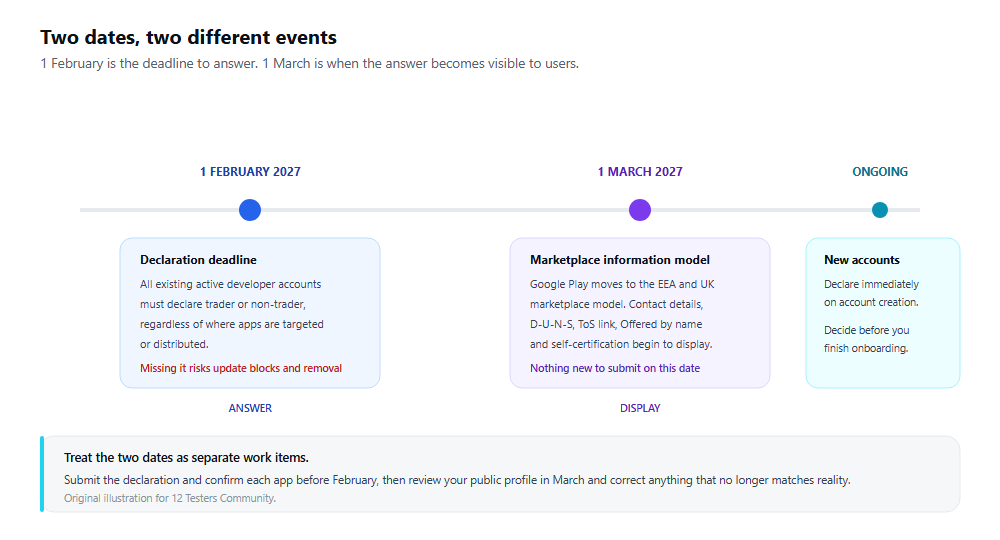
Figure 3 — The deadline and the display date are distinct. Original illustration for 12 Testers Community.
How to declare trader status in Play Console
Google documents the account-level path precisely, and it is short. The interface can change, so treat the labels as a map rather than a contract.
- Sign in to Google Play Console.
- Go to Manage account > Account details > About you.
- Follow the on-screen prompts to declare status for the overall account.
- Read the statements in full before selecting; they describe the legal meaning of each option.
- Select the declaration that matches your circumstances.
- If you declare trader, self-certify that you commit to offering only lawful products or services, and supply each app's Terms of Service link.
- If you hold a personal account and declare trader, provide the contact phone number that will be displayed.
- Submit, then reopen the page and confirm the saved declaration reads as intended.
You can change the declaration later: "If your business model or app distribution details change ... you can update your declaration at any time." That is not a reason to guess now, since the answer is visible to consumers and is the basis on which Google may later query your status.
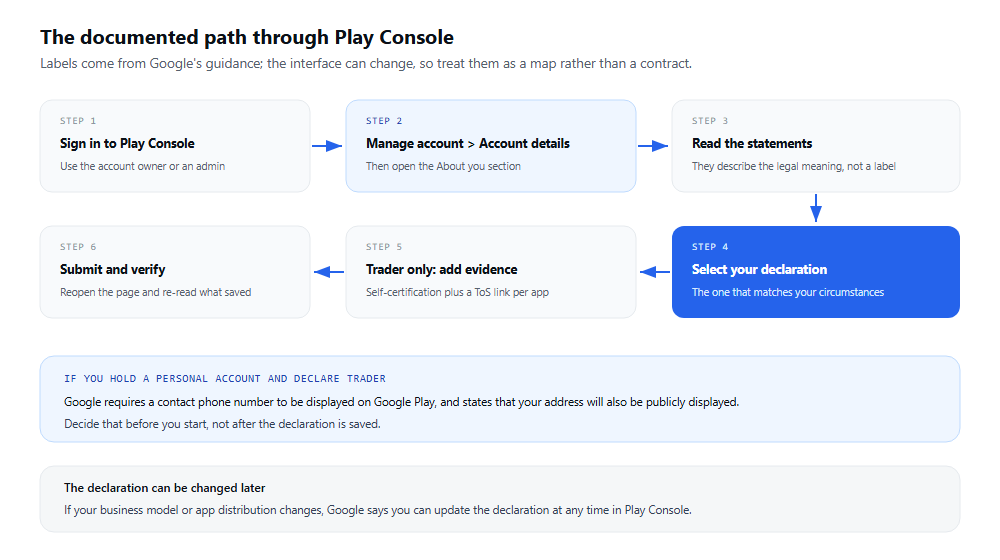
Figure 4 — The documented account-level path. Original illustration for 12 Testers Community.
Confirming status for each app
The account-level declaration covers your identity as a developer; the app-level step covers what each listing presents. Google documents the path as: sign in, select the app, then Monitor and improve > Policy and programs > App content, and confirm trader status for that app.
| Account level | App level |
|---|---|
| Set once in Manage account > Account details > About you | Confirmed per app in Policy and programs > App content |
| Describes you as a developer | Describes the listing users see |
| Triggers self-certification and ToS collection where you are a trader | Attaches the ToS link and trader display to the correct app |
| Applies across the portfolio | Must be repeated for every app you publish |
Google's phrase is "If you are a trader, confirm the trader status for each app in your portfolio." A developer with six apps who completes only the account step has not finished.
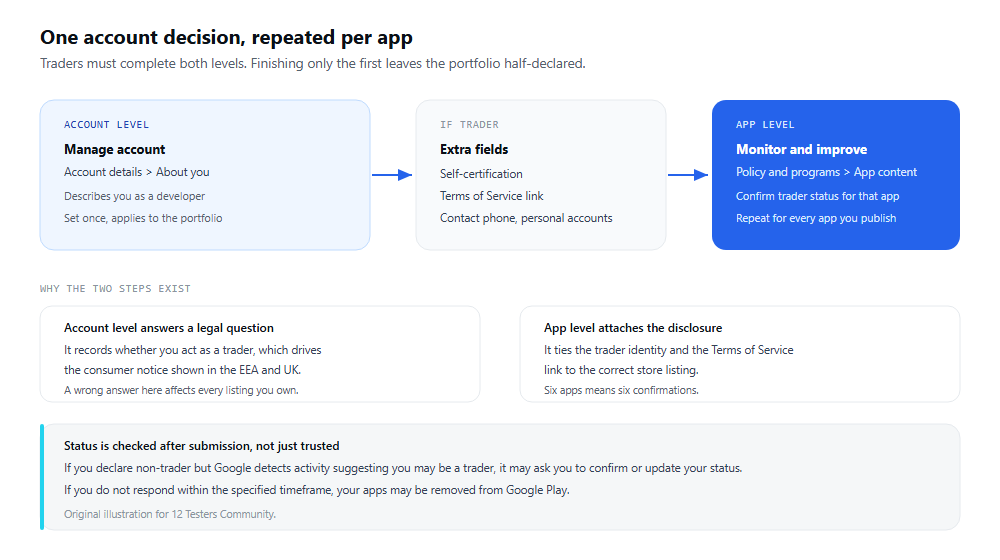
Figure 5 — One account decision, repeated per app. Original illustration for 12 Testers Community.
What becomes public
This is where the declaration becomes a privacy decision. Two sets of fields exist and only one is published. Google distinguishes contact email and contact phone, "for Google to contact you", from developer email, developer phone and trader status, "shown as part of your developer profile on Google Play".
| Field | Personal trader | Organization trader | Non-trader |
|---|---|---|---|
| Developer name in "Offered by" (EEA/UK) | Shown, replacing "Google" from 1 March 2027 | Shown, replacing "Google" from 1 March 2027 | Not shown under the trader rules |
| Legal name | Shown | Shown | Existing profile rules still apply |
| Address | Publicly displayed; already shown if you monetise | Legal address shown | Existing profile rules still apply |
| Phone number | Must be provided for display | Developer phone shown | Not required for trader display |
| Email address | Developer email shown | Developer email shown | Developer email shown |
| D-U-N-S number | Only if one exists and was supplied | Shown in "App support" | Not applicable |
| Terms of Service link | Shown if supplied | Shown if supplied | Not applicable |
| EEA/UK self-certification | Displayed | Displayed | Not displayed; consumer-rights notice shown instead |
Two limits matter. Internal contact fields, support email and the organization phone used for verification are not published; Google says the organisation phone "does not display to users". And these rules sit alongside existing disclosure rules, so declaring non-trader is no privacy shield for a monetised personal app whose full address Google already displays.
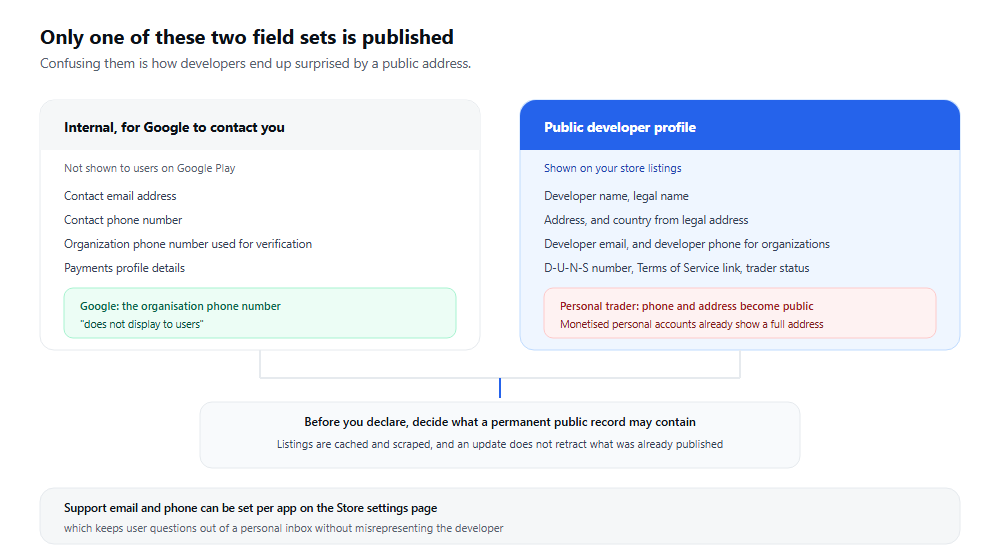
Figure 6 — Only one of these two fields sets is published. Original illustration for 12 Testers Community.
D-U-N-S and developer verification
D-U-N-S confusion wastes weeks. Google answers it in one line: "You are not re-doing the D-U-N-S verification; instead, if you are a trader, the D-U-N-S number you already provided will be displayed to users on your app's detail page."
| Aspect | D-U-N-S / identity verification | Trader status declaration |
|---|---|---|
| What it establishes | That you are who you say you are | Whether you act as a trader under EEA/UK law |
| Who needs it | Every developer; organizations need a D-U-N-S number | Every active developer account, at some status |
| When | During account setup, or within your verification window | By 1 February 2027, or at account creation |
| Evidence used | Identity or organization documents, payments profile, D-U-N-S record | Your own assessment against the published indicators |
| Replaces the other? | No | No |
| Personal accounts | No D-U-N-S number required | Phone number and address become public if trader |
Two rules prevent most of the damage. D-U-N-S numbers are free through Dun & Bradstreet, and Google warns about "third-party services that may attempt to charge high administrative fees". The number must also belong to the legal entity you register; large organisations often hold several, and the one you pick should carry the details you want on the account.
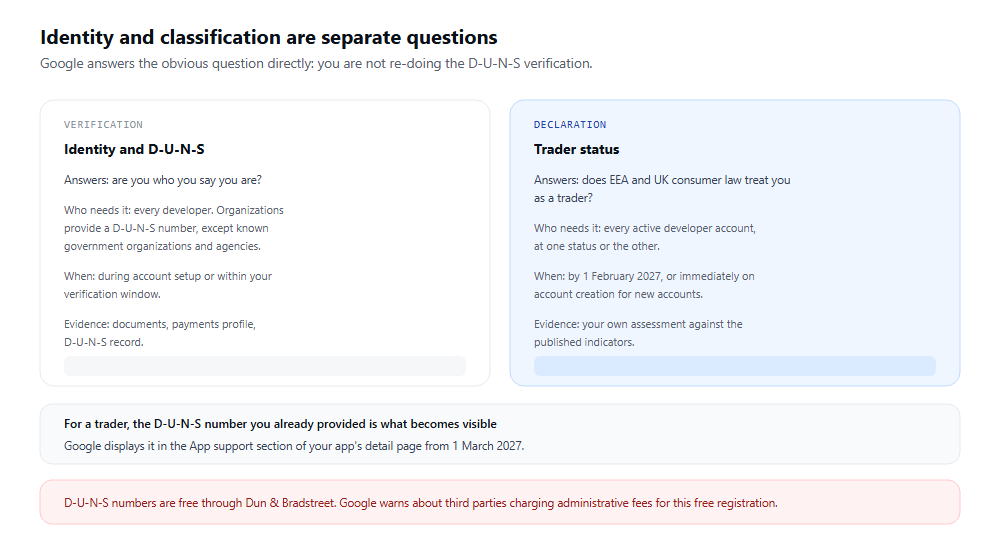
Figure 7 — Identity and classification are separate questions. Original illustration for 12 Testers Community.
What developers outside Europe need to know
The declaration is worldwide; the information shown is regional. That distinction is the practical answer for most non-European developers.
| Developer situation | Declaration required | Practical consideration |
|---|---|---|
| Bangladesh, app not offered in EEA/UK | Yes, by 1 February 2027 | Google's documented route of declaring non-trader is available when you do not distribute there |
| India, app offered in EEA/UK, monetised | Yes | Assess against the indicators; local tax registration is not the test |
| Pakistan, freelancer publishing client apps | Yes, per account | Who is the trader, you or the client, is a contractual question worth settling in writing |
| United States, free app distributed globally | Yes | Distribution in the EEA/UK plus any ad revenue is the part that changes the answer |
| Any country, no EEA/UK distribution and no commerce | Yes | Declare non-trader, and keep it accurate if distribution changes |
Nothing here overrides local law, and Google cannot decide your classification. If you operate through a company, or your app generates revenue, take local advice rather than importing a conclusion from a blog post, including this one.
Privacy and security considerations
Assume the address is permanent. A public listing is cached, scraped and aggregated. Google allows the declaration to be updated but does not retract what has been published. If a personal trader declaration would expose a home address, the sensible options are a business address you may use, publishing through a registered entity, or reconsidering whether the app is commercial.
Separate support channels from identity. Google lets you set a different support email and phone per app on the Store settings page, routing user questions away from a personal inbox without misrepresenting who the developer is.
Prepare the Terms of Service before you declare trader. The link is requested per app, and a broken or placeholder page is worse than none.
Never use a false address to protect privacy. Google's representations and warranties in Section 11.4 of the Developer Distribution Agreement cover what you declare, and its enforcement note points to suspension or termination under Section 10.3(a).
What happens if you miss the deadline
Google's published consequences are specific about mechanism and deliberately vague about timing.
- No declaration by 1 February 2027: enforcement "may trigger ... app update blocks and removal from the Play Store globally".
- Non-trader declared, activity suggests otherwise: Google may ask you to confirm or update, and "if you don't respond within the specified timeframe, your apps may be removed from Google Play".
- Misrepresentation: treated as a breach of Section 11.4 of the DDA, with suspension or termination under Section 10.3(a) globally.
Google publishes no grace period or automatic suspension date, and no third-party summary can invent one reliably. The safe reading is that an update block is the first practical symptom, which for a maintained app is worse than removal.
Common mistakes
- Assuming a personal account means non-trader. The test is the purpose of the activity.
- Assuming an organization account is automatically a trader, without checking what the app does or where it ships.
- Treating D-U-N-S verification as the declaration and concluding the work is done.
- Completing the account-level declaration and forgetting per-app confirmation.
- Public details that no longer match reality, such as a cancelled phone number.
- Entering an address unrelated to the account's verified identity to keep a home address private.
- Declaring non-trader purely to avoid disclosure, which is what the UCPD and DMCCA prohibit.
- Treating 1 February as optional because the app is not distributed in Europe.
- Confusing internal contact fields with the profile details users see.
Complete compliance checklist
| Area | Action |
|---|---|
| A. Account review | Confirm account type, owner, and every app attached to the account |
| B. Commercial assessment | Write down your revenue sources: price, subscriptions, in-app purchases, ads, client work |
| C. Distribution review | Check whether each app is listed in the EEA or UK, and in which countries |
| D. Classification | Assess against the four published indicators and record the reasoning |
| E. Public information | Decide the phone number and address that would be displayed, and whether they are fit to publish |
| F. Verification | Confirm identity or organization verification is complete and details match the payments profile |
| G. Terms of Service | Publish a reachable ToS page per app before declaring trader |
| H. App-level declaration | Confirm trader status in Policy and programs > App content for every app |
| I. Submission | Submit before 1 February 2027, then reopen the page and verify what was saved |
| J. Monitoring | Revisit the declaration whenever revenue, distribution or legal status changes |
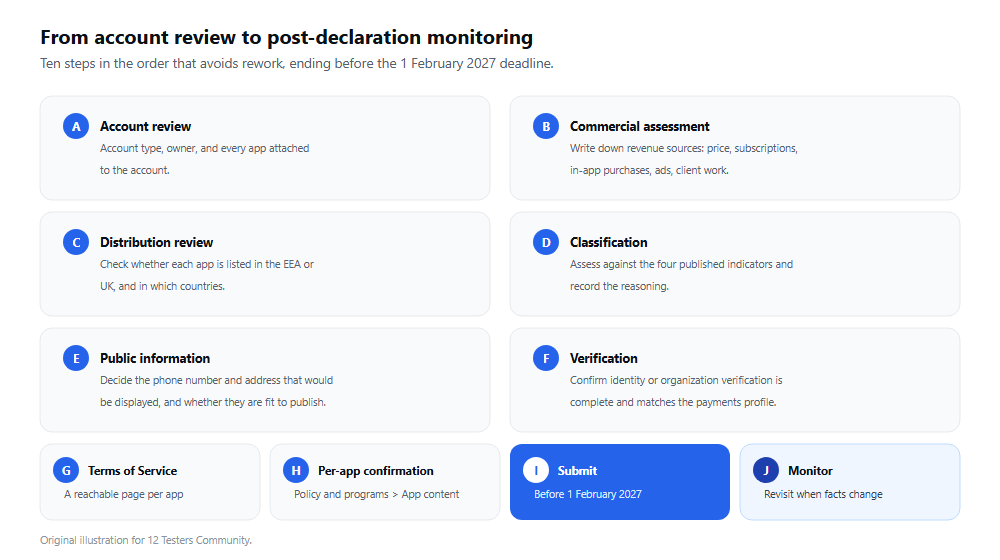
Figure 8 — The full sequence, from account review to post-declaration monitoring. Original illustration for 12 Testers Community.
Frequently asked questions
1. What is Google Play trader status? A declaration, required under Play's global developer policies, stating whether you are a trader or non-trader under EEA and UK laws.
2. Is the February 2027 deadline worldwide? Yes, "regardless of where apps are targeted or distributed".
3. Does it apply to developers in Bangladesh? Yes. The obligation attaches to the account, not the country.
4. Does it apply to personal developer accounts? Yes, and declaring trader adds public phone and address disclosure.
5. Does it apply to organization accounts? Yes. All active developer accounts must declare.
6. Can a personal developer be a trader? Yes. The test is the purpose of the activity, not the account type.
7. Can a business declare non-trader? Only truthfully. Falsely claiming non-trader status may result in global removal.
8. What if I do not distribute apps in Europe? Google says you can declare as a non-trader if you do not distribute in the EEA or UK.
9. What is the difference between trader and non-trader? Traders show consumer-protection information; non-traders have consumers told those rights do not apply to their contracts.
10. Will my home address become public? Yes for a personal account declaring trader. Monetised personal accounts already display a full address.
11. Will my phone number become public? Yes for a personal trader account; a contact number is required for display.
12. Does a personal trader account need a D-U-N-S number? No. D-U-N-S belongs to organization account setup.
13. Is D-U-N-S verification the same as the declaration? No. Google says you "are not re-doing the D-U-N-S verification".
14. What is the March 1, 2027 change? The move to the EEA and UK marketplace information model, when the information attached to your declaration begins to display.
15. Where do I declare my status? Manage account > Account details > About you.
16. Do I need to confirm status for each app? Yes if you are a trader, under Policy and programs > App content.
17. Can I change my declaration later? Yes, at any time if your business model or distribution changes.
18. What happens if I miss the deadline? Google says it "may trigger enforcement including app update blocks and removal from the Play Store globally".
19. Will my apps be removed automatically? Removal is a possible outcome; Google publishes no automatic removal schedule.
20. Does advertising revenue affect trader status? Ad-sponsored apps are one of Google's examples of profit-seeking motive: an indicator, not a threshold.
21. Do in-app purchases affect classification? Yes; they are listed alongside paid apps and ads as remuneration.
22. Do I need a Terms of Service page? If you declare trader, Google asks for the link for each app.
23. What is self-certification? A commitment shown to EEA and UK users from 1 March 2027 that you will offer only lawful products or services.
24. Is trader status a tax registration? No. It is a consumer-law classification, separate from tax registration.
25. Can Google tell me which status to choose? No. Google "cannot evaluate your business activities or provide legal determinations of your trader status".
Legal frameworks and further reading
Primary law and guidance. Regulation (EU) 2022/2065, the Digital Services Act, defines a trader in Article 3(f) and sets the traceability information platforms must obtain, including the self-certification, in Article 30. Commission Notice 2021/C 526/01, guidance on Directive 2005/29/EC, contains the criteria Google summarises under Section 2.2, "The concept of trader". Annex I No 22 of that Directive prohibits falsely claiming not to be a trader. In the UK, the Digital Markets, Competition and Consumers Act 2024, Part 4 Chapter 1, defines a trader in section 225(3).
Google Play documentation. Trader status declaration, Required information to create a Play Console developer account, and Verify your developer identity information on Play Console Help; the Google Play Developer Policies; and the Developer Distribution Agreement, Sections 10.3(a) and 11.4.
Academic research. No peer-reviewed study or thesis examining Google Play's trader declaration exists, because the requirement is recent and platform-specific. Searches of Crossref and the European legal literature returned no master's thesis or dissertation assessing trader-identification rules for app stores specifically, and that gap is stated rather than filled. Treat the legal instruments above, not secondary commentary, as authority for your own classification.
Conclusion
The trader declaration is a two-minute form preceded by an hour of honest assessment. Decide what your app is for, whether anyone in the EEA or UK can install it, and what personal information you will publish permanently.
Then finish the mechanical parts: submit before 1 February 2027, confirm status for every app, publish the Terms of Service you promised, and check after 1 March 2027 what the store now shows. When revenue, distribution or legal status changes, revisit the declaration; Google allows updates because the facts move.
Action plan. This week: confirm your account type and list every app with its revenue sources and distribution countries. Next: decide the classification and check whether the phone number and address it implies are ones you will publish. Then: publish the ToS page, submit, confirm per app, and diary a review for after 1 March 2027.