
Reviewed against the official Android, ML Kit and Flutter documentation in November 2026. CameraX 1.6.2 is the stable release referenced throughout.
Android camera code has a reputation problem, and it is deserved. The build that produces a crisp, correctly oriented preview on your desk phone produces a stretched picture, a sideways selfie or an out-of-memory crash on hardware you have never held — different sensor, different HAL, different OEM layer, different resolutions, different memory ceiling. CameraX is Google's answer: a Jetpack library that owns the parts of camera work which depend on the device, so you can stop writing per-model branches.
Quick answer
CameraX is a Jetpack camera library that gives Android apps a consistent, lifecycle-aware API for preview, capture, video and real-time analysis, with backward compatibility to Android 5.0 (API level 21).
- It is not a new camera stack — it drives Camera2 underneath and adds workarounds for known device quirks.
- It is not a guarantee: it works across "the vast majority" of devices, not all of them identically.
- It does not detect faces, prove liveness or verify identity. Those start where the frame pipeline ends.
What CameraX is
CameraX exposes camera work as use cases — Preview, ImageAnalysis, ImageCapture, VideoCapture — that you configure, combine and bind to a lifecycle. It ships on its own cadence, so camera fixes arrive with a library update rather than an annual Android release; Google cites that updatability when recommending migration off the deprecated Camera1 class.
The compatibility claim is deliberately modest. Google states CameraX supports Android 5.0 and higher — over 98% of Android devices — and "works across the vast majority of Android devices". That is an engineering-coverage statement, not a per-model certification. The library carries internal quirk classes and Google maintains a lab-tested device list, but a list of tested models is evidence about those models only.
Three limits matter before anything else. Hardware limits stay hard: if a sensor cannot stream a size, CameraX will not invent it, and extensions such as HDR or bokeh are unavailable where the device lacks the capability. Not every low-level control is exposed; fine-grained sensor work remains Camera2 territory, which is why CameraX documents an interop path. Analysis is not understanding: ImageAnalysis hands you pixels, and deciding what they mean is your model's job.
What it does take off your plate is worth the dependency: it manages the capture session, negotiates a resolution the device accepts, applies rotation so output matches the display, and releases the camera when the lifecycle stops — the four places hand-rolled camera code usually breaks.
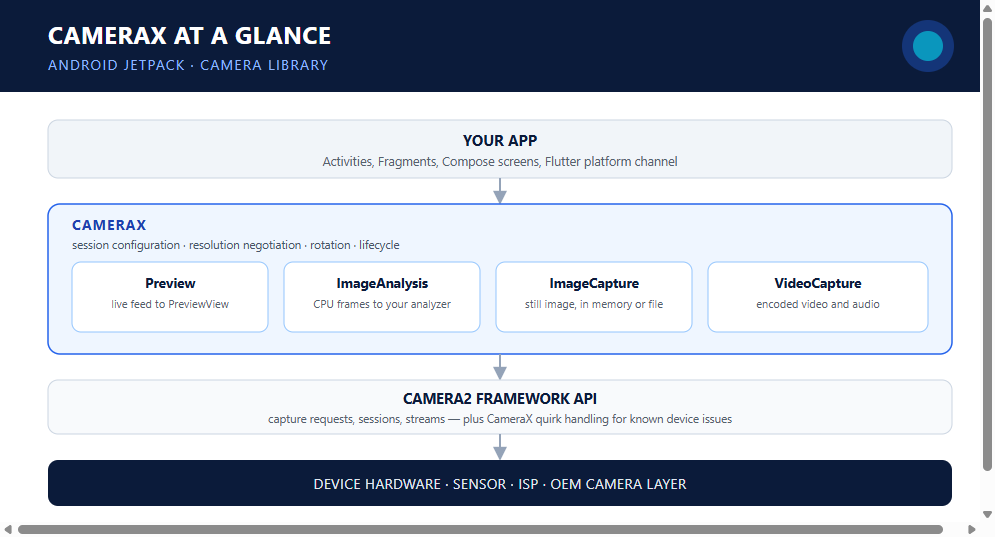
Figure 1 — CameraX sits between your app and Camera2, exposing four use cases and owning session, resolution, rotation and lifecycle work. Original illustration for 12 Testers Community.
Camera1 vs Camera2 vs CameraX
These are not successive attempts at one job. Camera1 (android.hardware.Camera) has been deprecated since API 21 and leaves preview surface, buffers, orientation and OEM variation to you. Camera2 is the low-level framework API: per-frame request control, manual sensor settings, raw output and multiple streams — control that computational photography needs and that you maintain forever. CameraX is the abstraction above Camera2 where you describe intent and the library resolves it against hardware.
| Feature | Camera1 | Camera2 | CameraX |
|---|---|---|---|
| API complexity | Small surface area, every detail manual. | High: sessions, requests, targets, state transitions. | Low: configure use cases, bind to a lifecycle. |
| Device compatibility | Runs on old devices; behaviour varies by OEM. | Full framework access; compatibility is yours. | Library workarounds for known quirks; tested in a device lab. |
| Lifecycle handling | Manual open and release. | Manual; you open and close the device. | Bound to a LifecycleOwner; released when it stops. |
| OEM-specific issues | Yours to find and patch per model. | Yours, unless you rebuild quirk handling. | Handled where a known quirk exists. |
| Preview handling | Manual surface and aspect-ratio correction. | Manual SurfaceTexture or SurfaceView plumbing. | PreviewView with scale types and implementation modes. |
| Image analysis | Preview callbacks and conversions you write. | ImageReader and your own buffers. | ImageAnalysis with backpressure and rotation metadata. |
| Resolution selection | Query sizes, pick one, handle failure. | Read the stream map, build a session that fits. | ResolutionSelector with explicit fallback rules. |
| Maintenance | High, on a deprecated API. | High and permanent. | Low; fixes arrive with library updates. |
| Recommended use | Legacy only. Migrate. | Raw capture, manual sensor control, advanced streams. | Preview, capture, video and analysis in most apps. |
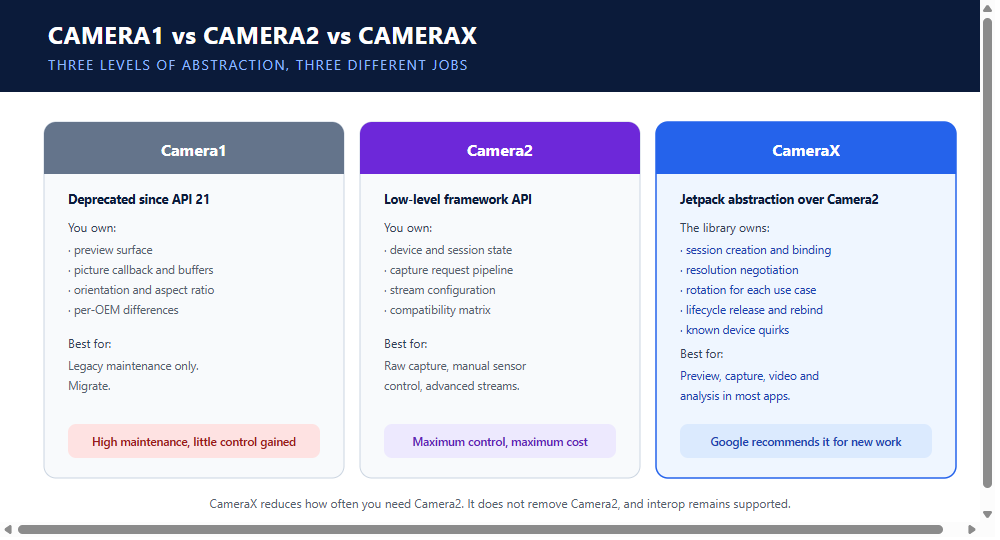
Figure 2 — The three APIs address different needs rather than replacing one another. Original illustration for 12 Testers Community.
CameraX reduces how often you need Camera2; it does not remove it. Interop is supported, and features depending on precise per-frame control are still built there.
Inside the architecture
Six objects explain almost every CameraX bug. ProcessCameraProvider is the entry point and effectively a process singleton; it knows which cameras exist and every bind goes through it, which is why binding code calls unbindAll() before rebinding. CameraSelector chooses the lens. Use cases are the work, each built with its own builder. LifecycleOwner is the contract that makes the library lifecycle-aware: no onResume/onPause plumbing, and no camera left open in the background. PreviewView displays the stream, cropping, scaling and rotating for the screen; PERFORMANCE is the default implementation mode and uses SurfaceView with TextureView fallback, while COMPATIBLE uses TextureView when the preview must be transformed. CameraController (LifecycleCameraController) is the shortcut: one object, tap-to-focus and pinch-to-zoom included, but it requires PreviewView and hides some configuration.
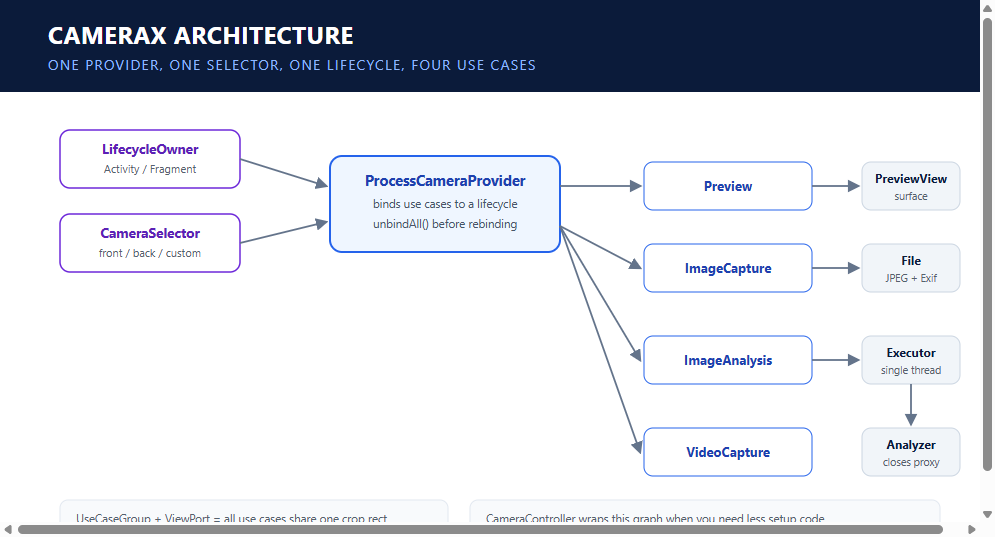
Figure 3 — One provider, one selector, one lifecycle, four use cases. Original illustration for 12 Testers Community.
When preview and analysis must agree on framing, bind them in a UseCaseGroup with a shared ViewPort. The viewport defines what the user sees; CameraX crops every use case in the group to the same sensor area, which is the difference between "the face I framed is the face I analysed" and a model looking at a wider crop than the user.
val viewPort = ViewPort.Builder(Rational(previewWidth, previewHeight), display.rotation).build()

val group = UseCaseGroup.Builder()
    .addUseCase(preview)
    .addUseCase(imageAnalysis)
    .addUseCase(imageCapture)
    .setViewPort(viewPort)
    .build()

cameraProvider.bindToLifecycle(lifecycleOwner, cameraSelector, group)
The four use cases
Use cases combine and run concurrently, which is why a scanner can preview, analyse every frame and still capture a still. Every additional stream costs sensor and memory bandwidth, and budget chipsets feel that first.
| Use case | Produces | Configure with | Typical use |
|---|---|---|---|
| Preview | Live stream rendered to the PreviewView surface. | ResolutionSelector, target rotation. | Framing; guiding a face or document into position. |
| ImageCapture | A still image in memory or saved to a file. | Capture mode, flash mode, resolution, output options. | Profile photos, documents, verification evidence. |
| ImageAnalysis | CPU-accessible frames as ImageProxy objects. | Backpressure, output format, resolution, executor. | Face or barcode detection, quality gating, inference. |
| VideoCapture | An encoded video file, with audio when added. | Recorder, quality selector, output options. | Recording a liveness challenge or evidence clip. |
Two rules follow: do not bind a use case you are not using, because a third stream is where entry-level hardware starts dropping frames; and treat ImageAnalysis as a sampling pipeline, not a recorder.
Real-time ImageAnalysis
CameraX is the producer, your analyzer is the consumer, and they run at different speeds. Everything else — backpressure, executors, the ImageProxy lifecycle — manages that mismatch.
Each frame arrives as an ImageProxy wrapping image planes plus metadata such as width, height and imageInfo.rotationDegrees. The buffers are reused by CameraX, so the proxy must be closed; skipping close() is the most common cause of "analysis stopped after a few frames", because the pipeline has no free buffer left. Close it in a finally block so an exception in your model cannot wedge the camera.
Two output formats exist. YUV_420_888 is the default and the efficient choice for a detector that accepts YUV. RGBA_8888 is available through setOutputImageFormat(), with CameraX converting internally into the first plane — convenient, but real CPU work that shows up in frame rate on low-end hardware.
| Strategy | Mode | When analysis is slow | Choose it when |
|---|---|---|---|
| STRATEGY_KEEP_ONLY_LATEST | Non-blocking (default) | The newest frame overwrites the buffered one; queue depth is ignored. | Real-time detection; preview must stay smooth; a late frame is worthless. |
| STRATEGY_BLOCK_PRODUCER | Blocking | Frames queue to the configured depth, then drop; the delay applies across the whole camera scope, so a bound Preview stutters too. | You need most frames in order and can tolerate preview latency. |
Google's guidance maps onto those rows: if total analysis time is under a frame interval — 16 ms at 60 fps — either mode works; a fast but jittery analyzer wants blocking with a slightly longer queue; a genuinely slow analyzer plus a live preview wants non-blocking, because only the analysis path drops frames. Queue depth applies to blocking mode only, and every queued frame is a full buffer.
private val analysisExecutor = Executors.newSingleThreadExecutor()

private val analyzer = ImageAnalysis.Analyzer { imageProxy ->
    try {
        val rotation = imageProxy.imageInfo.rotationDegrees
        onFrame(imageProxy, rotation)
    } finally {
        imageProxy.close()   // always, even if the detector threw
    }
}

val imageAnalysis = ImageAnalysis.Builder()
    .setBackpressureStrategy(ImageAnalysis.STRATEGY_KEEP_ONLY_LATEST)
    .setResolutionSelector(resolutionSelector)
    .build()
    .also { it.setAnalyzer(analysisExecutor, analyzer) }
Stop analysis with clearAnalyzer() or by unbinding — frames keep arriving immediately after binding — and shut the executor down when its owner dies, or you leak both the thread and your analyzer.
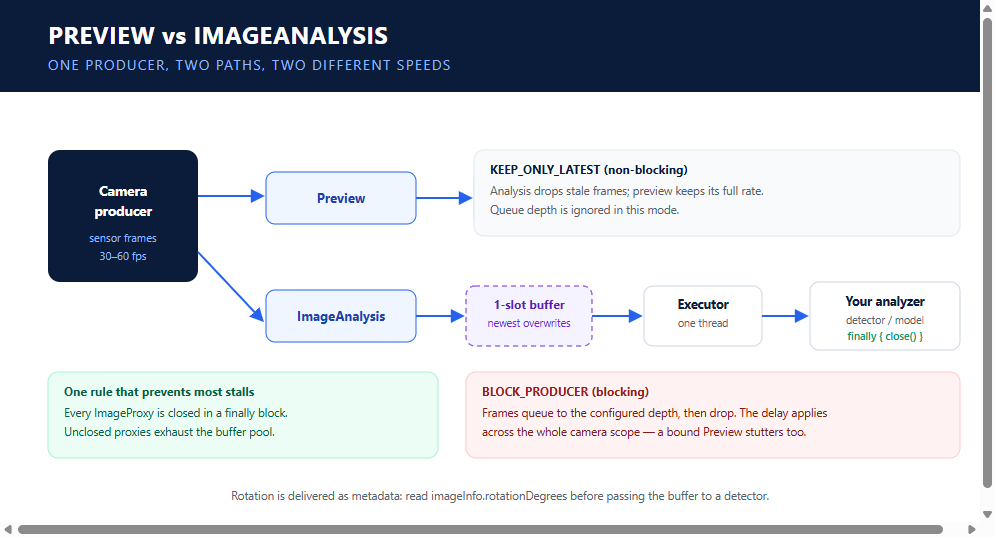
Figure 4 — Preview and analysis diverge after the producer; KEEP_ONLY_LATEST drops stale analysis frames while preview keeps its rate. Original illustration for 12 Testers Community.
Resolution and image quality
Resolution is the setting most often chosen for the wrong reason. "Highest available" is a memory, latency and thermal decision that sometimes also improves quality.
ResolutionSelector, available since CameraX 1.3.0, replaces the older mutually exclusive resolution and aspect-ratio setters with a ResolutionStrategy (target size plus fallback rule) and an AspectRatioStrategy; the library picks the closest size the device supports.
| Fallback rule | Behaviour when the bound size is unavailable | Practical effect |
|---|---|---|
| FALLBACK_RULE_CLOSEST_HIGHER_THEN_LOWER | Closest higher size; if none exists, closest lower size. | Favours sharpness, at higher memory than the target implies. |
| FALLBACK_RULE_CLOSEST_LOWER_THEN_HIGHER | Closest lower size; if none exists, closest higher size. | Caps memory — the safety-first choice for analysis on budget devices. |
| FALLBACK_RULE_CLOSEST_HIGHER | Only a higher size; no lower fallback. | Use when a minimum pixel density is a requirement. |
| FALLBACK_RULE_CLOSEST_LOWER | Only a lower size; no higher fallback. | A hard ceiling on buffer size. |
| FALLBACK_RULE_NONE | No substitution at all. | CameraX still needs a workable session; do not read this as "fail loudly". |
CameraX documents that it compromises when it must: the device may not support the size, legacy hardware may only work at certain sizes, some formats exist only at certain aspect ratios, and some devices prefer a "nearest mod16" width or height for JPEG and video. Hence the instruction to check the size your use cases actually return.
val resolutionSelector = ResolutionSelector.Builder()
    .setAspectRatioStrategy(AspectRatioStrategy.RATIO_4_3_FALLBACK_AUTO_STRATEGY)
    .setResolutionStrategy(
        ResolutionStrategy(
            Size(1200, 900),
            ResolutionStrategy.FALLBACK_RULE_CLOSEST_HIGHER_THEN_LOWER
        )
    )
    .build()
The arithmetic explains why the rule matters. YUV_420_888 costs roughly 1.5 bytes per pixel and ARGB_8888 four: a 1920×1080 ARGB copy is about 7.9 MiB, 4000×3000 about 45.8 MiB, and 1200×900 about 4.1 MiB. Multiply by queued frames and every conversion copy, and "better" resolution becomes a crash on a 1 GB phone.
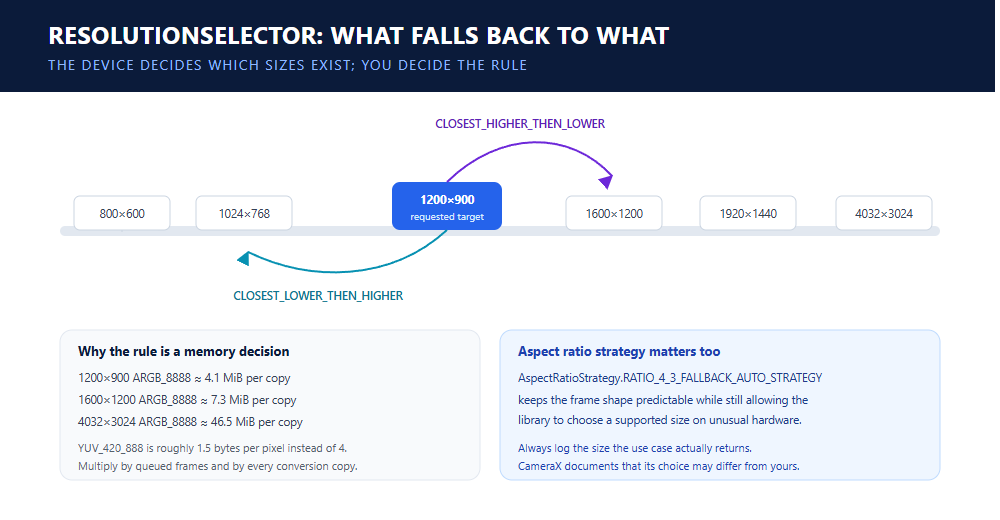
Figure 5 — The fallback rule decides whether the library rounds up or down when the exact size is missing. Original illustration for 12 Testers Community.
Rotation and crop need the same precision. A captured still carries orientation that gallery apps read — CameraX documents that Exif, the buffer, or both may be adjusted depending on the HAL. Analysis receives an unrotated buffer with metadata, so the detector must be told how to rotate it. And the crop rect matches the preview only when the use cases share one ViewPort.
CameraX and ML Kit
ML Kit supplies the models, CameraX supplies the frames, and MlKitAnalyzer adapts one to the other: it implements ImageAnalysis.Analyzer, overrides the default target resolution when ML Kit needs it, handles the coordinate transform and aggregates results per frame.
Face detection returns, per face, a bounding polygon and rotation angles, landmarks on request, optional contours, optional classification such as smiling or eyes-open, and a tracking ID consistent across frames. That is a strong framing signal and not an identification: Google's own overview says the API "detects faces, it does not recognize people".
Two integration details catch teams out. The floors differ — CameraX supports API 21, ML Kit face detection requires API 23 — so a module shipping to 21 must gate the ML Kit path. And the model choice is a size decision: bundled com.google.mlkit:face-detection adds about 6.9 MB, while the Play-services variant adds about 800 KB but may need a download before first use, during which detection legitimately returns nothing. ML Kit's input guidance bridges resolution and accuracy: each face at least 100×100 px, 200×200 px for contours, and images of at least 480×360 recommended — which is exactly what a face guide in the preview is for.
val faceDetectorOptions = FaceDetectorOptions.Builder()
    .setPerformanceMode(FaceDetectorOptions.PERFORMANCE_MODE_FAST)
    .setLandmarkMode(FaceDetectorOptions.LANDMARK_MODE_ALL)
    .setClassificationMode(FaceDetectorOptions.CLASSIFICATION_MODE_ALL)
    .build()

val faceDetector = FaceDetection.getClient(faceDetectorOptions)

// CameraController maps detector coordinates onto PreviewView for you.
cameraController.setImageAnalysisAnalyzer(
    ContextCompat.getMainExecutor(this),
    MlKitAnalyzer(
        listOf(faceDetector),
        COORDINATE_SYSTEM_VIEW_REFERENCED,
        ContextCompat.getMainExecutor(this)
    ) { result ->
        updateFaceGuide(result?.getValue(faceDetector).orEmpty())
    }
)
Coordinate systems are the other half. COORDINATE_SYSTEM_VIEW_REFERENCED gives results already mapped to PreviewView, which is what you want for an overlay in the same layout. COORDINATE_SYSTEM_ORIGINAL — or using ImageAnalysis directly — gives analysis-stream coordinates, and you apply the same rotation, scale and crop the preview applies. A misplaced face box is almost always this, not a detection failure.
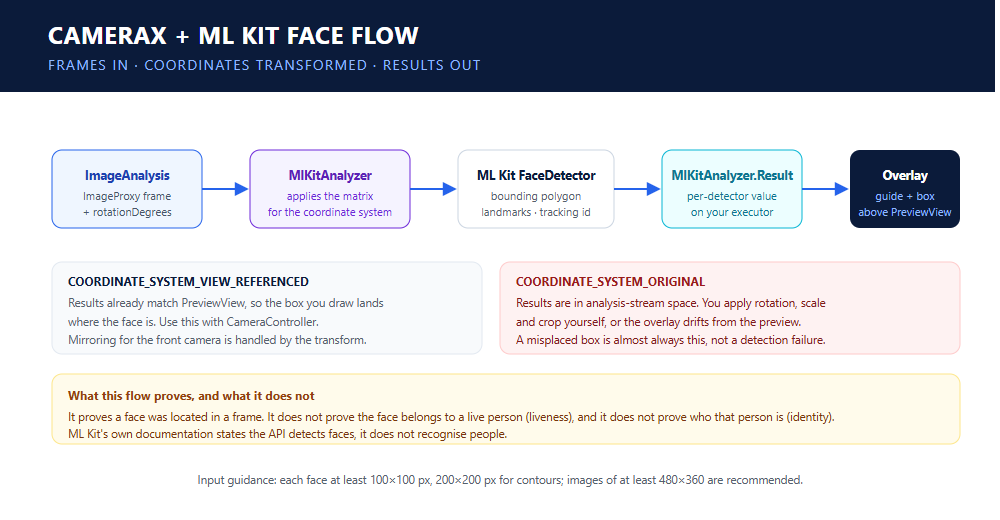
Figure 6 — MlKitAnalyzer sits between the frame pipeline and your overlay and does the coordinate maths in the middle. Original illustration for 12 Testers Community.
The same adapter pattern covers barcodes and labeling. What it does not cover is assurance: detection answers "is there a face and where", liveness answers "is this a live person", identity answers "does it match this claim". Three problems, three models, three failure profiles.
Low-RAM devices and OOM
Out-of-memory crashes are the most common camera failure on entry-level hardware, and the SmileID case study names the conditions: devices with 1 GB of RAM or less, where processing raw high-resolution images leads to fatal allocation crashes. CameraX does not change the arithmetic; it changes how easily you can avoid the worst of it.
The failure follows a familiar path. A large analysis resolution is requested "for quality". Every frame is converted from YUV to full-frame ARGB. Rotation allocates a second bitmap of the same size. The result is retained in a list. A frame is missed, another allocation starts, and the process dies at a fraction of the device's marketing RAM.
| Pressure point | Why it costs memory | What to do instead |
|---|---|---|
| Full-sensor analysis frames | Buffer size grows with pixel count; a 12 MP frame is a liability, not a detection input. | Request what the model needs, with a lower-first fallback rule. |
| YUV to ARGB conversion | Adds a 4-byte-per-pixel copy of every frame beside the original buffer. | Pass YUV to a detector that accepts it, or convert only a crop. |
| Rotation by copy | Every Bitmap.createBitmap rotation doubles peak usage for its duration. |
Carry rotation as metadata, or draw into one reusable bitmap. |
| Queued frames | Blocking mode keeps N full buffers alive at once. | Use STRATEGY_KEEP_ONLY_LATEST unless ordering is required. |
| Unclosed ImageProxy | Buffers are never returned; analysis stalls, then the app dies. | close() in finally, every time. |
| Retained frames | A "recent frames" list or a bitmap in a ViewModel survives navigation. | Keep one in-flight frame, store the smallest crop, null references on stop. |
| Concurrent use cases | Preview plus analysis plus capture is three stream buffers on a small heap. | Disable unused use cases; unbind before switching flows. |
| Work after stop | An analyzer or executor outliving the screen holds buffers and context. | Clear the analyzer and shut the executor down in the matching callback. |
Two habits prevent the rest: downscale before you allocate, choosing the analysis size from what the model consumes rather than the sensor maximum; and measure instead of guessing, with the Android Studio Memory Profiler or adb shell dumpsys meminfo <package> during a live session. If the bitmap line climbs and never falls, you have found the crash before a user did. Raising the heap with android:largeHeap is not a fix — it creates no memory the device lacks and does not address the leak.
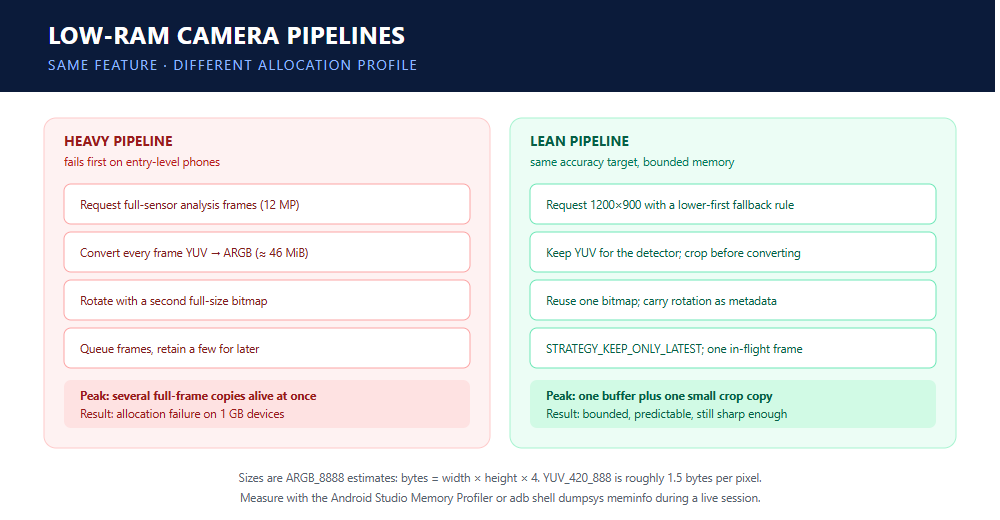
Figure 7 — The same feature, two memory profiles; the difference is where the allocations happen. Original illustration for 12 Testers Community.
The SmileID case study: 18,000+ device types
In November 2026 Google published a case study on SmileID's migration to CameraX. It is the most concrete public account of what fragmentation does to a camera-dependent product. Every figure below is SmileID's reported result, published by Google, independently unaudited, and not a promise about your app.
Context matters for reading it. Android is 85% of SmileID's target market, including entry-level phones, obscure regional models and ruggedised POS terminals. Before CameraX, devices reported sensor orientations differently, producing rotated previews and badly oriented captures; requesting a size on budget hardware stretched the preview and distorted faces until biometric checks became useless; raw high-resolution frames on 1 GB devices caused fatal allocations; OEM bugs sat on top. Growth was limited to 2–3x, and many verifications fell back to static photo uploads over a high-latency REST API.
After CameraX, the SDK runs Preview for a proportioned feed that guides the user and ImageAnalysis for continuous local face-in-frame and liveness work, with a ResolutionSelector at 1200×900 using FALLBACK_RULE_CLOSEST_HIGHER_THEN_LOWER and STRATEGY_KEEP_ONLY_LATEST to stay responsive. They compress the cropped face on-device, so sharper data costs no extra bandwidth — the "4x pixels with zero network overhead" claim. And they rely on CameraX's quirk handling instead of branching on device model.
| Metric | Reported result | What it actually measures |
|---|---|---|
| Device model compatibility | 18,000+ Android device types supported | Reach of the shipped SDK, not a per-device certification by Google. |
| Verifications processed | 160 million+ identity verifications | Cumulative volume on the CameraX-based SDK. |
| Verification pass rates | 20% increase for apps using the SDKs | Fewer failed captures — a capture-quality gain, not a model-accuracy claim. |
| Capture resolution | 4x increase in selfie and liveness pixels, no added network overhead | Pixel count of the captured crop; on-device compression kept upload size flat. |
| SDK adoption growth | 20x by year two, up from 2–3x before CameraX | Integrations, not verifications; a proxy for ease of adoption. |
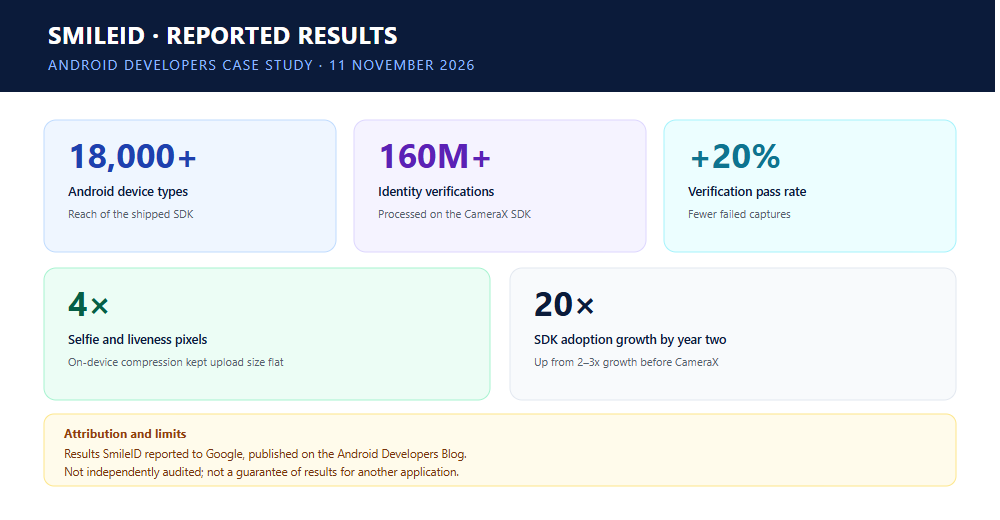
Figure 8 — Reported outcomes from the Android Developers case study published 11 November 2026; company-reported, not independently audited. Original illustration for 12 Testers Community.
The honest reading is narrower than the headline: a camera library did not raise a pass rate, it removed capture failures — wrong orientation, wrong proportions, frames too small to use — which is exactly the class of bug CameraX exists to remove.
Google's camera and media test lab
CameraX behaves consistently partly because Google runs an automated suite daily across a rotating matrix of more than 190 physical Android device models, spanning chipsets, OS versions and hardware capabilities, so library regressions are caught before they reach your app. The rest is invisible by design: internal DeviceQuirks and CameraQuirks in camera-camera2 inject workarounds when a known device issue is detected — some devices fail to apply custom exposure, others report inverted data at certain aspect ratios.
That does not mean your app is tested on 190 devices; it means the library is. Your layout, resolution choices, analyzer and memory profile have never run on any of them until you run them. A green emulator run proves only that your code compiles and CameraX can initialise a synthetic camera.
Build it in Kotlin
A complete, production-shaped implementation: preview, capture and analysis with permissions and cleanup. It targets CameraX 1.6.2 and uses the ProcessCameraProvider path so the analyzer configuration stays explicit. At the time of writing 1.6.2 is stable and 1.7.0-rc02 is a release candidate — not the default for shipping.
1. Dependencies. Keep one version variable across all artifacts; mixed CameraX versions produce confusing runtime behaviour.
// app/build.gradle.kts
val cameraxVersion = "1.6.2"

dependencies {
    implementation("androidx.camera:camera-core:$cameraxVersion")
    implementation("androidx.camera:camera-camera2:$cameraxVersion")
    implementation("androidx.camera:camera-lifecycle:$cameraxVersion")
    implementation("androidx.camera:camera-view:$cameraxVersion")
    implementation("androidx.camera:camera-video:$cameraxVersion")
    implementation("androidx.camera:camera-mlkit-vision:$cameraxVersion") // ML Kit Analyzer
}
2. Manifest. Declaring camera.any as required keeps the app off devices with no camera; video with audio also needs RECORD_AUDIO, best requested at the moment of recording.
<uses-permission android:name="android.permission.CAMERA" />
<uses-feature android:name="android.hardware.camera.any" android:required="true" />
3. Runtime permission. The camera permission is dangerous-level, so handle three outcomes: granted, denied with rationale, and permanently denied with a settings route.
private val requestCamera = registerForActivityResult(
    ActivityResultContracts.RequestPermission()
) { granted ->
    if (granted) startCamera() else showPermissionRationale()
}

private fun ensureCameraPermission() {
    when {
        ContextCompat.checkSelfPermission(this, Manifest.permission.CAMERA)
            == PackageManager.PERMISSION_GRANTED -> startCamera()

        ActivityCompat.shouldShowRequestPermissionRationale(this, Manifest.permission.CAMERA) ->
            showPermissionRationale()

        else -> requestCamera.launch(Manifest.permission.CAMERA)
    }
}
4. Provider, use cases and binding. Bind on the main executor, after checking the selector resolves; wrap the bind so a refused combination surfaces as a message, not a crash.
class CameraActivity : AppCompatActivity() {

    private lateinit var previewView: PreviewView
    private val analysisExecutor = Executors.newSingleThreadExecutor()
    private var imageCapture: ImageCapture? = null
    private var imageAnalysis: ImageAnalysis? = null
    private val cameraProviderFuture by lazy { ProcessCameraProvider.getInstance(this) }

    private fun startCamera() {
        cameraProviderFuture.addListener({
            bindUseCases(cameraProviderFuture.get())
        }, ContextCompat.getMainExecutor(this))
    }

    private fun bindUseCases(cameraProvider: ProcessCameraProvider) {
        val selector = CameraSelector.DEFAULT_BACK_CAMERA
        if (!cameraProvider.hasCamera(selector)) { showCameraUnavailable(); return }

        val preview = Preview.Builder().build().also {
            it.surfaceProvider = previewView.surfaceProvider
        }

        val capture = ImageCapture.Builder()
            .setCaptureMode(ImageCapture.CAPTURE_MODE_MINIMIZE_LATENCY)
            .build()

        val analysis = ImageAnalysis.Builder()
            .setResolutionSelector(
                ResolutionSelector.Builder()
                    .setAspectRatioStrategy(AspectRatioStrategy.RATIO_4_3_FALLBACK_AUTO_STRATEGY)
                    .setResolutionStrategy(
                        ResolutionStrategy(
                            Size(1200, 900),
                            ResolutionStrategy.FALLBACK_RULE_CLOSEST_LOWER_THEN_HIGHER
                        )
                    )
                    .build()
            )
            .setBackpressureStrategy(ImageAnalysis.STRATEGY_KEEP_ONLY_LATEST)
            .build()
            .also { it.setAnalyzer(analysisExecutor, frameAnalyzer) }

        imageCapture = capture
        imageAnalysis = analysis

        try {
            cameraProvider.unbindAll()
            cameraProvider.bindToLifecycle(this, selector, preview, capture, analysis)
        } catch (e: IllegalArgumentException) {
            showCameraUnavailable()   // no matching camera, or unsupported combination
        }
    }
}
5. Capture. Write to a cache file you control, and handle both callbacks; the captured file already carries rotation information.
private fun takePhoto() {
    val capture = imageCapture ?: return
    val file = File(cacheDir, "capture-${System.currentTimeMillis()}.jpg")

    capture.takePicture(
        ImageCapture.OutputFileOptions.Builder(file).build(),
        ContextCompat.getMainExecutor(this),
        object : ImageCapture.OnImageSavedCallback {
            override fun onImageSaved(output: ImageCapture.OutputFileResults) = onPhotoReady(file)
            override fun onError(exception: ImageCaptureException) = showCaptureFailed()
        }
    )
}
6. Analyzer and cleanup. Close every frame, stop the analyzer before the executor dies, and unbind the provider.
private val frameAnalyzer = ImageAnalysis.Analyzer { proxy ->
    try {
        analyzeFrame(proxy, proxy.imageInfo.rotationDegrees)   // must not retain proxy
    } finally {
        proxy.close()
    }
}

override fun onDestroy() {
    super.onDestroy()
    imageAnalysis?.clearAnalyzer()
    analysisExecutor.shutdown()
    cameraProviderFuture.addListener({
        cameraProviderFuture.get().unbindAll()
    }, ContextCompat.getMainExecutor(this))
}
Camera error handling is mostly three states the library cannot resolve for you: no camera matches the selector, the combination fails to bind, and capture fails. Each deserves a distinct message — "your device does not expose a rear camera" is actionable in a way that "camera error" is not.
Flutter and CameraX
Flutter does not call CameraX directly, and there is no separate CameraX plugin to install. There is something more useful: the official camera plugin (0.12.2 at the time of writing) defaults on Android to camera_android_camerax (0.7.x), which is built on CameraX. If you use the default implementation, your Flutter app already gets CameraX and its compatibility work without seeing the API.
That default is an endorsement, not an equivalence. The plugin exposes a cross-platform surface — controller, preview widget, photo, video, optional image stream. Anything CameraX does beyond that surface (a custom analyzer, a specific resolution strategy, concurrent cameras) needs native code, and the package documents its own CameraX implementation limits while offering the older Camera2-based camera_android as an alternative.
| Approach | Advantages | Limitations |
|---|---|---|
Official camera plugin (CameraX implementation) |
Maintained by the Flutter team; preview, capture, video, image stream; CameraX underneath. | Only the cross-platform surface; lifecycle is yours since 0.5.0; documented implementation limits. |
| Native CameraX module over Platform Channels | Full control of use cases, resolution, backpressure and analyzers; ML Kit in native code. | Two codebases; you own Android lifecycle and threading; iOS needs its own implementation. |
| Hybrid: plugin for preview and capture, channel for analysis | Keeps the maintained UI path; adds specialised processing only where needed. | Two camera sessions to coordinate — never open both at once. |
Use MethodChannel for commands and EventChannel when native code must push events such as detector results. Sending pixels is the expensive part: every byte array passed to Dart is copied, and a full-resolution frame per second will hurt the devices you were trying to help. Pass results — boxes, scores, an encoded crop — and keep pixels native.
// Kotlin, inside your FlutterActivity or a plugin
private val channel = MethodChannel(messenger, "app/camera")

channel.setMethodCallHandler { call, result ->
    when (call.method) {
        "startAnalysis" -> {
            cameraController.setImageAnalysisAnalyzer(
                ContextCompat.getMainExecutor(context),
                mlKitAnalyzer { faces ->
                    channel.invokeMethod("onFaces", faces.map { it.boundingBox.toList() })
                }
            )
            result.success(null)
        }
        "stopAnalysis" -> {
            cameraController.clearImageAnalysisAnalyzer()
            result.success(null)
        }
        else -> result.notImplemented()
    }
}
// Dart side
final _channel = const MethodChannel('app/camera');
_channel.setMethodCallHandler((call) async {
if (call.method == 'onFaces') {
setState(() => _faceBoxes = (call.arguments as List).cast<List>());
}
});
await _channel.invokeMethod('startAnalysis');Two responsibilities the plugin no longer carries: lifecycle — since 0.5.0 dispose the controller on AppLifecycleState.inactive and re-initialise on resumed, or you get the classic "camera works, then doesn't"; and errors — initialisation can throw documented codes such as CameraAccessDenied and AudioAccessDenied, which belong in your UI copy, not a stack trace.
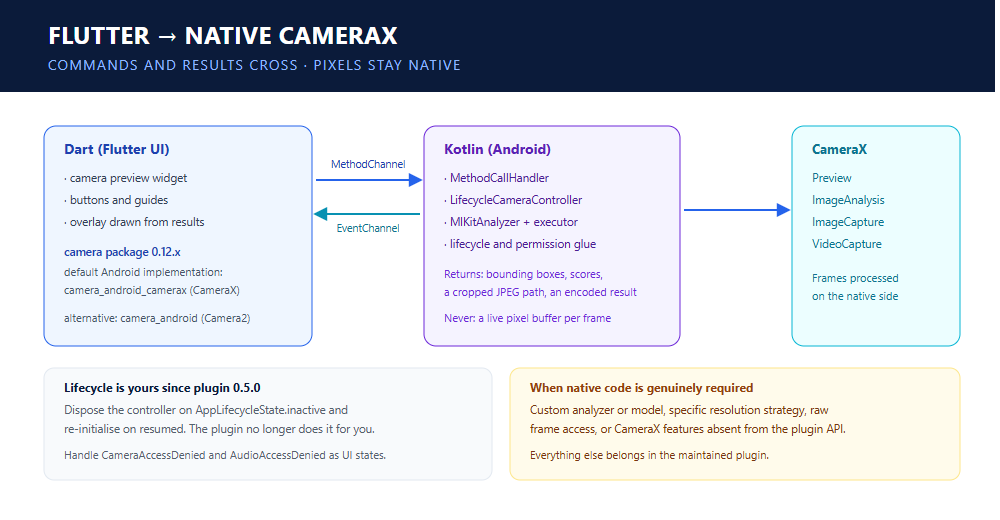
Figure 9 — The Flutter boundary: commands and results cross the channel, pixel buffers do not. Original illustration for 12 Testers Community.
Security, privacy and biometric data
A camera screen in a banking or identity app is a regulated collection point, and the library choice does not change that. Three concepts are routinely conflated: face detection locates a face, liveness detection estimates whether a live person is present rather than a photo, replay or mask, and identity verification compares a live capture with a claimed identity, usually server-side. Different models, different error rates, different evidence.
| Requirement | What it means in practice | CameraX role |
|---|---|---|
| Explicit consent | Explain before the camera opens what is captured and why; make refusal survivable. | Handles the permission gate; your UI handles the meaning. |
| Data minimisation | Capture and transmit the smallest artefact that serves the purpose — usually a cropped face, not the frame. | ResolutionSelector and cropping are the tools; nothing enforces the choice. |
| Secure transport | TLS for uploads, certificate validation on, no image bytes in query strings or logs. | Outside the library. |
| Retention limits | Delete temporary captures when the flow ends; state and honour a server-side retention period. | Your file handling; the camera keeps running if you forget to stop it. |
| Biometric sensitivity | Face data used to identify a person is special-category personal data in several jurisdictions; take local advice. | Not a library concern. |
| Server-side decision | Keep the identity decision on a trusted server; the device captures evidence, it does not certify it. | Out of scope; a client-side result is not an authorisation. |
| Anti-spoofing | Assume printed photos, screens and masks; use a dedicated liveness model and test it against attack samples. | Supplies frames; liveness is a model, not a camera setting. |
Privacy by default keeps the rest coherent: minimum collected, minimum duration, visible at the moment of collection. No app copy should claim CameraX provides biometric security — it provides frames. The security properties come from your liveness model, transport, storage policy and server decision, which are also what an attacker targets.
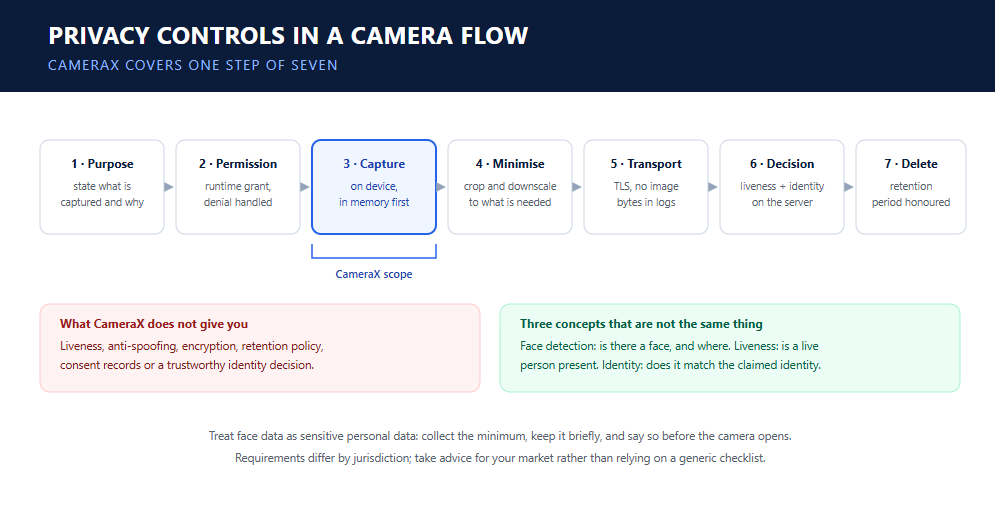
Figure 10 — Where each control belongs; CameraX covers the capture stage only. Original illustration for 12 Testers Community.
Device compatibility testing
Camera testing is a matrix, not a checklist, and the rows that matter most are the cheap phones because they fail first and loudest.
| Test category | Scenario | Expected result |
|---|---|---|
| Entry-level hardware | Run the full flow on a low-cost phone from a regional brand. | Preview starts, analysis keeps up, no crash in a sustained five-minute session. |
| Low RAM (1–2 GB) | Run with several apps resident; watch memory in Android Studio. | Bitmap allocations bounded; no OOM; analysis resumes after a memory warning. |
| Mid-range and flagship | Same flow on a recent Pixel and a recent Samsung mid-tier device. | Consistent framing and orientation; capture matches the preview. |
| Manufacturer variation | One OEM with a custom camera HAL and one near-stock device. | No stretched preview, inverted colour or missing resolution. |
| Android versions | Your minimum, the current release and one below it. | Permissions, rotation and capture work on each; ML Kit gated to API 23+. |
| Front and rear camera | Switch lenses mid-flow and capture from both. | Mirroring and rotation handled; analysis stays aligned with preview. |
| Aspect ratios | 4:3, 16:9 and a tall 20:9 display. | Preview and capture share framing; no distortion of faces or documents. |
| Orientation | Portrait, landscape, and rotation locked. | Saved image orientation matches the display; overlays stay upright. |
| Low light | Detection and capture in dim conditions. | Frame rate degrades gracefully; the UI explains the quality problem. |
| High-resolution requests | Request a size the device cannot provide; log what returns. | Documented fallback applies; code adapts to the actual size. |
| Interrupted session | Take a call or launch another camera app mid-flow. | Camera releases and rebinds; analysis resumes without a duplicate session. |
| Permission denial | Deny once, deny permanently, then grant from settings. | Rationale shown, settings route offered, recovery without restart. |
| Background and foreground | Background the app for several minutes and return. | No camera in use while backgrounded; state restored on return. |
| No camera | Run where the selected camera does not exist. | A specific message; no crash, no blank preview. |
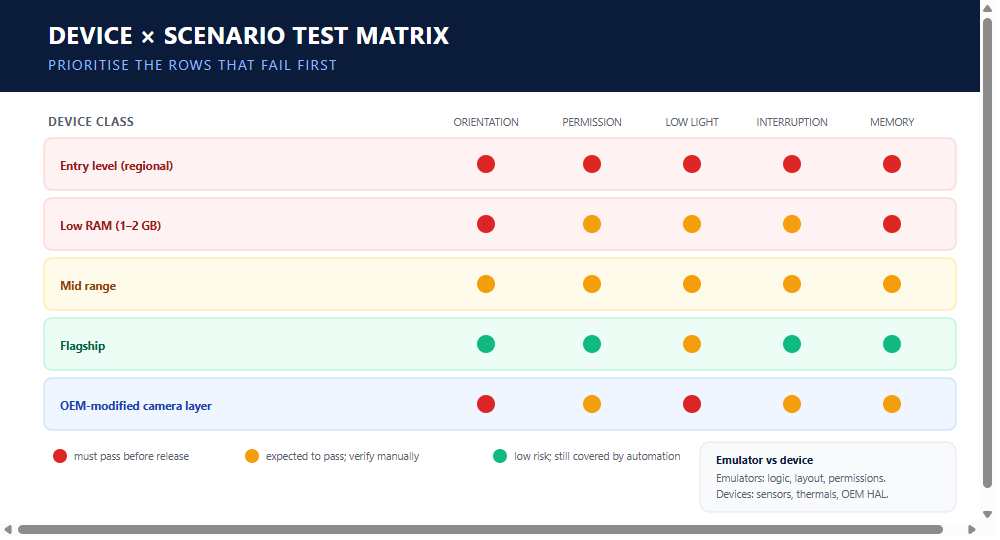
Figure 11 — Device classes crossed with scenarios; the red cells are where camera bugs live. Original illustration for 12 Testers Community.
Automate what is repeatable — launch, permission grant, capture, teardown — and keep quality judgements manual, because "the face looks stretched" is not an assertion a UI test can make. When you report a camera bug, include device model, Android version, camera id and the resolution the use case returned; without those four, the report is usually unresolvable. Our reproducible bug report template covers the structure, the device compatibility guide covers choosing the matrix, and the performance guide covers the slow-start path a camera screen adds.
Common problems and fixes
The symptom rarely names the cause; this table maps one to the other.
| Problem | Likely cause | Recommended solution |
|---|---|---|
| Preview looks stretched | Stream aspect ratio differs from the view's, and the scale type fills instead of fitting. | Constrain the stream with an AspectRatioStrategy and choose the scale type deliberately (FILL_CENTER crops, FIT_CENTER letterboxes; neither distorts when the ratio is honoured). |
| Captured image is rotated | targetRotation not set for the current display, or rotation metadata ignored downstream. |
Set rotation from the display, update it on orientation changes, read rotationDegrees in analysis. |
| Camera unavailable | No camera matches the selector, or another app holds the device. | Check hasCamera(selector) before binding; offer a lens switch; retry after release. |
| Analysis lags | Per-frame work exceeds the frame interval — often RGBA conversion or a full-resolution input. | STRATEGY_KEEP_ONLY_LATEST, smaller analysis size, keep YUV, heavy work off the main thread. |
| Out-of-memory crash | Large buffers multiplied by copies, queue depth or retained frames. | Cap resolution, remove copies, drop the queue, release references on stop. |
| Preview and photo framing disagree | Use cases negotiate different crop rectangles. | Bind in a UseCaseGroup with a shared ViewPort; match aspect-ratio strategies. |
| Blank screen after denial | Denial path unimplemented, or the user denied permanently. | Show a rationale, then a settings route when the system will no longer prompt. |
| Binding fails on return | A use case is still bound, so the new bind has nothing to attach to. | unbindAll() before every rebind; reuse the existing provider. |
| Analysis stops after a few seconds | An ImageProxy was not closed, or the executor died while bound. |
Close in finally; shut the executor down only after clearing the analyzer. |
| Unexpected resolution | The requested size is unsupported and the fallback chose a neighbour. | Log the returned size, derive scaling from it, pick a fallback that matches your constraint. |
| Face boxes misplaced | Results are in analysis coordinates while the overlay is in view coordinates. | Use COORDINATE_SYSTEM_VIEW_REFERENCED with CameraController, or apply the transform yourself. |
| Camera dies on app switch | CameraX released the session with the lifecycle and nothing rebinds. | Bind on every resume, or observe the lifecycle and rebind when it becomes active. |
Production checklist
Ordered by how often each is missed, not by importance.
- Dependencies. One version across all
androidx.cameraartifacts, and a stable release rather than an accidental candidate. - Permission flow. Requested at point of use, explained, permanent denial handled, no crash on refusal.
- Lifecycle. Bound to an owner; analysis stopped and executor shut down on destroy; nothing holds the camera in the background.
- Resolution. Explicit
ResolutionSelectorwith a deliberate fallback rule, and code that reads the returned size. - Backpressure.
STRATEGY_KEEP_ONLY_LATESTfor real-time work, or a justified queue depth. - ImageProxy. Closed in
finally; nothing retained after the analyzer returns. - Memory. Analysis size from model requirements, one in-flight frame, verified on a 1–2 GB device.
- Rotation and crop. Target rotation tracks the display, Exif orientation correct, preview and capture agree.
- ML Kit. API 23 floor respected, model download explained, coordinates verified against the overlay.
- Error states. Distinct messages for no camera, bind failure, capture failure and denial.
- Privacy. Purpose stated before capture, minimum retained, temp files deleted, no image bytes in logs.
- Transport. TLS, credential-safe endpoints, a retention period the code actually enforces.
- Monitoring. Camera errors and OOM visible in production telemetry with model and OS version.
- Real devices. Entry-level, low-RAM and OEM-modified hardware tested on a release build.
- Accessibility. Content descriptions on controls, an accessible preview label, usable with large text and TalkBack.
- Degradation. If the camera or a detector is unavailable, the user can still finish the task.
Frequently asked questions
What is CameraX in Android?
A Jetpack library giving a consistent, lifecycle-aware camera API above Camera2. It exposes Preview, ImageAnalysis, ImageCapture and VideoCapture, supporting Android 5.0 (API 21) and above.
Is CameraX better than Camera2?
For common camera work, yes: less device-specific code, fixes via library updates. For per-frame control, raw capture and advanced streams, Camera2 remains right — and CameraX supports interop with it.
Which Android versions support CameraX?
Android 5.0 (API 21) and higher — over 98% of Android devices. Individual integrations can raise that floor: ML Kit face detection needs API 23.
What is ImageAnalysis used for?
Delivering CPU-accessible frames to your analyzer for detection, scanning, quality gating or inference. It is a sampling pipeline: you get the freshest frame you can keep up with.
What is ResolutionSelector?
A configuration object since CameraX 1.3.0 combining a ResolutionStrategy (target plus fallback rule) with an AspectRatioStrategy; the library picks the closest supported size.
How does CameraX handle different devices?
Internal quirk handling for known issues, a device-lab test suite across chipsets and OS versions, and session negotiation when a requested size is unsupported. Not a per-model guarantee.
Can CameraX detect faces?
Not by itself. It supplies frames; ML Kit detects through MlKitAnalyzer in camera-mlkit-vision, returning polygons, landmarks and optional contours in your chosen coordinate system.
Can CameraX perform liveness detection?
No. Liveness is a separate model trained against photos, screens and masks. Neither CameraX nor ML Kit face detection implements anti-spoofing; both only provide or locate a face.
How do I avoid out-of-memory crashes?
Request only the resolution the model needs, avoid full-frame YUV-to-ARGB conversions and copy rotations, keep only the latest frame, close every proxy, and verify on a 1–2 GB device.
What is STRATEGY_KEEP_ONLY_LATEST?
The non-blocking default: CameraX buffers one frame and overwrites it as newer ones arrive, so you analyse the freshest image while preview keeps its rate. Queue depth is ignored.
How does CameraX integrate with ML Kit?
Add camera-mlkit-vision, pass detectors to MlKitAnalyzer with a coordinate system and executor; it adjusts the target resolution and handles coordinate transformation.
Can Flutter developers use CameraX?
Yes, indirectly: the camera plugin's default Android implementation is camera_android_camerax, built on CameraX. Anything beyond that surface needs a native module over a channel.
What is PreviewView?
A View that displays the preview stream and handles cropping, scaling and rotation. It offers FILL_CENTER and FIT_CENTER scale types, and PERFORMANCE/COMPATIBLE implementation modes.
What is the latest stable CameraX version?
At the time of writing, 1.6.2, with 1.7.0-rc02 as a release candidate. Check the release notes before pinning — the stable line advances on its own schedule.
How should developers test camera compatibility?
Automate repeatable flows, then test physically: one entry-level, one low-RAM and one OEM-modified device across your supported OS versions. Emulators do not exercise real sensors or HALs.
Is CameraX suitable for banking and identity apps?
For the camera layer, yes — it is why SmileID's SDK scales across device types. Liveness, anti-spoofing, secure transport, retention and the server-side decision remain yours.
Where CameraX fits, and where your work begins
CameraX solves one expensive problem well: it makes camera behaviour consistent enough that you stop writing per-device branches. Its lifecycle model removes the "camera left open" bug, its negotiation turns an unsupported request into a workable session, and its quirk layer absorbs hardware behaviour you would otherwise learn from crash reports.
Everything else is yours. Your resolution choice decides whether a 1 GB phone survives, your backpressure strategy decides whether the preview stutters, closing an ImageProxy decides whether analysis continues, and testing on real devices decides whether you find any of it first.
Academic research and further reading
Camera engineering on Android sits between two research areas: software engineering under platform fragmentation, and computer vision on constrained devices. Each reference was verified against its publisher.
- Lili Wei. "Taming fragmentation-induced compatibility issues in Android applications." PhD dissertation, HKUST, 2020. DOI 10.14711/thesis-991012818262503412 — frames fragmentation as a compatibility problem tooling can detect, the premise behind CameraX's quirk layer.
- X. Sun, X. Chen, Y. Liu, J. Grundy, L. Li. "Taming Android Fragmentation through Lightweight Crowdsourced Testing." IEEE TSE, 2023. DOI 10.1109/TSE.2023.3266324 — peer-reviewed evidence that real-device crowdsourced testing finds bugs single-device development misses.
- Z. Yu, Y. Qin, X. Li, C. Zhao, Z. Lei, G. Zhao. "Deep Learning for Face Anti-Spoofing: A Survey." IEEE TPAMI, 2022. DOI 10.1109/TPAMI.2022.3215850 — maps the liveness problem space, and why a detected face says nothing about who is present.
- Yang et al. "Face Anti-Spoofing: Model Matters, so Does Data." CVPR 2019. DOI 10.1109/CVPR.2019.00362 — anti-spoofing depends heavily on data and domain coverage, so validation does not transfer automatically.
- M. Sandler, A. Howard, M. Zhu, A. Zhmoginov, L.-C. Chen. "MobileNetV2." CVPR 2018. DOI 10.1109/CVPR.2018.00474 — a standard on-device vision architecture, and why 1200×900 at a few frames per second is a sane target.
- A. Howard et al. "Searching for MobileNetV3." ICCV 2019. DOI 10.1109/ICCV.2019.00140 — states the accuracy-versus-latency trade you also make with analysis resolution and backpressure.
- P. Viola, M. Jones. "Rapid object detection using a boosted cascade of simple features." CVPR 2001. DOI 10.1109/CVPR.2001.990517 — the foundational real-time face detector, and why pipelines optimise per-frame cost.
- W. Zhu et al. "A Multiple Attributes Image Quality Database for Smartphone Camera Photo Quality Assessment." IEEE ICIP 2020, pp. 2990–2994. DOI 10.1109/ICIP40778.2020.9191104 — camera quality is multi-dimensional, so one resolution number is a poor proxy for usability.
On master's theses: no master's dissertation on Android camera performance or CameraX was found whose title, author, institution and year could all be confirmed authoritatively. The verified PhD dissertation above is cited instead, and candidates without a resolvable record were excluded.
Official documentation
- CameraX — overview, architecture, image analysis, configuration, preview, ML Kit Analyzer, Camera1 migration, lab-tested devices.
- CameraX — release notes (1.6.2 stable, 1.7.0-rc02 candidate) and ResolutionStrategy reference.
- Android Developers Blog — SmileID case study, 11 November 2026 (all SmileID figures, the 190+ device matrix, the quirk classes).
- ML Kit — face detection overview and Android guide (API 23 floor, bundled versus unbundled, input guidance).
- Android — request permissions and manage your app's memory.
- Flutter — platform channels, camera plugin, camera_android_camerax.
For the adjacent work, see our guides on Android app memory optimization and large-screen compatibility testing. If you need real testers across device classes, 12 Testers Community explains the programme.