
Last reviewed against the official Google Play policy and Console documentation. Policy details and Play Console labels can change, so confirm the current position on the official pages linked at the end of this article.
If your Android app lets people create an account, Google Play requires you to give them a way to delete it — and it requires two of them: a path inside the app, and a separate web page that works without the app. An app that only offers one is not compliant, and the gap is easy to miss because the two pathways look like duplicates of each other.
The requirement catches developers out for a second reason. It is assessed against your declaration. The Data safety form asks whether your app provides account deletion and where users can request it, and those answers appear on your store listing. If the form says one thing and the app does another, the mismatch is visible to users and to review.
This guide covers what Google counts as an app account, which apps the requirement applies to, how the two pathways differ, what has to happen to data associated with a deleted account, where the declarations live, and the mistakes that most often cause trouble. It separates what Google actually requires from what is merely good practice, because the two are mixed together in most advice on this topic.
Quick answer: what must a developer provide?
The short version
- Two pathways if you allow account creation: an in-app path to delete the account and its associated data, and an external web resource where deletion can be requested.
- The web resource is not optional even though the in-app path exists. It is what reaches users who already uninstalled your app.
- All developers complete the Data deletion questions in the Data safety form, on the App content page in Play Console.
- Delete the associated data too, not just the sign-in record. Freezing an account is explicitly not a valid substitute.
- Disclose anything you retain for security, fraud prevention or legal compliance — and say so in your privacy policy.
Two clarifications worth carrying forward. The in-app path and the web resource serve different users, so neither substitutes for the other. And the requirement is about app accounts specifically — there are documented situations where it does not apply, covered below.
What counts as an app account under Google Play policy?
Google defines an app account precisely, and the definition is narrower than "anywhere a user identifies themselves." An app account is a unique user identity that you provide as a user-facing feature to serve the user across applications or devices. It typically involves usernames, email addresses and passwords, and comes with a mechanism for authenticating the user — a password, one-time password, two-factor authentication, biometrics, single sign-on, or similar.
Two parts of that definition do work: the identity has to be user-facing, and it has to work across apps or devices. A local profile that never leaves one installation and has no authentication is a different thing from an account a user signs into.
Accounts created outside the app still count
This is the detail most developers get wrong. Google states that your app supports account creation if a user can complete creating an app account directly in the app, or if the app directs the user to an account creation flow outside the app.
So a sign-up flow that begins with a button in your app and finishes on your website still counts. The requirement follows the user experience, not the screen where the account record is finally written.
You cannot sidestep it by making an account optional
Google is explicit here as well: if your app offers account creation in any part of the app experience, you still need to offer account deletion — even if many features can be accessed without an account at all. That is where "but you don't need an account to use it" stops being an argument. The test is whether account creation exists, not whether the app is usable without one.
Offline accounts are outside the policy
Google draws one clear boundary in your favour: accounts that are created and operated offline are not app accounts and fall outside the scope of this policy. If a user's identity is created and used only on their own device, with no online account service behind it, the account deletion requirement does not apply to that identity.
Which apps need account deletion?
The decision has two steps: does an app account exist, and does any documented exception apply? Figure 1 walks the same sequence.
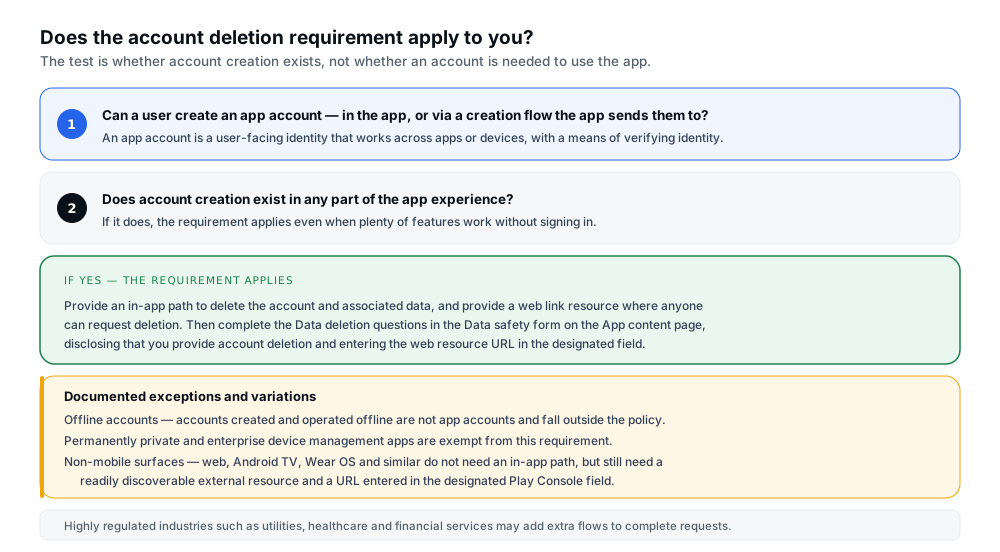
Figure 1 — The test is whether account creation exists, not whether an account is needed to use the app.
Google documents these boundaries and variations:
- Accounts created and operated offline are not app accounts and do not fall within policy scope.
- Permanently private and enterprise device management apps are exempt from this policy requirement.
- Non-mobile app surfaces — web, Android TV, Wear OS and similar — do not have to provide an in-app way to start account deletion, because Google acknowledges a non-mobile in-app experience can be genuinely difficult for both developer and user. They are still required to provide a readily discoverable option to start deletion outside the app, such as on your website, and to enter a link to that resource in the designated URL field in Play Console.
- Highly regulated industries — utilities, healthcare and financial services are the examples Google gives — may need to provide additional flows to carry an account deletion request through to completion. That is permitted rather than penalised.
If none of those apply and your app lets users create an account, the requirement applies in full.
In-app account deletion vs external web deletion
Google's requirement has two arms, and they exist because they cover different people. The in-app path serves users who still have your app installed and are signed in. The external resource serves everyone else — including users who have already uninstalled the app, or who cannot get into their account for some reason. Google explains the reasoning directly: some users may have already uninstalled the app or may not be able to access the in-app experience, and the intent is that all users can still exercise control over their data.
| Attribute | In-app deletion path | External web deletion resource | Key checks |
|---|---|---|---|
| Purpose | Deletes the account and associated data for users inside the app. | Accepts deletion requests from anyone, including people without the app installed. | Both reach a real deletion, not a deactivation. |
| Who can use it | Users who have the app installed and can sign in. | Anyone. It must not require returning to the app or reinstalling it. | Test the web path as a logged-out stranger would use it. |
| Implementation | A deletion flow in the app, or a link that takes the user to your web resource. | A public page with a form, a support email, or a link that starts deletion. | Google documents the in-app link as an accepted alternative. |
| Discoverability | Should be prominent — for example within account settings or a similar section. No specific layout is mandated. | Pathway must be prominently featured and easily discoverable on the page, and the page must name the app or developer. | A user should find it without hunting. |
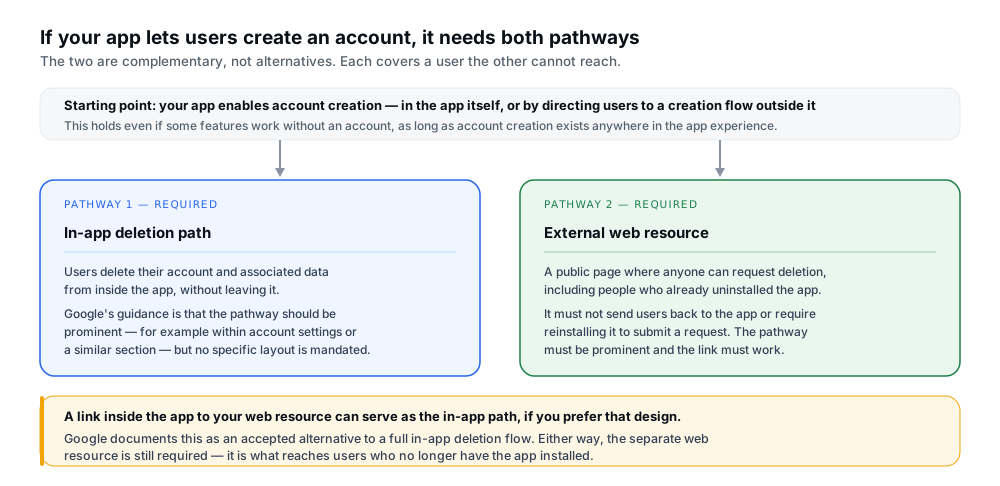
Figure 2 — The two pathways are complementary, not alternatives.
One point of flexibility is worth knowing, because it makes compliance much cheaper for a small team. Google states that a full end-to-end mobile-first deletion experience is a great user experience but acknowledges it may not be feasible for every developer, and therefore permits an alternative: a link within your app that takes users to your account deletion web resource. Build the web resource properly and a link to it can satisfy the in-app requirement.
How to design a clear in-app deletion path
Google's stated requirement for the in-app path is that it should be intuitive — the pathway should be prominent, for example within the account settings or a similar section. Google also says it recognises there are many ways to implement this, so treat the specifics below as sensible implementation rather than mandated design.
The practical steps that work in most apps:
- Put it where account settings live. A "Delete account" entry alongside sign-out, profile and security settings is the pattern users already expect. Google names account settings as its own example of a prominent location.
- Lead the user straight to deletion. Google's design guidance is to design the flow with discoverability in mind by taking the user directly to the deletion process, since navigating multiple screens before reaching the deletion page is a barrier.
- Explain the consequences before they commit. Say what will be removed and what will not, and flag anything they must do first — pausing a payment method or downloading data they want to keep. Being clear up front prevents accidental deletions as well as complaints afterwards.
- Confirm that deletion happened. Users often cannot tell whether the account itself or only some app data was deleted. An explicit confirmation removes the ambiguity.
- Do not treat deactivation as deletion. If you offer a "disable" or "freeze" option as well, make the difference unmistakable — because one of them does not satisfy the policy.
A word on that last point, because it is the single most common substantive error. Google's policy states directly that account freezing is not a valid substitute for deletion. A design where "delete account" quietly deactivates the login and retains everything else fails the requirement, however clearly it is labelled.
How to create an external account deletion web resource
The web resource has more specific requirements attached to it than the in-app path, and Google's wording is detailed enough to work from directly. Figure 3 sets the five out.
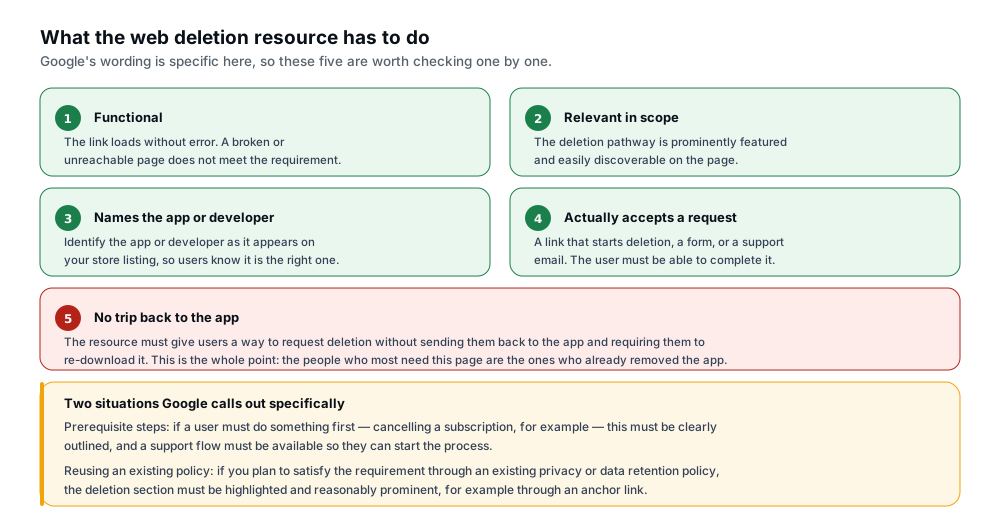
Figure 3 — Five things the web resource must do, as stated in Google's policy guidance.
Taken straight from that guidance, the link must be:
- Functional — it loads without error. A 404 or a page that times out does not meet the requirement.
- Relevant in scope — the pathway to request account deletion should be prominently featured and easily discoverable on the page, not buried below other content.
- Attributed — it must reference the app or developer name as it appears on your store listing, so a user arriving from your listing knows they are in the right place.
- Actionable — the user must be able to request deletion through the pathway. Google accepts many forms: a link that initiates account deletion, a customer service email, or a form they can submit a request through.
- Not a redirect back to the app — the resource must give users a way to request deletion without sending them back to the app and requiring them to re-download it.
Two situations Google calls out specifically, and both are easy to overlook:
Prerequisite steps. If a user has to do something before their account can be deleted — cancelling a subscription is the example Google gives — this must be clearly outlined, and a support flow must be available so users can start the process. A page that says "cancel your subscription first" with no way to do so or ask for help does not satisfy the requirement.
Reusing an existing policy page. If you plan to satisfy the requirement through an existing privacy or data retention policy, the data deletion section must be highlighted and reasonably prominent — for example through an anchor link that takes the reader straight to it. A visible link to your privacy policy, leaving the reader to hunt for the relevant paragraph, is not enough.
What good looks like in practice
A workable page is short and does one job. It names the app and developer, states in the first screen that this is where an account is deleted, and offers the request mechanism immediately. If there is automated deletion, a button that starts it. If not, a form with the minimum fields needed to locate the account, or a support email address. Anything about subscriptions or data retention sits underneath as explanation, not as a prerequisite obstacle.
What must happen to associated user data?
Deleting the account is only half the requirement. Google states that when you delete an app account on a user's request, you must also delete the user data associated with that app account.
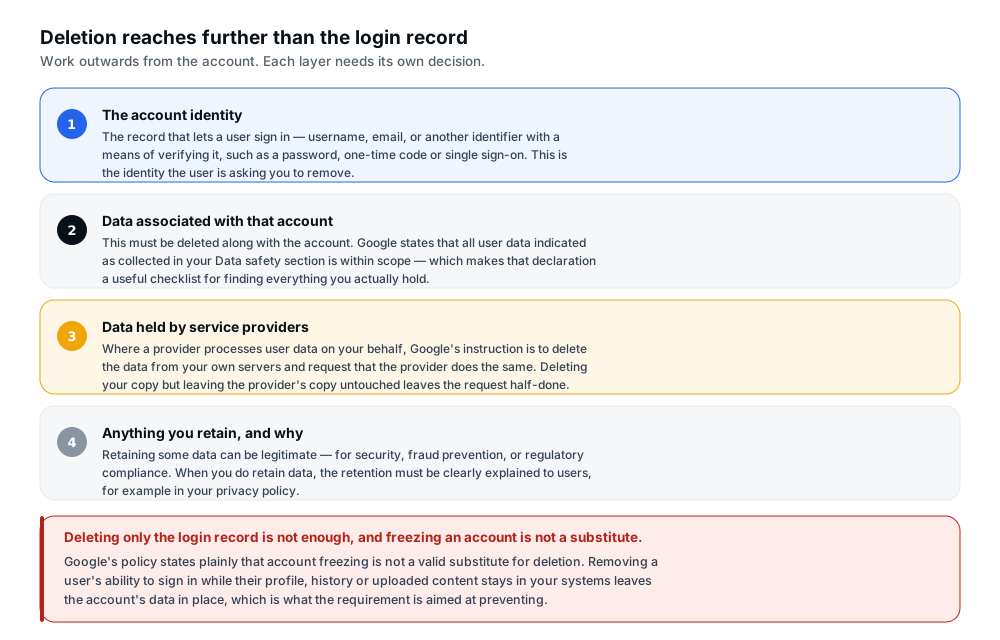
Figure 4 — Deleting only the login record leaves associated data in place, which is the failure this requirement targets.
What counts as user data
Google describes the scope in terms of its categories rather than an exhaustive list: personal and sensitive user data, personally identifiable information, financial and payment information, authentication information, phonebook and contacts, device location, SMS and call-related data, health data, Health Connect data, the inventory of other apps on the device, microphone and camera data, and other sensitive device or usage data.
The most useful sentence for an engineer is the next one: all user data indicated as collected in your Data safety section is within scope. That turns your own declaration into a checklist. Whatever you told Google Play you collect is, by your own account, data you hold — and it has to go with the account.
This is why the requirement is usually more work than it looks. A sign-in record in one table is easy to delete; the user's uploaded content, history, device tokens, analytics identity, support tickets and payment references are spread across several systems. Reviewing your actual architecture and data flows is the only reliable way to find them all, and assuming the login row is everything is the mistake this policy exists to prevent.
Service providers
If your app relies on service providers to process user data, Google's instruction is specific: delete the data from your own servers and request the service provider to do the same. Both halves matter. Deleting your copy while leaving a provider's copy live leaves the request half-finished.
That means knowing what your providers hold. Analytics platforms, crash reporters, cloud storage, email services, support tools and payment services are the usual candidates. For each, establish whether it stores user data on your behalf and what mechanism exists to have it removed.
Legitimate retention
Not everything must disappear, and Google says so. Your app may need to retain certain data for legitimate reasons such as security, fraud prevention or regulatory compliance. Where that applies, you must clearly inform users about your data retention practices — Google's example is within your privacy policy. Apps in highly regulated industries that require additional retention periods must clearly inform users within their data retention policies.
The disclosure is the operative part. A retention decision you can justify but never told anyone about is where compliance tends to break down, and it is why the privacy policy and the deletion flow need to agree with each other.
On timelines: expect guidance, not a fixed number
Google's wording is that you should let users know what to expect and complete their requests within a reasonably quick period of time. No specific day count is published, and the same guidance says to check with legal advisers, because some countries impose their own rules on data deletion and retention. There is no universal deadline to design against: state a realistic timeframe, meet it, and take legal advice for the jurisdictions you serve rather than borrowing a number from a blog post.
How to configure the relevant Play Console and Data safety declarations
The declaration side has two parts: what you answer in the Data safety form, and the URL you enter alongside it. Google's requirement applies to all developers — everyone is required to answer the Data deletion questions, whether or not their app falls within the account deletion requirement itself.
From Google's documentation, the requirements are:
- Complete the Data deletion questions in the Data safety form, which sits on the App content page in Play Console. Play Console labels and navigation have changed over time, so confirm the current location in your own account rather than relying on a remembered path.
- If your app enables account creation, disclose that your app provides account deletion and supply the web link resource within the Data safety form.
- Enter the URL in the designated field. Non-mobile apps must also enter a link to their external resource in the designated URL form field in Play Console.
Some answers become public. Google states that part of what you provide about account and data deletion is visible on your store listing, where users see a data deletion badge and a data deletion area and can follow your link to submit a request. Store copy should not contradict the form.
The declaration is a commitment. Google notes that issues with your answers to the Data deletion questions can cause new submissions and app updates to be rejected in Play Console. That makes this release-blocking rather than a tidy-up task.
Keeping the declaration true over time
An accurate declaration can go stale without anyone editing it. Adding a sign-in option, a subscription, a related app sharing the same account, or a new analytics provider can all change the honest answer to a question you already submitted.
The practical discipline is narrow: treat the Data deletion questions and the external URL as part of the release checklist for any change touching accounts, authentication or user data handling. Re-read the declaration and re-test the URL. And verify the link on a schedule — a page that worked when you submitted it can stop working after a site migration or redirect change, and a broken link is a compliance problem you created without touching your app.
Common account deletion compliance problems
Table B maps the problems that come up most often to why they matter and what to do about them. These are described as problems rather than quoted policy text, because Google's wording and Play Console labels change over time.
| Problem | Why it matters | Practical corrective action |
|---|---|---|
| "Delete account" only deactivates or freezes the account. | Google's policy states account freezing is not a valid substitute for deletion. The account and its data remain. | Make the flow perform a real deletion of the account and associated data. If you keep a deactivate option, label it and separate it clearly. |
| Only an in-app path exists, with no web resource. | Users who uninstalled the app cannot exercise control over their data, which is exactly what the requirement addresses. | Publish a public page that accepts deletion requests without requiring the app, then supply its URL in the Data safety form. |
| The web link is buried in a long privacy policy. | The requirement is that the pathway be prominently featured and easily discoverable, not merely present. | Highlight the deletion section and link directly to it with an anchor, or give deletion its own page. |
| The page asks users to open or reinstall the app. | Google states the resource must not send users back to the app and require re-downloading it to submit a request. | Provide a form, support email or web-based deletion action that completes on the web page. |
| Account deleted, but profile, uploads or history remain. | Associated user data must be deleted with the account; all data declared as collected is within scope. | Audit systems against your own Data safety declaration and delete each data type, including caches and derived records. |
| Third-party providers keep their copy. | Google's instruction covers both your servers and a request to the provider to delete its copy. | List every provider processing user data on your behalf, use each one's deletion mechanism, and keep a record. |
| Retained data is never disclosed to users. | Legitimate retention is allowed, but you must clearly inform users about your retention practices. | Document what you retain and why, state it in the privacy policy, and keep the deletion flow consistent with it. |
| The Data safety answers no longer match the app. | Issues with these answers can block new submissions and app updates, and some answers appear publicly. | Re-check the declaration whenever accounts, authentication or data handling change, and update it before releasing. |
| The external URL stops working after a site change. | The link must load without error and remain relevant; a dead link fails on both counts. | Add the URL to your release checks and re-test it after any change to your website, redirects or domain. |
A practical pre-submission checklist
Run through this before submitting, and again after any change to accounts or data handling.
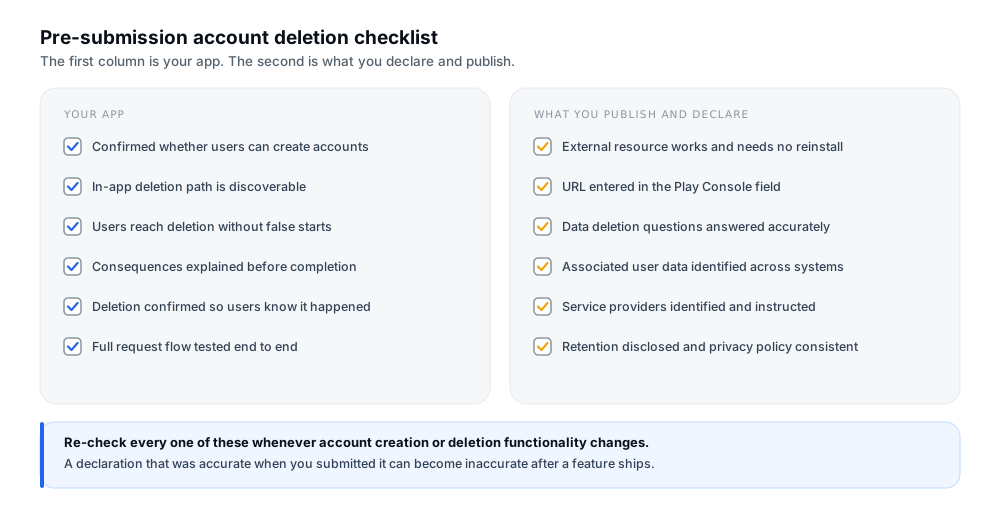
Figure 5 — The first column is your app; the second is what you declare and publish.
- Confirmed whether users can create accounts — in the app, or through a flow your app directs users to.
- Provided a discoverable in-app deletion pathway if the requirement applies, in a place users would look.
- Created a functional external deletion resource that loads without error and needs no app reinstall.
- Entered the correct external URL in the designated field in Play Console.
- Answered the Data deletion questions accurately in the Data safety form.
- Identified associated user data across every relevant system, using your own declaration as the checklist.
- Reviewed third-party service providers that process user data on your behalf, and know how to have data removed.
- Handled legitimate retention transparently — documented, and stated in your privacy policy.
- Tested the complete deletion-request flow end to end, from both the app and the web resource.
- Checked the privacy policy for consistency with what the deletion flow and the declaration actually do.
- Verified all relevant links before submitting.
On the testing step, do it from the outside. Request deletion through the web resource as someone who has never installed the app, and confirm that the account and its associated data are actually gone — not merely inaccessible. That single test catches the majority of failures described in Table B.
Frequently asked questions
Does every Google Play app need an account deletion option?
No. It depends on whether your app enables account creation. If it does not, this particular requirement does not apply. Note that all developers are still required to answer the Data deletion questions in the Data safety form. Documented exceptions include accounts created and operated offline, permanently private apps, and enterprise device management apps.
What counts as an app account?
A unique user identity you provide as a user-facing feature to serve the user across apps or devices, typically with a means of authenticating them — a password, one-time code, two-factor authentication, biometrics or single sign-on. Accounts created and operated offline are not app accounts. An account created through a flow your app sends users to outside the app still counts.
Is in-app deletion alone enough?
No. Google's requirement has two arms: an in-app path and a web link resource. They cover different users, so neither replaces the other. The web resource is what reaches people who have already uninstalled your app or cannot get into their account.
Why does Google require an external deletion URL?
Because some users have uninstalled the app or cannot access the in-app experience, and Google's stated intent is that all users can still exercise control over their data. A user should not have to reinstall an app to ask for their account to be deleted.
Can I provide a web form or support email for deletion requests?
Yes. Google accepts many forms, including a link that starts account deletion, a customer service email, or a form users can submit a request through. What matters is that the user can actually request deletion through the pathway, that it is prominently featured, and that the page names your app or developer as it appears on your store listing.
Is deactivating an account the same as deleting it?
No. Google's policy states that account freezing is not a valid substitute for deletion. Deactivation typically removes access while leaving the account record and associated data in place, which is the opposite of what the requirement asks for.
What user data must be deleted?
The data associated with the account. Google states that all user data indicated as collected in your Data safety section is within scope, which makes your own declaration the practical list to work from. Where providers process that data on your behalf, delete it from your servers and request the provider does the same.
What if my app must retain some data for legal reasons?
Retention can be legitimate — Google names security, fraud prevention and regulatory compliance. When it applies, you must clearly inform users about your retention practices, for example in your privacy policy. Apps in highly regulated industries with additional retention periods must inform users in their data retention policies. Take legal advice for the jurisdictions you serve rather than working from a general rule.
Where do I enter the account deletion URL in Play Console?
In the Data safety form, which Google documents as sitting on the App content page in Play Console. If your app enables account creation, you disclose that you provide account deletion and supply the web link there. Play Console navigation and labels have changed before, so confirm the current location in your own account before relying on any written path — including this one.
Official Google resources
- Google Play Console Help — Understanding Google Play's app account deletion requirements — the primary reference: what an app account is, when account creation counts, the two required pathways, what the web resource must do, exceptions, and the Data safety requirement.
- Google Play User Data policy — the underlying policy, including the account deletion requirement and the statement that account freezing is not a valid substitute.
- Google Play Console Help — Provide information for Google Play's Data safety section — how the Data safety form works, the deletion request mechanism, and what qualifies as a service provider.
- Google Play Console Help — Prepare your app for review — the App content page where policy declarations including Data safety are completed.
- Google Play Console Help — Account deletion requirement — the policy section this requirement originates from.
For the reusable declarations that sit alongside these — data types, sharing and the broader Data safety form — see the Data safety section guide. If your app has sign-in, providing reviewer access with sign-in details covers the separate requirement that reviewers be able to reach the parts of your app that need a login.
Conclusion
The requirement is unusual in how little room it leaves for interpretation. If your app lets users create an account, you need an in-app path to delete it and an external web resource that works without the app. You delete the account's associated data, you ask your service providers to do the same, and you disclose anything you keep. Then you tell Google Play all of that through the Data safety form, and some of it becomes visible to users on your store listing.
What makes this more tractable than it sounds is that your own declaration is the checklist. Everything you said you collect is, by definition, data you hold — so the Data safety form stops being paperwork and becomes the inventory you delete against. Work from it, and the usual failure mode disappears: deleting the sign-in record and assuming that was the account.
Two habits keep it compliant over time. Re-read the declaration whenever accounts, authentication or data handling change, because an accurate answer can go stale without being edited. And test the web resource from the outside, as a stranger with no app installed, because that is the user the second pathway exists for.
Preparing an app for release?
12 Testers Community helps Android developers run a managed closed test with real testers who stay opted in for the full required testing period, alongside guides for the rest of the Play submission process. Your account and data handling are yours to own: no testing service can implement deletion flows, manage your declarations or take over responsibility for policy compliance, and nothing here is legal advice or a guarantee of approval, production access or ranking.
