
Last reviewed against Google Play's official documentation: October 2026. Google updates these pages and the Play Console interface regularly — confirm the current wording in your own console and on the pages linked below.
The Data Safety section is the part of your store listing that tells users what your app does with their data before they install it. Google requires every developer with a published app on Google Play to complete it, and Google Play reviews the answers you give as part of the app review process.
It is also the part of a Play submission most likely to be completed in a hurry, and for an understandable reason: the form asks about behaviour that is spread across your own code, your permissions, your backend and every third-party SDK in your dependency tree. If analytics, crash reporting, advertising or an authentication library is transmitting data, you have to declare it — Google's wording is that this includes data collected and handled through any third-party libraries or SDKs used in your app.
This guide covers the Google Play Data Safety section end to end: who must complete the form, what Google means by collecting and sharing, how to investigate what your app and its SDKs actually do, how the declaration relates to your privacy policy and account deletion requirements, and the mistakes that cause the declaration to drift out of step with reality. Requirements are sourced to Google's documentation, and practical recommendations are labelled as recommendations.
Google's position: you alone are responsible for making complete and accurate declarations. Google reviews apps across all policy requirements, but it states that it cannot make determinations on your behalf about how you handle user data. When it becomes aware of a discrepancy between your app's behaviour and your declaration, it may take enforcement action.
One caveat before the detail: completing the form does not guarantee approval. The declaration is one requirement among many. What an accurate declaration does is remove a specific, avoidable reason for a review problem — and protect you from the far more serious position of having declared something your app does not do.
Quick answer: what developers need to prepare
Before opening the form, work out four things and write them down:
- What leaves the device. Google defines collection as transmitting data from your app off a user's device. Data that is only read and processed on the device is not collection; data sent anywhere off the device is — including data sent by a library you did not write.
- Where it goes. Sharing means transferring data collected from your app to a third party. It covers server-to-server transfers, on-device transfers to another app, and transfers made by SDKs — but not transfers to a service provider processing data on your behalf, or transfers you have disclosed and the user has consented to.
- Which types, and why. Each data type you collect or share needs a purpose, and each one is marked optional or required based on whether the app's core functionality depends on it.
- How it is protected and removed. The form asks about encryption in transit and whether you offer a deletion request mechanism. If your app allows account creation, the User Data policy requires a deletion path both inside the app and on an external web resource.
Two dependencies are worth knowing up front. You need a privacy policy — Google states it is required to complete the form and to have your data safety information shown to users. And you need to have reviewed third-party code, because the form covers it whether or not you wrote it.
What is the Google Play Data Safety section?
The Data Safety section is Google's transparency surface for data practices. Google describes it as a simple way for developers to help people understand what user data an app collects or shares, and to showcase key privacy and security practices, so users can make more informed choices about what to install.
You supply that information through the Data safety form in Play Console. Once you complete and submit it, Google Play reviews it as part of the app review process, and the result is shown on your store listing.
Figure 1 shows how the pieces relate. The important idea is that the form is a record of behaviour, not a policy you can choose independently of what the app does.
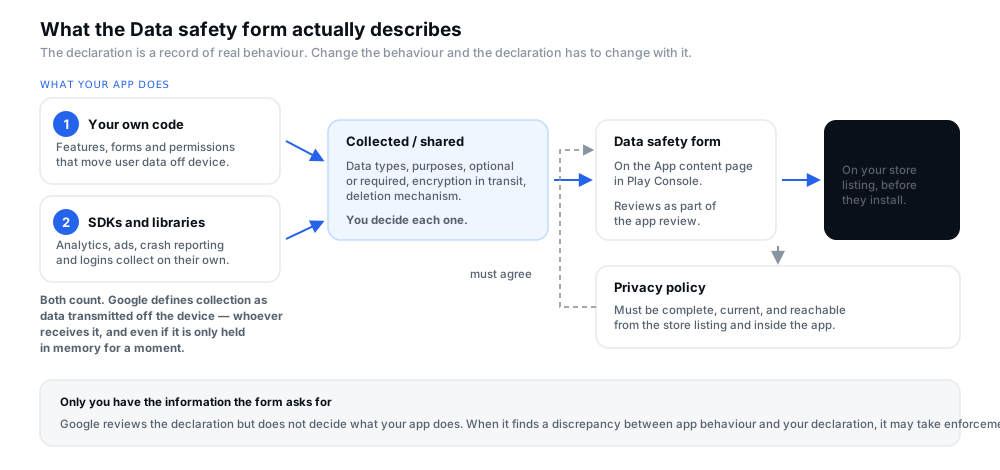
Figure 1 — What the Data safety form describes. The declaration is a record of real behaviour, and the privacy policy has to agree with it.
Which apps and developers need to complete the form?
More apps are in scope than many developers expect, and the exemptions are narrow. Google's documentation sets it out as follows.
- All developers with an app published on Google Play must complete the form, including apps on closed, open or production testing tracks. Pregranted and preloaded apps that update through Google Play are also covered.
- Apps active only on internal testing tracks are exempt. Apps exclusively active on that track do not need to complete the form.
- Even apps that collect nothing must complete it and provide a link to their privacy policy. In that case the form and the policy can both state that no user data is collected or shared.
- System services and private apps are out of scope.
- The form is required per app at the app package level, though developers may exclude old artifacts in a specific case: artifacts with an effective target SDK version below 21 where 90% or more of the active install base is on artifacts targeting 21 or higher.
There is a practical consequence to the internal-testing exemption. If your only listing is an internal test today, you have no form to complete — but the moment you move to closed, open or production, the requirement applies, and your store listing will carry the reminder the User Data policy describes for apps that do not collect or share data.
Where to find Data Safety in Play Console
The Data safety form lives on the App content page: open your app, then Policy and programs → App content. That page is the same one that holds your privacy policy link, ads declaration, target audience, content ratings and sign-in details — which is why the Data Safety section is best planned alongside those rather than after them.
Google links the requirement to a specific action for developers with apps in production: it recommends reading the form requirements and the User Data policy, confirming a privacy policy is in place, reviewing how your app collects and shares user data — in particular checking declared permissions and the APIs your app uses — and reviewing third-party code. It also publishes a PolicyBytes walkthrough video that steps through the form.
What does Google mean by collecting, sharing and handling data?
Most Data Safety mistakes trace back to a misreading of three words. Google's definitions are precise, and they are broader than a plain-English reading in some places and narrower in others.
Collecting
"Collect" means transmitting data from your app off a user's device. That is the whole test. Several consequences follow:
- Libraries and SDKs count. Data transmitted off device by libraries or SDKs in your app is collection, regardless of whether it goes to you or to a third-party server.
- Webviews you control count. Data collected from a webview opened from your app is in scope if your app controls the code or behaviour delivered through it. Data from a webview where users are navigating the open web is not.
- Brief processing still counts. Data transmitted off device and processed ephemerally must be included in your form. It will not be disclosed publicly if it meets Google's standard — accessing and using it while it is only stored in memory and retained no longer than necessary to service the request in real time. Using data to build advertising or other user profiles cannot be treated as ephemeral.
- Pseudonymous data counts. Data collected pseudonymously must be disclosed; the test Google gives is whether it can reasonably be re-associated with a user.
- On-device processing does not count. Data accessed by your app and only processed locally, never sent off the device, does not need to be disclosed.
- End-to-end encrypted data does not count — where the data is unreadable by you or anyone other than the sender and recipient, and no intermediary, including you, can read it.
Sharing
Sharing means transferring user data collected from your app to a third party. Google lists the routes that count: off-device transfers such as server-to-server; on-device transfer from your app to another app, even if the data never leaves the user's device; transfers made directly to a third party by libraries or SDKs in your app; and transfers via a webview your app controls.
Four kinds of transfer are not sharing:
- Service providers — an entity that processes user data on your behalf and on your instructions. This is why a backend provider can be a service provider while an analytics vendor is a third party, and it is a distinction worth getting right rather than guessing.
- Legal purposes, such as responding to a legal obligation or government request.
- User-initiated action, or prominent disclosure with consent — where the user reasonably expects the transfer, or where an in-app disclosure and consent meeting the User Data policy requirements has been obtained.
- Fully anonymised data that can no longer be associated with an individual user.
Google also defines who is who: the first party is the primary organisation responsible for processing data collected by the app — typically the organisation publishing it — and a third party is any organisation other than the first party or its service providers.
Handling
Handling covers the optional/required distinction and the security and deletion practices, all treated in the sections below.
How to review data collected by the app itself
Start with the app you control. Google's developer guidance for declaring data use is built for exactly this: it lists the permissions and APIs that typically indicate collection for each data category, so you can search your codebase rather than reason from memory.
A workable order:
- List the features that ask users for something — sign-up, profile editing, checkout, search, support forms, any upload.
- Read the manifest and note every permission you declare. Then find the code paths that actually use each one; a permission declared by a library shows up here too, which is the first place the SDK question and the code question meet.
- Follow the data to the boundary. Does the value stay in memory or on disk, or does it reach an API call? Only the second is collection.
- Check the transfer route. Is it your server, a vendor's server, or another app on the device? That decides collection versus sharing.
Two examples from Google's guidance show how concrete this gets. For location, collection signals include declaring ACCESS_COARSE_LOCATION, ACCESS_FINE_LOCATION or ACCESS_MEDIA_LOCATION, or deriving location from an IP address or access point name. Google also draws the line between approximate location — an area of 3 square kilometres or more — and precise location, which is anything smaller. For personal info, signals include declaring GET_ACCOUNTS or BIND_AUTOFILL_SERVICE, or using the AccountManager API.
Google's guidance also lists general indicators that something in the app is handling user data, including password entry fields, biometric authentication workflows, forms and alerts that prompt for input, code controlling a WebView, autofill support, and use of the data access auditing APIs. None of these proves collection on its own — they are places to look.
How to review third-party SDKs, analytics, ads, crash reporting and authentication
This is where Data Safety declarations go wrong most often, because the data leaving the device is not sent by code you wrote. Google's instruction is direct: you must reflect data collection or sharing carried out by third-party code in the Data safety form for your app. The User Data policy goes further, requiring that third-party code in your app, and the third party's practices with respect to user data from your app, comply with Play policies — including requirements that SDK providers do not sell personal and sensitive user data, and that this extends to third-party AI integrations.
Figure 2 is the investigation sequence, including the SDK steps.
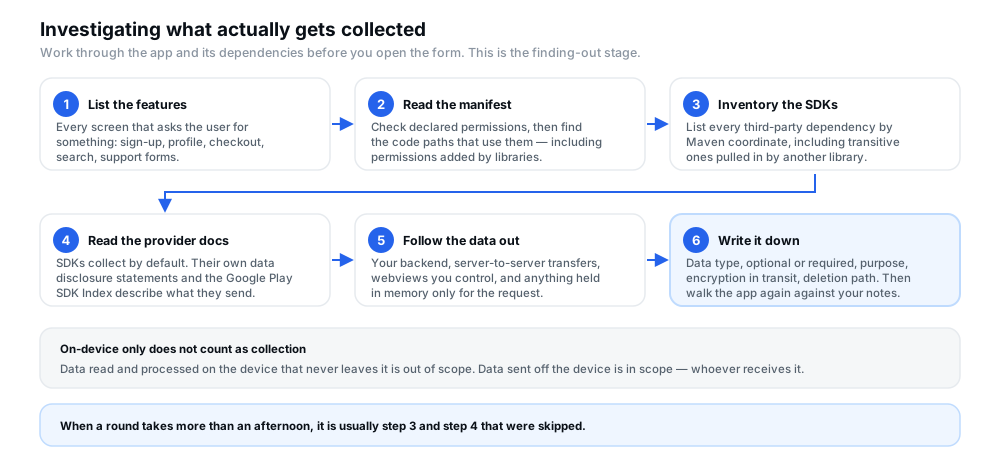
Figure 2 — The investigation workflow. Steps 3 and 4 are the ones most often skipped, and the ones most likely to change your answers.
Three sources of truth are worth knowing about:
- The SDK provider's own disclosure. Google's Data safety article points developers to their SDK providers' published Data safety information for details of what a provider collects.
- The Google Play SDK Index, which Google describes as providing information about commercial SDKs on Google Play, including which Android permissions they use and whether they are registered in Google Play SDK Console. It is searchable by SDK name, company name or Maven ID. This is the fastest way to find the permissions an SDK adds before you have read a line of its documentation.
- Your own dependency tree, including transitive dependencies. A library you never added deliberately can still arrive inside another one, and it does not stop collecting because you have not read about it.
A practical warning about SDKs whose behaviour depends on configuration: an analytics SDK initialised without advertising features enabled behaves differently from the same SDK with them turned on, and an advertising SDK may collect by default. The declaration has to describe your configuration, not the SDK's most commonly discussed one. If you cannot determine what a configuration sends, treat that as a reason to change the configuration rather than to guess in the form.
The User Data policy adds a specific obligation for third-party code designed to collect personal and sensitive user data by default: on request from Google Play, you must provide sufficient evidence that your app meets the Prominent Disclosure and Consent requirements, including for data access, collection, use or sharing via that third-party code.
How to identify the relevant data types and purposes
Once you know what leaves the device, the form work is mostly mapping. The data type categories are the ones Google publishes, and the categories exist so you can search for them: location, personal info, financial info, health and fitness, messages, photos and videos, files and docs, calendar, contacts, app activity, web browsing, app info and performance, and device or other IDs.
Two habits make the mapping reliable:
- Work type by type, not feature by feature. One sign-up form can touch email address, name, user IDs and phone number. Google's guidance is organised this way deliberately: it lists each data type with the permissions and APIs that indicate it.
- Assign a purpose to each entry. A data type without a purpose is an incomplete declaration. If you cannot articulate a purpose that matches a real feature, that is worth investigating before you submit.
Required versus optional data collection
The form asks whether each data type is optional or required, and the test Google applies is stricter than developers usually assume.
If your app's primary functionality requires the data type, you should declare it as required. Optional includes the ability to opt into or opt out of collection — for example where a user controls the collection and can use the app without providing the data, or where the user chooses whether to provide it manually.
All users, all regions. Google states that you can declare a data type optional only if all users — regardless of device or region — can optionally provide it, opt out, or opt in. An opt-out that exists in one market and not another does not make the collection optional.
Google's own examples make the line concrete: asking for a user's birthday for marketing communication is optional if the user can still sign up without providing it, and data collected only when a user signs in is optional if users can engage with the app without signing in. Where a data type is needed for sign-in itself, it is part of the core functionality and belongs as required.
Data encrypted in transit and other applicable security disclosures
The form's security questions are part of the public Data Safety section, so they are worth answering with the same care as the data types.
Encryption in transit asks whether data collected or shared by your app is encrypted in transit, protecting the flow of user data between the device and the server. Google notes a case worth understanding: apps designed to let users transfer data to another site or service — a messaging app sending an SMS through a carrier, for example, where the carrier maintains different encryption practices — may declare that data is transferred over a secure connection as long as they use best industry standards to safely encrypt data travelling between the device and the app's servers.
A deletion request mechanism asks whether your app provides a way for users to request deletion of their data. Section 15 covers what the policy requires when your app also allows account creation.
Two further disclosures are optional and worth not confusing with the mandatory ones. Apps with children in their target audience, which comply with the Families policy requirements, can opt into a "Committed to follow the Play Families Policy" badge from the Security practices section. And any app can declare an independent security review carried out through MASA with a Google Authorized Lab against OWASP's MASVS. Google is explicit about the limits of that review: it may not be scoped to verify the accuracy and completeness of your Data safety declarations, and you remain solely responsible for them.
How the Data Safety section should align with the app's privacy policy
Three things have to describe the same reality: what the app and its SDKs actually do, what the privacy policy tells users, and what the form declares. Figure 3 sets out the triangle.
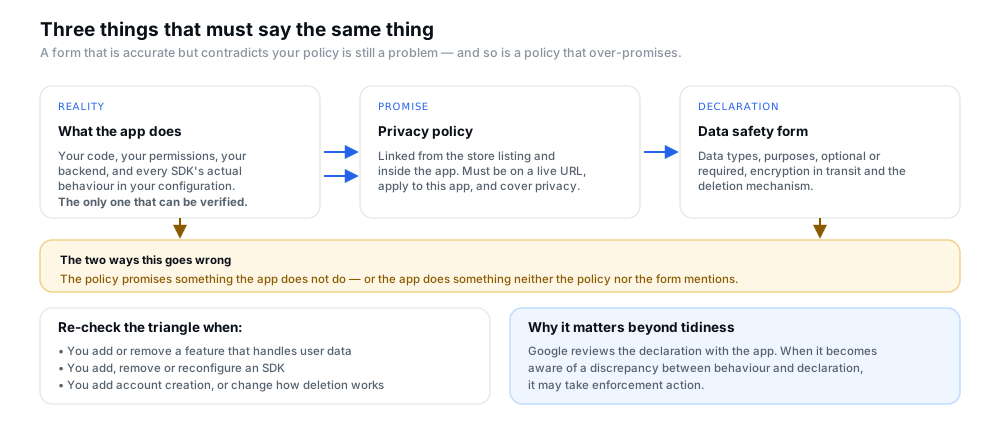
Figure 3 — Behaviour, policy and declaration. The form must be accurate, and the policy must not contradict it in either direction.
The reason this matters beyond tidiness is the enforcement line quoted earlier: when Google becomes aware of a discrepancy between app behaviour and your declaration, it may take action. The User Data policy's own guidance pairs the two — disclose your data collection and sharing practices in the Data safety section, and maintain a valid privacy policy in the store listing and within the app, without providing misleading or inaccurate information about your data practices.
Which means the form is not a one-off. Every time you add or remove a feature that handles data, add, remove or reconfigure an SDK, or change how accounts and deletion work, both the policy and the declaration may need to change with it.
Privacy policy requirements and public accessibility
The privacy policy is a prerequisite for the Data Safety section, not an alternative to it. Google states that you must have added a privacy policy to complete the form and to have your data safety information shown to users.
The requirements Google publishes for the policy itself:
- Where it must appear. Apps that request access to sensitive permissions or data must link to a privacy policy on the store listing page and within the app.
- How it must be hosted. The policy must be available on an active URL, apply to your app, and specifically cover user privacy.
- Apps targeting children. You must link to a privacy policy on the store listing and within the app regardless of whether the app accesses sensitive permissions or data. Google notes that even apps not accessing personal or sensitive user data must still submit a privacy policy.
- Content. The policy, together with any in-app disclosures, must comprehensively disclose how the app collects, uses and shares user data, including the types of parties it is shared with. Google recommends consulting a legal representative on what is required in your situation.
- A disclosure is not enough. The User Data policy's prominent disclosure requirement states that the in-app disclosure of data access, collection, use and sharing cannot be placed only in a privacy policy or terms of service.
Practical advice rather than policy: keep the policy's data-type list in the same words as the form, so the two can be compared line by line. Divergence between a policy written by one person and a form completed by another is a common and entirely avoidable source of inconsistency.
Account creation and account deletion requirements
If your app allows users to create an account from within the app, the User Data policy requires that it must also allow users to request deletion of that account. This applies whether or not the app's main purpose is an account-based service.
Google breaks the obligation down as follows:
- All developers must complete the Data deletion questions in the Data safety form on the App content page.
- If your app enables account creation, you must provide both an in-app path for users to delete their app accounts and associated data, and a web link resource where users can request account and associated data deletion.
- Deactivating is not deleting. The User Data policy states plainly that account freezing is not a valid substitute for deletion.
On implementation, Google describes the in-app path as needing to be intuitive and prominent — within account settings or a similar section — and acknowledges there are many ways to build it. Non-mobile surfaces behave differently: apps on web, Android TV, Wear OS and similar do not have to offer account deletion from within the app, but they must still provide a readily discoverable option outside the app and enter that web resource link in the designated field in Play Console.
One conditional worth planning for: an app may need to retain certain data for legitimate reasons such as security, fraud prevention or regulatory compliance. In that case Google requires that you clearly inform users about your retention practices, for example within your privacy policy. Decide this before you write the policy, not after a reviewer asks.
Common Data Safety mistakes and how to prevent them
The table below collects the failures that recur, with the corrective action for each.
| Common mistake | Why it matters | Corrective action |
|---|---|---|
| Declaring no data collection without checking SDK behaviour | An SDK may be transmitting data you never intended, making the declaration false. | Complete the SDK inventory and provider documentation review before answering this question at all. |
| Confusing device access with data transmitted off-device | Leads to either over-declaring local processing or under-declaring real collection. | Apply Google's test: collection is transmission off the device. Trace each value to the API call that sends it. |
| Omitting data processed by third-party SDKs | Google requires third-party collection and sharing to be reflected in your form regardless of who wrote the code. | Inventory dependencies including transitive ones, read each provider's disclosure, and check the Google Play SDK Index. |
| A privacy policy that conflicts with app behaviour | Google may act on a discrepancy between behaviour and declaration, and the policy is part of what users are shown. | Compare the policy's data list against the form line by line, and re-check both after any release that touches data or SDKs. |
| Leaving out relevant data types or purposes | An incomplete declaration is still an inaccurate one, and purposes are part of what the form asks for. | Work category by category using Google's permission and API guidance, and assign a real purpose to every entry. |
| Forgetting to update disclosures after a change | The declaration describes the app as it is now, not as it was when the form was first completed. | Treat data and SDK changes as triggers to revisit the form and the policy in the same release. |
| Treating deactivation as equivalent to deletion | The User Data policy states account freezing is not a valid substitute, and account creation triggers the deletion requirement. | Provide a genuine in-app deletion path and a web link resource, and document any legitimate retention in the policy. |
| Marking collection optional when it is not | Optional is only available if all users, in every region, can genuinely opt out or opt in. | Verify the opt-out exists for every user your app serves before declaring the data type optional. |
A practical pre-submission checklist
Table A is the working version: what to review, what to investigate, and what to keep as evidence for the next review. Not every row applies to every app — an app with no account creation has no account-deletion path to check — so use the rows that describe your app.
| Area to review | What to investigate | Evidence or information to collect |
|---|---|---|
| App source code and features | Which features ask for user data, and where each value is sent. | A feature list mapped to data types and the API calls that transmit them. |
| Login and account creation | What is collected at sign-up and sign-in, and whether the app works without an account. | The data types involved, plus whether each is optional or required. |
| Analytics and crash reporting | What the SDK sends by default in your configuration, and to whom. | Provider disclosure statements and the SDK's configuration in your project. |
| Advertising SDKs | Whether advertising or profiling features are enabled, and what identifiers leave the device. | Which ad SDKs are present, their permissions, and whether they build user or advertising profiles. |
| Firebase and other backend services | What is sent to your backend, and whether a vendor processes it on your behalf or as a third party. | A list of services with their role — service provider or third party — and the data types each receives. |
| Permissions and device data | Every permission in the merged manifest and the code that uses it, including library-added permissions. | A permission-to-code map, and a note of anything that never leaves the device. |
| Third-party libraries | The full dependency list, including transitive libraries no one added deliberately. | Maven coordinates, provider disclosures, and SDK Index entries for each. |
| Privacy policy | Whether it is live, applies to this app, and matches what the form declares. | The policy URL for the store listing and the in-app link, plus a line-by-line comparison with the form. |
| Account deletion | Whether account creation is possible, and whether both deletion routes exist and work. | The in-app deletion path, the web link resource, and any legitimate retention documented in the policy. |
| Current Play Console declarations | What the form says today, and whether it still matches the build you are shipping. | A dated note of the last review, so the next one is a comparison rather than a fresh start. |
Figure 4 is the same ground as a scannable card, which is often easier to keep beside you while you work through the console.
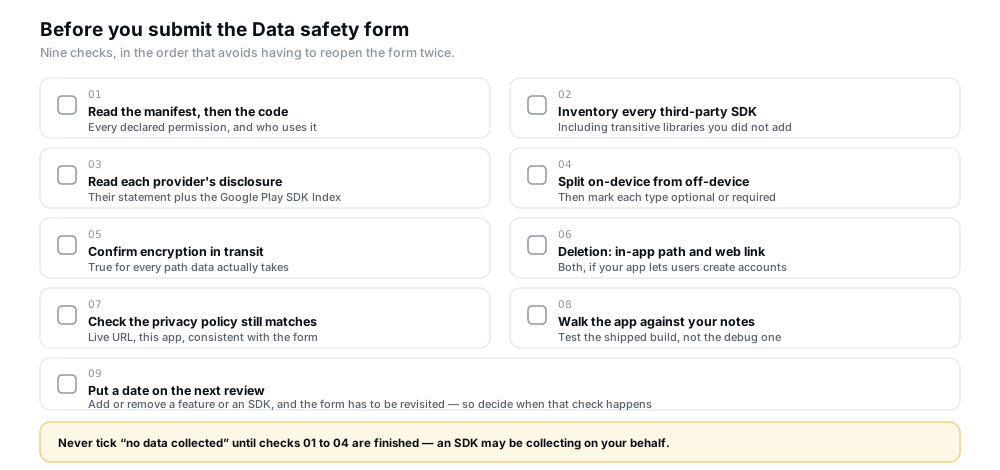
Figure 4 — The same checks in card form. The last one is the one that keeps the declaration true over time.
Frequently asked questions
Do I have to complete the Data Safety form if my app collects nothing?
Yes — if your app is published on Google Play. Google states that even developers with apps that do not collect any user data must complete the form and provide a link to their privacy policy, and in that case the form and the policy can indicate that no user data is collected or shared. What you must not do is answer "nothing collected" before checking, because an SDK may be collecting on your behalf.
My app is only on internal testing. Do I need the form?
Apps that are exclusively active on internal testing tracks are exempt from the Data safety section — Google says apps active only on that track do not need to complete the form. The exemption disappears as soon as the app is on a closed, open or production track.
Does an analytics or crash reporting SDK count as collecting data?
It can. Google's definition includes user data transmitted off device by libraries or SDKs in your app, irrespective of whether it goes to you or to a third-party server, and the requirement to reflect third-party collection in your form is explicit. Whether your configuration sends anything reportable is what you have to establish — read the provider's disclosure and check your initialisation settings rather than assuming either way.
The SDK vendor says they handle compliance. Is that enough?
No. The User Data policy requires that third-party code in your app, and the third party's practices with respect to user data from your app, comply with Play policies — and Google states that when it becomes aware of a discrepancy between your app behaviour and your declaration it may take action. Vendor documentation tells you what the SDK is capable of; it does not complete your form for you.
Is data processed only on the device something I need to declare?
Generally no. Google treats user data accessed by your app that is only processed locally on the device, and not sent off device, as not in scope for collection. The distinction that matters is transmission, so the practical task is tracing each value to see whether it reaches an API call at all.
What counts as sharing rather than just collecting?
Sharing is transferring data collected from your app to a third party. It includes server-to-server transfers, transfers by SDKs, and on-device transfers to another app — even if the data never leaves the user's device. Transfers to a service provider processing data on your behalf, for legal purposes, with the user's consent or reasonable expectation, or of fully anonymised data, are not treated as sharing.
Can I mark a data type as optional?
Only if the collection is genuinely optional for every user. Google allows an optional declaration where users have control over the collection and can use the app without providing the data, but states that you can declare collection optional only if all users — regardless of device or region — can optionally provide, opt out, or opt in. If the app's primary functionality requires the data, declare it required.
My app has no accounts. Do the deletion rules apply to me?
The account deletion requirement is triggered by allowing users to create an account from within the app. If your app has no accounts, that specific obligation does not arise — but Google states that all developers must complete the Data deletion questions in the Data safety form, so the questions themselves still appear.
We changed our analytics SDK. Do we have to update the form?
You have to check, and often yes. The declaration has to describe the app as it now behaves. A different SDK may collect different data types, for different purposes, with different sharing routes. The same applies to adding or removing a feature that handles user data, and to changing how accounts or deletion work.
Does completing the Data Safety section help my app get approved?
It removes one category of problem rather than guaranteeing anything. The form is reviewed as part of the app review process, and Google makes clear that it cannot determine how you handle user data on your behalf — the accuracy of the declaration is your responsibility. It is one requirement among many, alongside policy compliance, functionality and your store listing.
Official Google resources
These are Google's own pages. Where anything in this article and those pages disagree, the official pages and your own Play Console win.
- Provide information for Google Play's Data safety section — the form's requirements, the definitions of collecting and sharing, and the data types and purposes.
- Declare your app's data use — the permissions, APIs and code indicators that suggest each data category is being collected.
- User Data policy — privacy policy, data handling, prominent disclosure and consent, and the rules on third-party code.
- Understanding Google Play's app account deletion requirements — the in-app deletion path and web link resource, and how non-mobile surfaces differ.
- Prepare your app for review — the App content page and the privacy policy requirements.
- Google Play SDK Index — search commercial SDKs by name, company or Maven ID and see which Android permissions they use.
- Google Play Developer Policy Center — the full set of Developer Program policies, including the User Data policy in full.
Conclusion
The Data Safety section is unusual among Play Console requirements in that nobody can complete it accurately on your behalf. Google says so directly: only you possess the information the form asks for, and you remain responsible for the accuracy of what it shows users.
The work is therefore mostly investigation rather than form-filling. Trace what leaves the device, including what your SDKs send and what they send it to. Separate on-device processing from transmission, and separate service providers from third parties. Keep the privacy policy and the declaration describing the same reality, and treat any change to features, SDKs or accounts as a reason to revisit both.
Done that way, the form stops being a one-off chore before submission and becomes what Google intends it to be — a current, comparable record of your app's data practices, and one fewer thing standing between your release and a reviewer's attention.
If you are still working through Google's testing requirements before you can publish, the 12 testers and 14 days requirement explains the gate, app access instructions for reviewers covers the other thing a reviewer needs from you, and answering the production access questionnaire covers the application that follows a completed test. The supporting admin of a launch — track configuration and the declaration work that runs alongside it — is covered in the testing tracks compared.
Preparing an app for release?
12 Testers Community helps Android developers run a managed closed test with real testers who stay opted in for the full 14 days, and publishes guides for the rest of the Play submission process. If recruiting and keeping testers is the part slowing you down, it is a practical option — and it makes no promise of production approval, which always remains Google's decision.
