
Last verified against Google Play Console Help: September 2026.
The short answer
The production access application is the form inside Play Console that turns a finished closed test into a published app. Google documents exactly what it contains, and the list is shorter than most developers expect.
- Where: the Dashboard in Play Console → Apply for production.
- When it becomes available: for personal accounts created after November 13, 2023, once at least 12 testers have been opted in to your closed test continuously for the preceding 14 days. The button appears on the Dashboard when the criteria are met.
- What it asks: a required set of questions across three sections — “About your closed test”, “About your app/game”, and “About your production readiness”.
- What you must also do: Google states that you must summarise your testing feedback as part of the application.
- What happens next: Google reviews the submission and emails the account owner. Google says review usually takes seven days or less, but it can occasionally take longer.
- The part nobody can promise: meeting the testing requirement makes you eligible to apply. It does not approve you.
Important: Google reviews the application separately from the testing requirement, and it may ask you to continue testing. Anyone who promises you a guaranteed approval — including a company that sold you testers — is promising something outside their control. Judge providers on that answer.
If you have not yet set up the closed test itself, start with the complete guide to closed testing for new developers, then come back here when your 14 days are nearly done. If you are still unsure whether the rule applies to your account, the requirement itself is explained here.
What the application actually contains
Google’s own description of the form is short and precise. When you apply, you “answer questions to help clarify your app design, testing process, and production readiness”. Those three ideas map directly onto the three sections of the form.
| Section | Google’s stated purpose | What you answer | What to have ready |
|---|---|---|---|
| 1. About your closed test | To verify that apps have been thoroughly tested before publication — “protects users from low-quality apps, prevents malware distribution, and reduces fraud” | How easy recruitment was, tester engagement and feature coverage, and a summary of the feedback you received | Your feedback log from the 14 days, and your Console tester numbers |
| 2. About your app/game | To provide context about your app or game | Target audience, value proposition, and an estimated install range for the first year | A one-sentence description of who the app is for and why they would open it twice |
| 3. About your production readiness | To evaluate whether your app or game is prepared for production release | What you changed because of the test, and how you decided the build was ready | Your release history and your list of fixed issues |
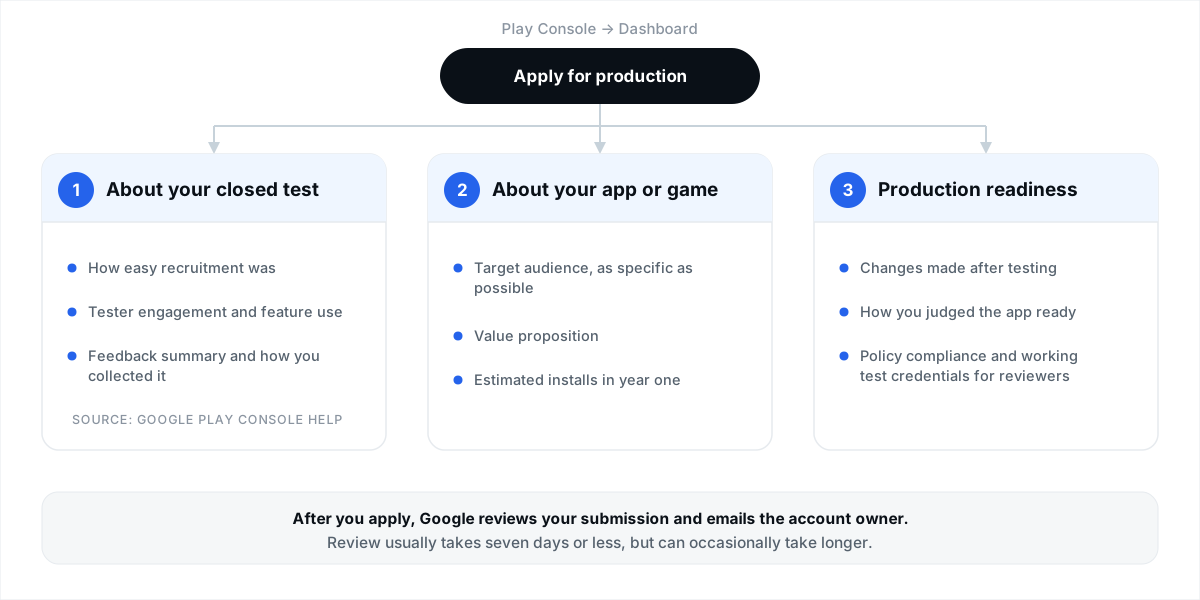 The three sections of the application, and the headings you answer under each. After you apply, Google reviews the submission and emails the account owner.
Two details from Google’s documentation are easy to miss and worth knowing before you start:
- You cannot consult your own Console data mid-form. The application expects written answers. Have your numbers and your feedback notes open in another window or tab first.
- Progress is not saved if you abandon the form. Google states that if you click Discard or leave the page without clicking Next (and finally Apply), your changes are not saved.
Before you open the form
The Dashboard is the authoritative source for your own account, and Google does not publish a blanket rule for every account type. Treat the table below as a list of things to confirm rather than assumptions to inherit from any blog post, including this one.
| What Google documents | What that means in practice | Where to confirm |
|---|---|---|
| Personal accounts created after November 13, 2023 must run a closed test before the app is eligible for distribution | This is the group the requirement covers. If you are in it, production and pre-registration stay disabled until you meet the criteria | Dashboard — look for the “Apply for production” prompt |
| At least 12 testers must be opted in to the closed test when you apply, and must have been opted in continuously for the preceding 14 days | “Opted in” is not the same as invited or listed. Check the opted-in count, not your email list | Test and release → Testing → Closed testing |
| Testers who opt in, test for fewer than 14 days, then opt out do not count toward the requirement. If a tester opts out and back in, the 14 days must be consecutive to count | The clock is per tester, not per release. This is the single most useful sentence in Google’s FAQ, and it is why gaps in opt-in matter | Documented in the FAQ of Google’s testing requirements article |
| You can start a closed test after completing your app setup | App content declarations, privacy policy, content rating and target audience are prerequisites rather than paperwork you can do later | Policy and programs → App content |
Keeping 12 people opted in without interruption is the hard part of this whole process, not the form. If your test is mid-flight, the practical playbook is in how to keep 12 testers opted in for 14 days, and if you are still filling the track, the mechanics are in how to add testers to a closed test.
Tip: run with more than the minimum. Google’s rule is a floor of 12, and a dropout in week two is normal. Aiming for 15–20 opted-in testers means a bad week does not push you below the threshold while you are preparing the application. We wrote about the maths in where to find 12 real testers.
Part 1: “About your closed test”
Google explains the purpose of this section plainly: it exists to verify that an app has been thoroughly tested before publication, to protect users from low-quality apps, to prevent malware distribution, and to reduce fraud. Read that sentence twice before you write anything — it tells you what the section is measuring.
Google documents three things you do here.
1. Say how easy it was to recruit testers
Google asks you to select an option indicating how easy it was to recruit testers for your app. It is a selectable option rather than an essay, so the only real decision is honesty. This question feeds a model of how realistic your test was: a test recruited through your own network looks different from one recruited through a service, and both are legitimate — Google’s own guidance recommends recruiting through personal and professional networks and through communities where your target users already are.
2. Describe tester engagement
This is the substantive part of the application. Google asks for details about engagement during your closed test, specifically:
- whether testers used all available app features, and
- whether tester usage matched expected production user behaviour, including details on any observed differences.
Notice the second bullet. Google is not asking you to claim that everything was perfect — it is asking whether you know where testing behaviour diverged from real-world behaviour, and whether you can say why. “Testers used the app daily but ignored the social sharing feature” is a better answer than a blanket “fully tested”, because it describes a test you actually observed.
3. Summarise the feedback and describe how you collected it
Google asks you to summarise the feedback received from testers and describe how feedback was collected. Google’s testing-requirements article reinforces this elsewhere: you must summarize your testing feedback when applying, and it recommends maintaining a record of received feedback across the testing period.
This is the question where preparation beats writing skill. If you kept a simple dated log from day one — what a tester reported, what you changed, what happened next — this answer writes itself. If you did not, you are reconstructing two weeks of history from memory, and it shows. We cover the log format in detail further down.
| Question | What it is really testing | Characteristics of a strong answer | Characteristics of a weak answer |
|---|---|---|---|
| How easy was recruitment? | Whether the test was genuinely populated by people, and how you reached them | Matches reality. If you used a service, say so — it is not disqualifying. If recruitment was slow, the honest option is the useful one | Contradicts your own Console data, such as claiming effortless recruitment while your list of 14 shows six installs |
| Feature coverage | Whether the test exercised the product or just the login screen | Names the parts of the app that were exercised, and the parts that were not | “All features were tested thoroughly” with nothing behind it |
| Usage vs expected production behaviour | Whether you understand your own users well enough to spot a difference | Describes an observable difference and what you concluded from it | Claims perfect parity between testers and future users — nobody can verify that, and it reads as filler |
| Feedback summary and collection method | Whether the test produced real information you acted on | Themes, roughly how often each appeared, the channel used, and what you changed | A list of vague positives (“testers liked it”) with no channel and no actions |
Part 2: “About your app/game”
Google states that this section exists to provide context about your app or game, and then adds something reassuring and specific: your answers are not displayed publicly on Google Play and do not affect app visibility, Play Console feature access, or eligibility for developer programs. You are not competing for a placement here. You are explaining what the app is.
Target audience — be as specific as possible
Google’s instruction here is unusually direct: specify the target audience for your app or game. Be as specific as possible. “Everyone aged 18–65 who likes apps” is the kind of answer that tells a reviewer you have not thought about it. “Freelance tradespeople in the UK who invoice from their phone between jobs” tells them you have.
Value proposition
For apps, Google asks you to describe how your app provides value to users, and links to its app-quality guidance on the Android Developers site. For games, it asks what makes your game unique. One paragraph is enough: the problem, who has it, and what your app does that a reasonable alternative does not.
Estimated install range for the first year
You select an estimated install range for your app or game during its first year. This is an estimate, not a forecast you are held to. Choose the range that reflects your actual launch plan — a closed test of 15 people and a plan to publish, then talk to users, is a legitimate early-stage answer.
Note (from Google’s documentation): answers in the “About your app/game” section are not displayed publicly on Google Play and do not affect app visibility, Play Console feature access, or eligibility for developer programs.
Part 3: “About your production readiness”
Google describes this section as helping it evaluate whether your app or game is prepared for production release. Two written answers carry the section.
1. What changed because of the test
You describe any changes made to your app or game based on what you learned from the closed test. This is the question that connects the test to the build sitting in front of the reviewer. The strongest answers are concrete and traceable: a crash on a specific Android version, a confusing onboarding step, a permission prompt you reworded. Feedback that produced no change is worth acknowledging too, as long as you can say why you decided it was not a defect.
2. How you decided it was ready
You describe how you determined that your app or game was ready for production. Google’s testing article lists the tools that make this answer credible: a pre-launch report, testing feedback from Console, and a habit of resolving reported bugs. If your answer is “the crash rate fell to zero across the latest test build and every open tester report has been addressed”, you have answered the question with evidence rather than confidence.
Warning: the last button is Apply, not Save. Google notes twice in this section that if you click Discard or leave the page without clicking Apply, your changes are not saved. Keep your answers somewhere else — a note, a draft document — until you are ready to submit them in one sitting.
The policy checks that decide most outcomes
Google states that compliance with the Play Developer Content Policies is your responsibility before submitting for production access, and adds a sentence worth reading carefully: “Google evaluates production apps for policy adherence, but review is not a troubleshooting step.” A review is not a QA pass on your behalf. Submitting a broken or non-compliant build and hoping a reviewer tells you what to fix leads to rejection, delay, and a longer appeal.
Google specifically asks you to double-check four areas before applying.
| Area Google flags | What to confirm before you apply |
|---|---|
| App content and features | Content, features and monetisation models comply with Play policies. No placeholder screens, no permissions you cannot justify, no ad declarations that do not match the build |
| App targeting and content rating | Your declared target age group and store listing settings accurately reflect the app’s actual audience and content |
| Functional reliability | The app is stable, with no broken functionality, crashes or missing screens on the build you are submitting |
| Test credentials | If the app requires authentication, valid working login credentials are in Play Console so reviewers can reach the features you described |
That last row fails more applications than most developers realise, because it is boring. If your app sits behind a login or an invite code, a reviewer who cannot get in cannot see the value proposition you just wrote about. Set up sign-in details on the App content page and test the credentials yourself the day before you apply.
Step-by-step: submitting the application
- Confirm the requirement is met. Open the Dashboard and check the opted-in tester count and that the 14 continuous days are complete for at least 12 testers.
- Clear your App content declarations. Work through anything sitting in “Needs attention” — privacy policy, ads declaration, target audience, content ratings, permissions, sign-in details.
- Freeze the build you are describing. Note the version code that your testers actually used. Your answers should describe that build, not a local branch.
- Assemble your evidence. Your feedback log, the number of tester reports you addressed, and anything from your pre-launch report you acted on.
- Write your three answers offline first. Recruitment, engagement, feedback summary in Part 1; audience, value, installs in Part 2; changes and readiness in Part 3.
- Open the Dashboard and click “Apply for production”.
- Complete Part 1 and click Next. Do not close the tab or click Discard — progress is not saved.
- Complete Part 2 and click Next. Same rule applies.
- Complete Part 3 and click Apply. This is the submission, not a save.
- Watch the account owner’s inbox. Google emails the account owner when the review completes. Google states that review usually takes seven days or less, but can occasionally take longer.
Tip: keep the closed test running while the application is under review. It costs you nothing, it keeps your engagement signals current, and if Google asks for more testing you are already in a position to answer — rather than restarting a 14-day window from a paused track.
How to prepare your feedback summary during the 14 days
The feedback summary is the only part of the application that cannot be written at the end. Google tells developers to maintain a record of feedback during testing. The cheapest way to do that is a single document you touch for two minutes a day.
| What you log | Why it matters at application time |
|---|---|
| Date and tester | Lets you answer the feedback question with dates and volume instead of adjectives, and shows a channel you actually used |
| Channel used | Google asks how feedback was collected. Name the channels: Play’s testing feedback, your email address, a group chat |
| What they reported | Becomes your themes: crashes, confusing copy, missing feature, performance, requests |
| What you changed | Feeds Part 3 directly. Link each change to a version code so the answer is traceable |
| Outcome | “Fixed and confirmed by the tester” is a stronger sentence than “fixed”. This is also where you note feedback you deliberately did not act on |
A structure that works
You do not need elegant prose. You need four beats per theme, repeated until you have covered the test:
- Theme — what the feedback was about, in one line.
- Evidence — how many testers reported it, through which channel, and roughly when.
- Change — what you changed in the build, with the version code.
- Result — what happened after the change, and whether it was confirmed.
Here is that structure applied to a fictional app, so you can see the shape rather than copy the words:
Theme: onboarding was abandoned at the permissions step. Evidence: four of 15 testers reported it between days 2 and 5, three through Play’s testing feedback and one by email. Change: moved the notification permission request behind a value explanation, shipped in version 1.0.4 on day 6. Result: no further reports in the remaining eight days, and the tester who raised it confirmed the new flow.
Three or four of these, written in your own words about your own app, is what a reviewer is asking for.
Warning: do not invent metrics, tester counts or crash statistics. Your Console carries the real numbers for tester activity, feedback and release history. An answer that reads well but contradicts your own account data is worse than a modest answer that matches it. Write about what happened.
Honest answers vs. copy-paste answers
Search for this form and you will find page after page offering “copy-paste answers” to the questionnaire. That demand exists for a real reason — the form is short, high-stakes, and nobody wants to be the developer who wrote the wrong thing. But the premise deserves scrutiny.
What Google documents is a form about your app, your test and your readiness, with answers assessed alongside the data in your account: opted-in tester counts, testing feedback, release history, and the reports you replied to. The two reasons Google names for requiring continued testing are fewer than 12 opted-in testers and insufficient tester engagement during the testing period.
Our opinion, clearly labelled as opinion: the value of the application is that it forces the test to have been real. An answer you cannot substantiate with your own account data is a liability in a way that a plain, specific, slightly unglamorous answer is not. Recruiting through a service and saying so is not a weakness — Google’s own guidance notes that developers recruit through networks and communities. What does not survive contact with a review is a confident claim that your own Console contradicts.
| Claim you will see online | What Google actually documents |
|---|---|
| There is a single correct wording that gets you approved | The form asks about your closed test, your app and your readiness. Google publishes the questions, not approved answers |
| Certain answers trigger automatic rejection | Google documents two reasons it may require continued testing: fewer than 12 opted-in testers, or insufficient tester engagement |
| A provider can guarantee approval | Google reviews each submission itself and notifies the account owner of the outcome. No third party controls that decision |
| You must keep testers active for exactly 30 days | The documented requirement is at least 12 testers opted in continuously for the preceding 14 days |
| You can save the form and finish it next week | Google states that clicking Discard, or leaving without clicking Next and finally Apply, means your answers are not saved |
After you apply: what happens, and when
| Stage | What Google says happens |
|---|---|
| Submitted | Google reviews your submission. An email notification goes to the account owner when the review completes |
| Typical duration | Usually seven days or less, but occasionally longer. Plan communications around that uncertainty rather than a date |
| If more testing is required | You may need to continue the closed test. Documented reasons are fewer than 12 opted-in testers, or insufficient tester engagement |
| If approved | Production opens (Test and release → Production) and Open testing also becomes available. Google still recommends testing thoroughly before publishing updates |
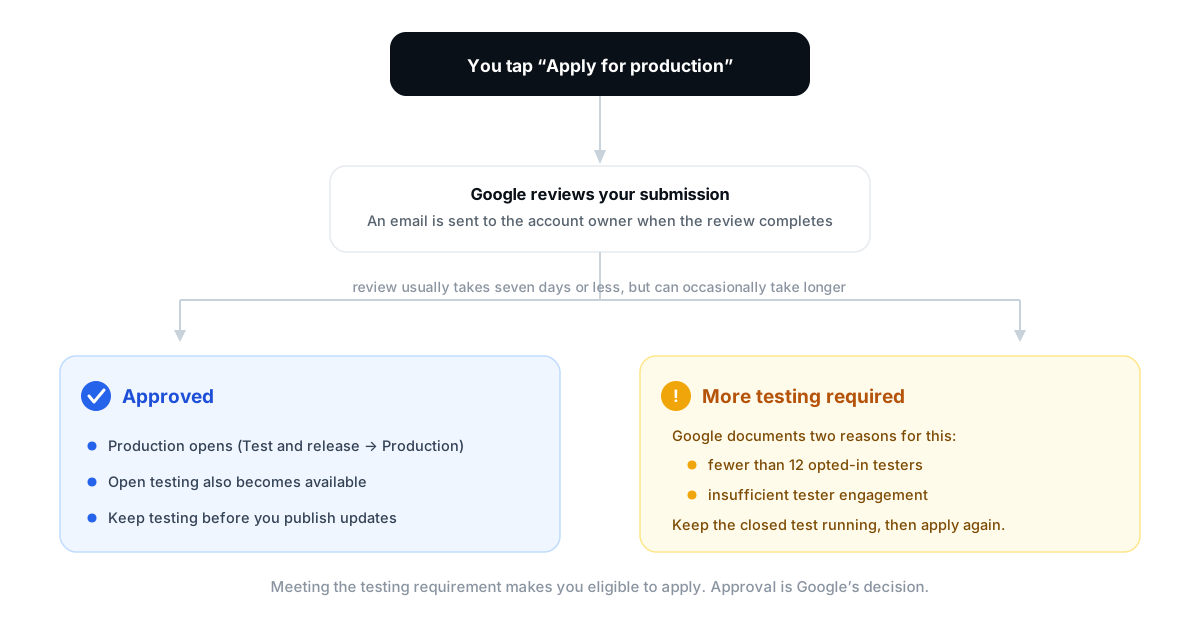 Both documented outcomes of a production access application. Nothing in this flow is guaranteed until Google completes its review.
If Google asks for more testing
Read that outcome correctly. Google documented two specific reasons for it, and neither is a judgement of your app’s quality: fewer than 12 opted-in testers, or insufficient tester engagement during the testing period. Both are things you can fix while the test is still running.
Do not tear down the closed test in frustration. Keep it live, get the opted-in count safely above 12, give testers a reason to use the app this week, respond to the feedback in Play Console, and then apply again. The detailed recovery pattern — including what to change between attempts — is in why production access is still rejected after 14 days.
Frequently asked questions
What questions does the Google Play production access application ask?
Google documents three sections. “About your closed test”: how easy it was to recruit testers, details about tester engagement (whether testers used all available features, and whether usage matched expected production behaviour including any differences), and a summary of the feedback received plus how it was collected. “About your app/game”: target audience, value proposition, and estimated first-year installs. “About your production readiness”: the changes you made based on the closed test, and how you determined the app was ready for production.
Do I need 12 testers opted in for 14 days before I can even open the form?
For personal accounts created after November 13, 2023, yes — Google states that you apply once at least 12 testers have been opted in continuously for the preceding 14 days, and that this is what unlocks the application. The Dashboard is the authoritative check for your own account.
What does “continuous 14-day opt-in” mean?
Google’s FAQ answers this directly: testers who opt in, test for fewer than 14 days, and then opt out do not count toward the requirement, and if a tester opts out and opts back in later, the 14 days must be consecutive to count. In practice the clock is per tester, so a gap in one tester’s participation affects that tester rather than the whole test.
Can I save the application and finish it later?
No. Google states that if you click Discard or leave the page without clicking Next — and, at the end, Apply — your changes are not saved. Draft your answers elsewhere and complete the form in one sitting.
How long does the application itself take to fill in?
It is a short form: a handful of questions across three sections. The work is not the typing — it is having real engagement data and a written feedback summary ready. If those exist, the form is a single sitting. If they do not, no amount of writing will substitute for them.
Will my answers be shown publicly on Google Play?
No. Google states that answers in the “About your app/game” section are not displayed publicly on Google Play and do not affect app visibility, Play Console feature access, or eligibility for developer programs.
What install range should I choose for the first year?
Choose the range that matches your actual plan. It is an estimate of first-year installs, not a commitment, and Google does not publish a minimum. A realistic early-stage range is a better answer than an ambitious one you cannot explain.
How long does production access review take?
Google states that review usually takes seven days or less, but can occasionally take longer. You are notified by email at the account owner’s address when the review completes. Treat the timeline as “about a week, sometimes more” and plan your launch around it.
What happens if my application is not approved?
Google may require you to continue running the closed test. Its documented reasons are fewer than 12 opted-in testers or insufficient tester engagement. Keep the test live, address the underlying issue, and apply again — you do not lose the work you have already done.
Should I keep the closed test running after I apply?
It is the safer choice. Google’s own guidance recommends continuing closed tests while you resolve reported issues, and it costs you nothing to keep testers opted in while you wait. If additional testing is requested, you are already in position to respond.
Do I need a privacy policy, content rating and sign-in details before applying?
Those are App content declarations, and Google asks you to confirm policy compliance before submitting for production access. You also need working sign-in details for reviewers if your app requires authentication — a reviewer who cannot get past the login cannot evaluate the value proposition you described.
Can a testing service guarantee that my app is approved?
No. Google reviews each application itself and notifies the account owner of the outcome. A provider can recruit real testers, keep them opted in for the full window, and hand you a documented feedback record you can summarise honestly. It cannot decide the review.
Does the production access application cost anything?
No — applying is not a paid step. Google does not charge a fee to apply for production access.
Official Google resources
Everything factual in this article comes from the pages below. If any of them ever disagrees with anything written here, the Google page wins.
- App testing requirements for new personal developer accounts — the testing requirement, the three application sections question by question, review outcomes, and the continuous 14-day opt-in FAQ
- Set up an open, closed, or internal test — track setup, tester management, opt-in links, and collecting feedback
- Prepare your app for review — App content declarations, privacy policy, ads, sign-in details, target audience, content ratings
- Use a pre-launch report to identify issues and understand your pre-launch report — evidence for your readiness answer
- Prepare and roll out a release — releases, version codes and tracks
- Google Play Developer Content Policies — the compliance standard Google evaluates production apps against
- Build high-quality apps and games — the app-quality guidance Google links to for the value proposition question
- Device verification requirements for new developer accounts — a separate requirement worth checking on a new account
About this guide
This article was written by the 12 Testers Community testing team. We run Google Play closed tests for indie developers every day — recruiting testers, tracking opt-in status across the full 14-day window, and supporting developers as they work through the production access application.
Every requirement, question and timeline in this guide was checked against Google’s own Play Console Help documentation. We have kept two categories strictly separate throughout: what Google publishes, and what we recommend in practice. Where Google does not document something — including whether a specific answer leads to a specific outcome — we say so instead of filling the gap with confident guesswork. Requirements, form wording and Console navigation change; if anything here drifts from the official pages linked above, trust Google.
Get the 14 days right and the application is the easy part
The form does not reward clever writing. It rewards a test that actually happened: 12 or more real people opted in, using your app for a fortnight, telling you things, and a developer who fixed some of them. That is the entire input.
We assign 12 or more real testers on real Android devices, keep them opted in for the full 14 consecutive days, track every day of progress live in your dashboard, and hand you a written report of their feedback so you can complete the application with answers that match your own account data.
We will not promise you production approval — that decision is Google’s, not ours, and any provider who says otherwise is telling you something useful about how they work. What we can do is make sure the testing requirement is finished properly, documented, and no longer the reason your launch is stuck.
See testing plans and pricing · see how the 14 days work · read the FAQ · or create your campaign. If you are mid-test and want a second pair of eyes on your application answers, read more about us and get in touch.
