
Last verified against Google Play Console Help: September 2026.
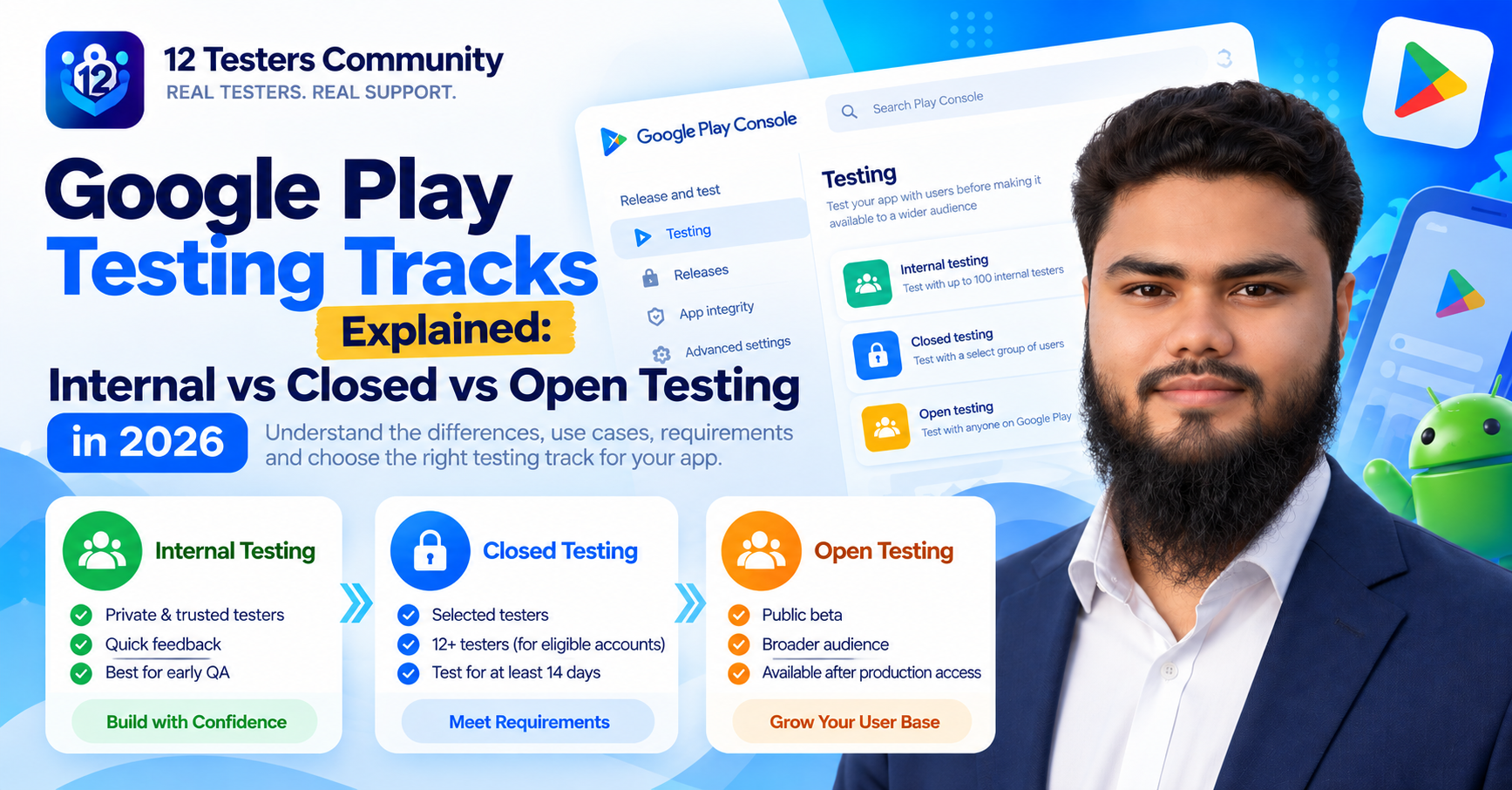
Google Play gives you three testing tracks before your app reaches production: internal testing, closed testing and open testing. Most explanations stop at "internal is a small group, closed is a chosen group, open is public". That is technically correct and almost useless, because it does not tell you which track Google's production access rules actually depend on, what each track does to a tester's Play Store experience, or why one of the three is unavailable to you right now.
This guide covers all three tracks properly: what each one is for, who can join, how access works, how they relate to the production access requirement for new personal developer accounts, and which track fits which stage of development.
One rule runs through the whole article. Everything Google documents is labelled as official. Everything else is labelled as practical guidance. That distinction is the reason most testing-track advice you read goes wrong, because the two get mixed together constantly.
Quick answer
- Internal testing — quick builds for a small group of trusted testers. It is optional, Google recommends it as a starting point, and it can begin before your app setup is complete.
- Closed testing — a targeted group of testers you control. This is the track that Google's production access requirement is written about.
- Open testing — a public beta surfaced on Google Play that anyone can join. It becomes available after you gain production access.
- Production access — for personal accounts created after 13 November 2023, you must run a closed test with at least 12 testers opted in continuously for the preceding 14 days before you can apply.
And the sentence that matters more than any other in this article: a closed test that meets the requirement makes you eligible to apply for production access. It does not approve you. Google reviews the application separately and can ask for more testing. If you are at that stage now, our complete guide to closed testing for new developers walks through the whole process end to end.
Google Play testing tracks at a glance
Three tracks, three different jobs. The last column is the one developers get wrong most often, so start there if you are in a hurry.
| Track | Who can join | Main purpose | Access type | Typical use | Production access relationship |
|---|---|---|---|---|---|
| Internal testing | Up to 100 testers per app, added by email address | Fast early quality assurance with people you trust | Private. Testers need the link or Play Store URL you share | Sprint-level checks, crash hunting, testing builds that are not fully configured | None. Google's requirement is about the closed test |
| Closed testing | Only testers on your email lists or in your selected Google Groups | A controlled beta with targeted feedback, and the track that gates production access | Invite-only. Each tester completes their own opt-in | The 12-testers / 14-day run, pre-launch validation, feedback you can summarise | Direct. At least 12 opted-in testers, continuously, for the preceding 14 days |
| Open testing | Anyone on Google Play who joins the testing programme | A wide beta with real-world devices and pressure on the store listing | Public. Your test version is visible on Google Play | Post-approval beta for a planned launch or a major update | None. It only becomes available after you gain production access |
Sources: Google Play Console Help — App testing requirements for new personal developer accounts and Set up an open, closed or internal test.
What is internal testing on Google Play?
Internal testing is Google's fast lane. You roll out a build, the people on your internal tester list get it, and you find out within minutes whether the app still works. According to Google, builds are normally available to testers within seconds of being added in Play Console.
What makes the track genuinely different from the other two is how little it demands before you can use it. Everything below comes from Google's own documentation:
- An internal test can have up to 100 testers per app, added by email address.
- You can create an internal testing release before completing your app setup. Google explicitly notes you can use internal testing to test apps that are not fully configured.
- Internal testing is optional, but recommended as a starting point.
- If needed, you can run internal tests concurrently with closed and open tests, for different app versions.
- You can add internal testers from any country, even if your app's test or production version is not available there.
- For paid apps, internal testers install your test version for free — unlike closed and open testers, who must buy paid apps.
- Device exclusion rules do not apply to internal testers.
- Internal tests may not be subject to standard Play policy or security reviews, and apps active on internal testing tracks are exempt from the Data safety section requirement.
That last point is worth pausing on, because it explains why internal testing is not a rehearsal for launch. It is a private workbench. Nobody outside your list sees your app, and your app is not yet being held to the standards it will face as a public listing.
Who should use internal testing
You, your teammates, and a handful of people whose judgement you trust — the group that can tolerate a broken build on a Tuesday afternoon and tell you exactly what broke. Because the track supports up to 100 testers, it also works well for a small closed group inside a company, or for QA contractors.
What internal testing is not designed to do
- It does not satisfy Google's production access requirement. Google's requirement names the closed test, and the testers it counts are opted in to your closed test.
- It does not represent your real audience. Fifty colleagues on two device models are not a beta.
- It does not produce public visibility. Testers cannot find your app by searching Google Play at this stage — you have to send them the link yourself.
Best suited for: fast, private testing before a wider beta. It is a starting point, not a shortcut.
What is closed testing on Google Play?
Closed testing is the middle track and, for anyone publishing a first app from a personal developer account created after 13 November 2023, it is the one that decides when you launch. Google describes it as sharing your app with a targeted group of users that you control, so you can fix issues and check policy compliance before launch.
You can start a closed test after completing your app setup. Testers are managed either by email lists or by Google Groups — for a Google Group you enter the group address (for example [email protected]), and users must join the group before they can opt in. Play Console allows up to 200 lists with up to 2,000 users each, and up to 50 lists per track, which is far more headroom than the requirement needs.
Two mechanics catch people out:
- A tester is only a tester once they have opted in. Adding an email address to a list is not the same as the person completing the opt-in step. Google also notes that the opt-in link only displays once the app status is Published — apps in Draft or Pending publication status do not show one.
- Testers in a closed test cannot find your app by searching Google Play before open testing or production rollout. You share the Play Store URL or opt-in link directly.
For the accounts the production access requirement covers, the closed test also carries a specific, measurable obligation: at least 12 testers opted in continuously for at least the preceding 14 days when you apply. Our breakdown of what counts as an eligible tester goes deeper on the opt-in detail, and adding testers to a closed test covers the Play Console mechanics.
How a closed test leads to a production access application
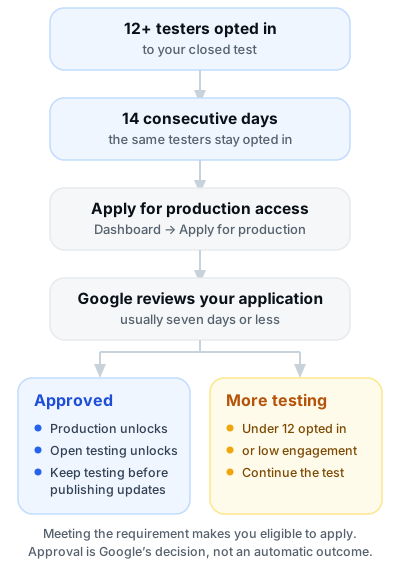 Figure 1 — The closed testing requirement, the application, and both documented outcomes.
Best suited for: a controlled beta you can actually manage — and for meeting the production access requirement on accounts created after 13 November 2023.
What is open testing on Google Play?
Open testing is a public beta. Google describes it as surfacing your app's test version on Google Play so that anyone can join your testing programme and submit private feedback. It is the widest of the three tracks and the one closest to a real launch, which is why Google tells developers to verify that the app and store listing are ready for public visibility before choosing it.
The detail that changes how you plan is this: open testing becomes available after you gain production access. It is not a fourth way to earn production access — it is something you unlock once you have it. For the personal accounts covered by the testing requirement, that means the closed test comes first and the open test comes later, if you want it at all.
Open testing is not a replacement for the closed test that Google's requirement refers to. If your goal is the production access application, your effort belongs in the closed track.
Internal vs closed vs open testing: complete comparison
The table below compares the three tracks on the dimensions that actually change your decisions.
| Internal | Closed | Open | |
|---|---|---|---|
| Audience | Trusted testers, up to 100 per app | Targeted users or groups you choose | Anyone who joins the programme |
| Access control | Email list, link shared by you | Email list or Google Groups; individual opt-in required | Open sign-up; no invitation needed |
| Main purpose | Early QA on fast-moving builds | Controlled beta, policy checks, production access requirement | Wide real-world beta before a release |
| Visibility | Private; not searchable on Google Play | Private to your list or group | Visible on Google Play as a test version |
| Tester recruitment | Internal team, colleagues, contractors | Networks, communities, or a managed tester service | Public opt-in; self-selecting testers |
| Feedback approach | Informal, fast, often in chat | Structured and recorded; you must summarise it when applying | Volume feedback plus private feedback via Play |
| Development stage | Can start before app setup is complete | Starts after app setup is complete | After production access; app and listing must be public-ready |
| Production access relationship | Does not count towards the requirement | The requirement: 12+ opted in, continuously, 14 days | Unavailable until production access is granted |
| Public availability | Never public | Never public while the test runs | Public test listing, not a production listing |
| Typical workflow | Ship a build, collect quick reactions, repeat | Run the 14-day test, then apply for production access | Open enrolment for a wider test before publishing |
If you want this as a single image, Figure 2 is the same story in three cards.
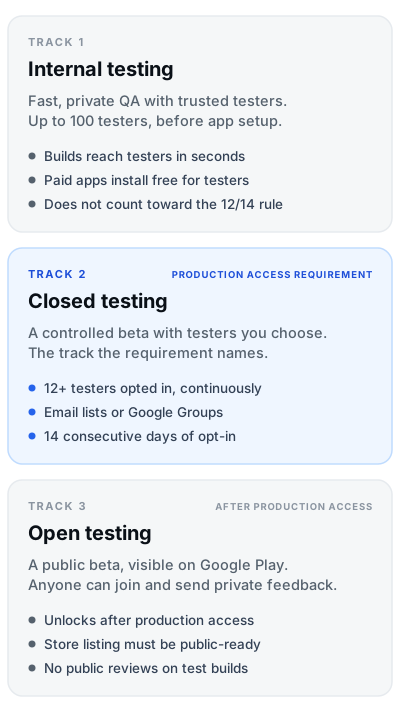 Figure 2 — The three tracks and the one that carries the production access requirement.
Does internal testing count towards the 12-testers / 14-day requirement?
No. Internal testing does not count towards Google's production access requirement.
Google's requirement is written specifically about the closed test: "at least 12 testers must be opted in to your closed test when you apply for production access, and they must have been opted in continuously for the preceding 14 days". Internal testers are a separate list on a separate track, with their own rules — including that internal testers get paid apps for free, which alone tells you the two groups are treated differently.
Internal testing is still valuable. Google recommends it as a starting point, and it is the fastest way to catch a build-breaking bug with people who will forgive one. It is just not a substitute for the closed test.
Important: running a spotless internal test for 14 days does not move you any closer to production access on the accounts this requirement covers. Only opted-in closed testers count. Read Google's own wording in App testing requirements for new personal developer accounts before you plan your timeline.
Why closed testing matters for new personal developer accounts
This is the part of the puzzle that makes the tracks matter for more than quality. Google requires personal developer accounts created after 13 November 2023 to test their apps before those apps are eligible for distribution, and it keeps two Play Console features switched off until then: Production and Pre-registration. If the Dashboard offers you "Apply for production", you are in scope.
The official requirement, in Google's terms:
- Account condition: personal accounts created after 13 November 2023.
- Which test: a closed test for your app.
- How many testers: a minimum of 12, opted in to the closed test.
- How long: opted in continuously for at least the preceding 14 days at the moment you apply.
- App setup: you can start a closed test after completing your app setup.
- How you apply: from the Dashboard in Play Console, answering questions in three sections — about your closed test, about your app or game, and about your production readiness.
- What you must be able to do: summarise your testing feedback. Google asks for this in the application, so feedback has to exist and be recorded.
- What happens next: Google reviews the submission and emails the account owner. Review usually takes seven days or less, but can occasionally take longer.
- If more testing is requested: you may need to continue running the closed test. Google names two reasons — fewer than 12 opted-in testers, or insufficient tester engagement during the testing period.
Official requirement vs. community belief
Official: 12 testers, continuously opted in for the preceding 14 days, in a closed test; a feedback summary in the application; approval decided by Google.
Not official: specific daily open counts, minimum minutes per day, session targets, or mandatory written feedback every single day. Google documents "insufficient tester engagement" as a reason it may require continued testing, but it does not publish numeric daily quotas. Treat any blog that quotes exact numbers as repeating community practice, not policy.
Two more linked guides are worth reading alongside this section: 12 testers and 14 days explained for the requirement itself, and how to keep 12 testers opted in for 14 days for the operational side.
Can the same tester be used in different testing tracks?
Google does not publish a rule preventing a person from being on more than one tester list. Each track has its own tester list, and one person's email address can appear in an internal test and a closed test at the same time. What matters is which list has the opt-in.
- Only closed-test opt-ins count towards the 12-testers / 14-day requirement. A tester who is also on your internal list contributes exactly one opted-in closed tester, not two.
- The requirement is about testers, not list entries. Twelve distinct people who have completed the opt-in is the practical reading of Google's wording — which is why tracking who actually opted in matters more than tracking who was invited. Our guide to eligible testers covers the invited-versus-installed-versus-opted-in distinction in detail.
- Play Console manages lists per track. Closed testers can be managed by email list or Google Group, and a Google Group member must join the group before opting in to your test.
Practical guidance, not official policy: if you are building the 12, recruit 12 distinct people and keep a simple record of who opted in and when. Padding the count by reusing the same address across lists is a good way to end up with fewer real testers than the Dashboard shows — and a documented reason for Google to ask for more testing.
Can internal and closed testing run at the same time?
Yes. Google states that if needed, you can run internal tests concurrently with closed and open tests for different app versions. Nothing forces your internal test to pause while the closed test runs.
That single sentence has practical consequences worth planning around:
- "For different app versions" is doing real work. Use internal testing for your fast-moving trunk builds and keep the closed test on a stable release your 12 testers can actually complete 14 days on.
- Do not destabilise the closed test. If your closed test version crashes on day 6, your testers have nothing to engage with — and Google can (and does) name insufficient engagement as a reason to require more testing.
- Ending a track is a deliberate action. Google's guidance for ending a test is to open the relevant testing page and select Pause track. After a track is paused, testers stop receiving updates but keep the app installed.
If you want to understand what actually breaks a 14-day run, what resets or breaks your testing period is the companion piece to this section.
What happens after you get production access?
Approval changes what is available to you in Play Console, and it changes what the testing tracks are for.
Officially: when your application is approved, you can access your app's Production page (Test and release > Production) and distribute the app on Google Play. You can also access Open testing (Test and release > Testing > Open testing). Google advises continuing to test your app thoroughly before publishing production updates.
In practice, the tracks do not become irrelevant after launch:
- Internal testing stays your fastest feedback loop for builds you would not trust with outsiders.
- Closed testing stays useful for pre-release validation of a significant update with a controlled group, or with a specific tester segment.
- Open testing becomes your wide beta before a major release — now genuinely available because production access is no longer withheld.
- Production releases are where staged rollouts and pre-launch reports pick up the job. Google's pre-launch report runs automated checks on your releases and can surface crashes, performance and compatibility issues before your users do.
One thing genuinely changes shape after approval: the production access requirement no longer constrains your planning, so your track choice becomes a quality decision rather than a gate.
Which Google Play testing track should you use at each stage?
If you are deciding right now, Figure 3 is the shortcut.
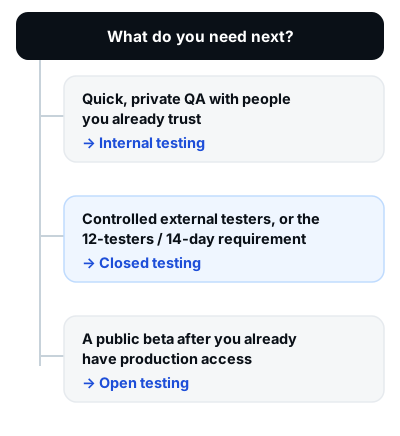 Figure 3 — Match the track to the problem you have today.
Mapped onto a normal development cycle, the tracks line up like this:
| Stage | Track | What you are trying to learn |
|---|---|---|
| Early QA | Internal testing | Does the build work at all? What broke in the last change? |
| Controlled beta | Closed testing | Do real users outside the team understand it, and can you satisfy the 12/14 requirement? |
| Production access | Dashboard application | Have you met the requirement and can you explain your testing and readiness? |
| Public beta | Open testing | How does the app behave at scale, on devices you have never seen? |
| Live releases | Production, plus any track above | Is this update safe for everyone, or should a smaller group see it first? |
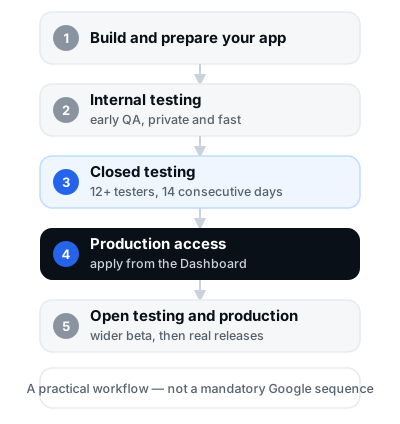 Figure 4 — A practical workflow for the three tracks. Not a mandatory Google sequence for every developer.
Common Google Play testing track mistakes
These are the mistakes that cost developers the most time, roughly in order of how often we see them.
1. Assuming internal testing satisfies the 12/14 requirement
Why it matters: internal testers are on a different list on a different track, and Google's requirement counts opted-in closed testers. A fortnight of internal testing can pass and you still will not be eligible to apply.
What to do instead: treat internal testing as preparation and start the closed test as early as your app setup allows.
2. Counting invited or installed testers as opted-in testers
Why it matters: an invitation that was never accepted, or an install that happened before the opt-in, is not an opt-in. Google's wording is "opted in", and each tester has to complete that step themselves.
What to do instead: verify opt-in status per tester, and keep a record of who opted in on which date.
3. Confusing a closed test with an open beta
Why it matters: the two have opposite access models. Closed testers come from your lists or groups; open testers are anyone on Google Play. Making your closed test public is not possible, and opening it early where you cannot is not an option.
What to do instead: plan closed testing for control, and open testing for scale once production access is granted.
4. Believing 14 days guarantees production approval
Why it matters: the requirement makes you eligible to apply. Google reviews the application, and it can require more testing — for instance with fewer than 12 opted-in testers or insufficient tester engagement.
What to do instead: treat the application as a real submission. Answer the three sections honestly, and be able to summarise the feedback you received. Our guide to answering the closed testing questionnaire covers that; if you have already been through it and it did not go your way, why production access is still refused after 14 days is the follow-up.
5. Looking for open testing before you have production access
Why it matters: open testing becomes available after you gain production access. If your launch plan assumes a public beta before approval, the plan needs changing.
What to do instead: put the closed test on the critical path and schedule the open beta after approval.
6. Never explaining what "opted in continuously" means
Why it matters: testers who leave the programme on day 9, even briefly, stop counting. Google's own guidance to developers is explicit: inform your testers that they need to remain opted in continuously for at least 14 days.
What to do instead: tell testers in writing on day one, remind them mid-run, and check the opt-in count in Play Console rather than assuming.
7. Treating community "daily activity" rules as official requirements
Why it matters: you may invest effort enforcing numbers Google never published, while missing the things it does ask for — clear instructions, a feedback channel, and a summarisable record of feedback.
What to do instead: meet the documented requirement first. Then, as practical guidance, encourage testers to open the app regularly during the run and use core features. That is community best practice, not policy.
8. Assuming a Google Group member is already a tester
Why it matters: for closed tests using a Google Group, users must join the group before they can opt in to your test. Group membership alone does not opt anybody in.
What to do instead: share the group link and the opt-in link together, and follow up until each tester confirms the opt-in.
9. Letting the closed test build go stale
Why it matters: if the 14-day run is spent on a version that crashes or has missing screens, testers disengage — and Google lists insufficient tester engagement as a reason it may require continued testing.
What to do instead: keep the closed test on a stable version and ship the experiment-heavy builds to internal testing, which Google allows you to run concurrently.
10. Leaving feedback collection to the last minute
Why it matters: Google requires you to summarise your testing feedback when you apply. A summary written from memory is weaker than a log written as you go.
What to do instead: set up one feedback channel before the test starts, encourage testers to use it, and review the Testing feedback page in Play Console (Monitor and improve > Ratings and reviews > Testing feedback) during the run.
A practical testing track workflow for Android developers
The order below is what works in practice. It is a workflow recommendation, not a Google-mandated sequence for every developer or every app.
- Prepare the app. Get the app to a state worth testing: no broken screens, working sign-in, and realistic test credentials if your app requires a login, since reviewers need to get in.
- Use internal testing for early QA. Google recommends it as a starting point, and you can run it before app setup is complete. This is where you resolve crashes and obvious usability problems cheaply.
- Move to closed testing when you need real external testers. Closed testing starts after your app setup is complete and lets you choose exactly who is in the room, by email list or Google Group.
- Meet the applicable closed-testing requirement. At least 12 testers opted in, continuously, for at least the preceding 14 days at application time. Tell them what staying opted in means, and keep the run stable.
- Apply for production access. From the Dashboard in Play Console, answering the three sections and including a genuine summary of the feedback you collected and acted on.
- After approval, use open testing when it helps. Open testing is now available; it is a good fit for a wide beta before a planned release, but it is not compulsory.
- Keep using internal and closed testing for future releases. Both remain useful for updates long after launch — internal for fast feedback, closed for pre-release validation with a smaller group.
If the closed-testing phase is where your project keeps stalling, finding 12 real testers and common reasons closed tests fail are the two most useful next reads.
Google Play testing tracks FAQ
What is the difference between internal and closed testing on Google Play?
Internal testing is a private track for up to 100 trusted testers, used for quick builds and early feedback, and it can start before your app setup is complete. Closed testing is a controlled track for a targeted group you choose, started after app setup is complete, and it is the track Google's production access requirement refers to.
Does internal testing count towards the 12 testers?
No. Google's requirement counts testers opted in to your closed test. Internal testers are a separate list and do not contribute to the 12.
Does open testing count towards the 14-day requirement?
No. Open testing becomes available after you gain production access, so it cannot be the test that earns you the eligibility — and Google's requirement names the closed test specifically.
How many testers are required for closed testing?
Officially, a minimum of 12 testers opted in continuously for at least the preceding 14 days when you apply for production access. Google documents tester-list limits rather than a cap on how many people you may test with, so there is no need to keep the number artificially low.
Do testers have to stay opted in for 14 days?
Yes — for the accounts covered by the requirement, at least 12 testers must have been opted in continuously for the preceding 14 days. Google's requirements article even includes a FAQ item on what continuous 14-day opt-in means for testers; it is worth reading in full, because the wording is precise.
Can I use Google Groups for closed testing?
Yes. In Play Console you can manage closed testers by email list or by Google Groups, entering the group address in the form [email protected]. Users must join the group before they can opt in to your test.
Can I run internal and closed testing together?
Yes. Google states that you can run internal tests concurrently with closed and open tests for different app versions. Keeping the closed test on a stable version while internal testers get the latest build is the usual setup.
What happens after production access is granted?
Your app's Production page and Open testing both become available. You can distribute to users on Google Play, and Google advises continuing to test thoroughly before publishing production updates.
Does completing 14 days guarantee approval?
No. Meeting the requirement makes you eligible to apply. Google reviews the application and can require continued testing, for example if fewer than 12 testers are opted in or tester engagement was insufficient.
Do testers need to submit written feedback every day?
Google does not document a daily written-feedback requirement, nor daily open, minute or session thresholds. What Google does document is that you should give testers clear instructions and a feedback channel, that you should act on their feedback, and that you must summarise your testing feedback when you apply for production access.
Which testing track should a new developer start with?
Internal testing, as a starting point — that is Google's own recommendation. Then move to closed testing, which is the track required for production access eligibility on the accounts the requirement covers.
Can I continue closed testing after production access?
Nothing in Google's documentation stops you from keeping a closed test running, and Play Console gives you a Pause track control for ending a test when you want to. In practice, many teams keep a closed track for pre-release builds or for a specific group of testers. Treat this as practical guidance rather than a documented entitlement.
Final checklist: choosing the right Google Play testing track
- ☐ I need quick, private QA on fast-moving builds → Internal testing
- ☐ I need a controlled beta with testers I choose → Closed testing
- ☐ I need to meet the 12 testers / 14 days production requirement → Closed testing
- ☐ I already have production access and want a wider beta → Open testing
- ☐ I know that internal testers do not count towards the 12
- ☐ I know that an invited tester is not an opted-in tester
- ☐ I know that meeting the requirement does not guarantee approval
- ☐ I have a feedback channel ready, because I will need to summarise what testers told me
The short version
Internal testing is a private workbench, closed testing is the controlled beta that carries Google's production access requirement, and open testing is the public beta you unlock afterwards. Internal testers do not count towards the 12; open testers cannot even be recruited until production access exists. If your app is on a personal account created after 13 November 2023, the closed test is the only one that moves you towards launch — and it moves you towards eligibility, not approval.
Choose the track that matches the question you are trying to answer this week, and treat the requirement as a deadline you plan around rather than a formality you get through.
Need help organising your closed test?
If your app is at the closed-testing stage and the hard part is keeping 12 real people opted in for the whole 14 days, 12 Testers Community provides managed Google Play closed-testing support — real testers on real devices, with the testing period and the feedback trail organised for you. Start your closed test or read the plans and pricing first.
