
Last verified against Google Play Console Help: September 2026.
Fourteen days of closed testing can pass in two very different ways. In the first, you finish with a folder of screenshots, a few chat threads, a rough idea of what testers thought, and a vague feeling that you should have written things down earlier. In the second, you finish with a dated record of what was tested, what testers reported, what you changed, whether the change worked, and why you believe the app is ready for production.
The second version is the one that helps you. It helps while the test is running, because you can see patterns instead of isolated complaints. It helps when you fix something, because you know what to ask testers to re-check. And it helps at the end, because Google's own guidance tells developers to maintain a record of received feedback and to summarise that feedback when applying for production access.
This article is about the recording side of closed testing: what to capture, how to organise it, how to document a bug properly, and how to turn fourteen days of scattered messages into a defensible summary. Everything Google publishes on the subject is labelled as official. Everything else is labelled practical guidance — useful, tested in practice, but not a Google requirement.
Quick answer — what should you record during a 14-day closed test?
A useful record for each piece of tester feedback captures:
- Which feature was tested — the screen or flow the tester was in when the observation happened.
- What the tester observed — their own words, kept as close to verbatim as you can.
- The category — functional bug, UI/UX problem, crash, performance, compatibility, or feature feedback.
- Device and Android version context where it is relevant to reproducing the problem.
- The action you took — fixed, planned, declined, or unable to reproduce.
- The retest result — whether the change was verified, and by whom.
- The final status — resolved, open, or deferred, with a date.
These are documentation practices, not Google thresholds. Google does not publish a required number of feedback reports, a required number of bugs, or a daily quota of tester sessions. What Google does publish is the expectation that you collect feedback, review it, act on it, and summarise it. A record like the one above is how you do that well — it is a practical recommendation, not a hidden scoring system.
What Google officially says about tester engagement and feedback
Before designing any tracker, it is worth reading what Google actually asks for, because the gap between Google's published guidance and the advice circulating in developer forums is wide. Google's app testing requirements page sets out a short list of expectations under the heading "Best practices for closed testing". Here is that list, separated from the community folklore that usually surrounds it.
| What Google documents | What Google does not document |
|---|---|
| Provide testers with clear instructions on how to test the app and how to report bugs. | A required format for those instructions, or a required length. |
| Specify the type of feedback you want to collect. | Any list of mandatory feedback categories. |
| Encourage testers to use as many features as possible so their feedback is holistic. | A minimum number of features, sessions, minutes, or opens per tester. |
| Provide a clear feedback channel — email, a website, or a messaging forum. Testers can also leave private feedback through Google Play. | A required channel, or a required response time. |
| Maintain a record of received feedback and review it regularly to spot recurring themes. | A required tool, template, or storage format for that record. |
| You must summarise your testing feedback when applying for production access. | A word count, structure, or exact wording for the summary. |
| Respond to tester feedback and resolve identified bugs throughout the testing period. | A required number of bugs to fix, or a severity threshold you must meet. |
| Inform testers that they must remain opted in continuously for at least 14 days. | Any daily engagement requirement per tester. |
The right-hand column matters as much as the left. A large amount of closed testing advice presents invented benchmarks — a number of daily sessions, a number of bug reports, a percentage of active testers — as though they were Google rules. None of them appear in Google's documentation. What Google does say, in the same article, is that if your app needs additional testing you may be asked to continue running your closed test, and that insufficient tester engagement during the testing period is one documented reason for that outcome. That is a real statement about a real risk. It is not a published formula.
Why this matters for how you document the test
Because the requirement is qualitative rather than numeric, your record is what turns "twelve testers for fourteen days" into an answer you can actually give. If a reviewer asks what testers did, what they reported, and what changed as a result, "we collected feedback and fixed bugs" is weak. A dated table with named features, quoted observations, versions, and retest results is not.
It is also worth remembering that the fourteen-day clock is about opting in, not about reporting. Testers can stay opted in and still say nothing, which is why Google tells developers to inform testers that they must remain opted in continuously and to specify the type of feedback you want. Keeping people opted in is a separate discipline from collecting their observations; our guide to keeping 12 testers opted in for 14 days covers the first half.
A written record removes a common source of anxiety too. Developers often worry they are failing an invisible test when a day passes with no messages in the group chat. The tracker makes that visible and harmless: it shows which features were exercised on which days and what came back, rather than relying on memory and impression.
What testers should report: 14 feedback categories worth recording
The categories below are drawn from the areas that a new Android app most often gets wrong, and they map onto the four subject areas Google's own testing fundamentals uses to classify tests: functional, performance, accessibility, and compatibility. They are not a Google checklist. They are a practical way to make sure your testers are looking at the whole app rather than only the first screen.
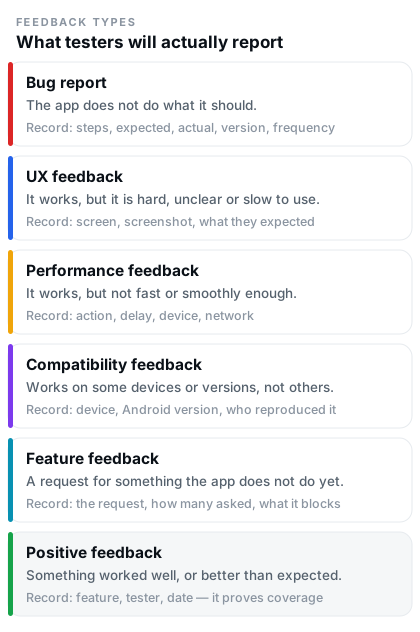 Figure 1 — The six feedback types you will actually receive, and what is worth recording for each.
1. Functional bugs
- What testers should look for: A button that does nothing, a form that saves the wrong value, a list that does not refresh, a flow that stops halfway.
- Example feedback: "Tapping Save on the profile screen shows a spinner forever. The name is not updated when I go back."
- What to record: Screen name, exact steps, expected result, actual result, app version, device, reproducibility (always / sometimes / once).
- Action that may follow: Fix and ship in the next closed-test release, then ask the reporting tester to retest the same steps.
2. UI and UX problems
- What testers should look for: Text that is cut off, contrast that is too low, elements that overlap on a small screen, a primary action that is hard to find.
- Example feedback: "The Continue button sits behind the keyboard on my phone, so I have to dismiss the keyboard before I can tap it."
- What to record: Screen, a screenshot, screen size or device, and which UI element is affected.
- Action that may follow: Layout fix, or a deliberate decision to accept the behaviour and note why.
3. Navigation problems
- What testers should look for: Getting lost, a back press that exits the app unexpectedly, a tab that loses its state, a flow with no clear way out.
- Example feedback: "After I open a notification and press back, the app closes instead of returning to the list."
- What to record: The entry point, the navigation path, and where the behaviour diverges from expectations.
- Action that may follow: Adjust the back-stack handling, then re-walk the same path during retesting.
4. Performance issues
- What testers should look for: Slow cold starts, janky scrolling, long waits after an action, battery or data usage that feels excessive.
- Example feedback: "The feed takes about six seconds to show anything on first open, then loads instantly afterwards."
- What to record: The action, the observed delay, whether it is reproducible, the device, and the network type.
- Action that may follow: Profiling, caching, or query changes — then the same measurement repeated to confirm the improvement.
5. Crashes and errors
- What testers should look for: The app closing without warning, frozen screens, error dialogs, or features that silently fail.
- Example feedback: "The app closes whenever I open the camera from the attach button."
- What to record: Steps to reproduce, device and Android version, app version, frequency, and any crash report or stack trace you can match to it.
- Action that may follow: Fix the crash, ship an update, and confirm the fix with the tester who reported it.
6. Login and account issues
- What testers should look for: Sign-up failures, verification emails that never arrive, sessions that drop, password resets that loop, profile data that does not persist.
- Example feedback: "I signed up with Google, then re-opened the app and was asked to sign up again."
- What to record: Sign-in method used, whether it is a fresh or returning session, and the exact step where it fails.
- Action that may follow: Fix the session or token handling — and check whether a fresh install behaves differently, which is often the whole answer.
7. Notifications
- What testers should look for: Notifications that never arrive, arrive twice, arrive after the event has passed, or open the wrong screen.
- Example feedback: "I get the reminder notification, but tapping it opens the home screen instead of the reminder."
- What to record: Notification type, expected timing versus actual timing, and the deep-link destination.
- Action that may follow: Fix the payload or the intent handling, then have testers check both foreground and background delivery.
8. Network and offline behaviour
- What testers should look for: What happens on a slow connection, in airplane mode, or while switching between Wi-Fi and mobile data mid-action.
- Example feedback: "In airplane mode the app shows an endless spinner instead of telling me I am offline."
- What to record: The connectivity state, the action in progress, and the message the app displayed.
- Action that may follow: Add an offline state or retry behaviour — a common source of real-world complaints that never appear on a fast office connection.
9. Device-specific issues
- What testers should look for: Problems that appear on one device or screen shape but not another — cut-off layouts, missing features, camera or permission quirks.
- Example feedback: "On my tablet the settings screen is stretched full width and the labels sit far from the switches."
- What to record: Device model, screen size or form factor, Android version, and whether any other tester sees the same thing.
- Action that may follow: Layout or resource changes. Google's own advice to recruit a diverse group of testers exists precisely because these issues are invisible on a single device.
10. Accessibility and usability observations
- What testers should look for: Text that does not survive a large font setting, touch targets that are too small, content that only makes sense visually, unusable states in TalkBack.
- Example feedback: "With the system font set to largest, the price on the checkout screen wraps over the button."
- What to record: The accessibility setting in use and the screen affected.
- Action that may follow: Improve labels, sizing, or contrast. Google's pre-launch report also flags some of these automatically, which is a useful cross-check.
11. Confusing flows
- What testers should look for: Moments where they had to stop and think, guess a next step, or ask you what a label meant. These are the most valuable and the most commonly lost observations.
- Example feedback: "I could not tell whether 'Sync' would overwrite my local changes, so I did not tap it."
- What to record: The screen, the tester's interpretation, and what they expected instead.
- Action that may follow: Reword the label, add a short explanation, or reorder the step — often a small change with a large effect on first-run success.
12. Missing or unclear information
- What testers should look for: Empty screens with no explanation, error messages that do not say what to do next, values with no units or context.
- Example feedback: "The list was empty and there was no message telling me whether I had no items or the app had failed to load them."
- What to record: Screen, state, and the wording testers expected to see.
- Action that may follow: Add empty, loading and error states — cheap to build, and one of the clearest quality signals in a tester's summary.
13. Unexpected behaviour
- What testers should look for: Anything that technically worked but did something the tester did not expect — a wrong order of events, a stale value, an action that silently succeeded.
- Example feedback: "Deleting an item removed it from the list but the counter at the top still showed the old total."
- What to record: What the app did, what the tester expected, and the steps that produced it.
- Action that may follow: Treat it as a bug even if it does not crash anything. Silent inconsistencies are the ones that generate one-star reviews later.
14. Feature-specific feedback
- What testers should look for: Whether a specific feature does the job it was built for — search that finds the right results, filters that filter correctly, uploads that keep quality.
- Example feedback: "Search finds items by title but not by category name, so I have to remember exact titles."
- What to record: The feature, the tester's goal, and where the feature fell short of it.
- Action that may follow: Improve the feature, or write down the decision to leave it as it is and why. Both are legitimate; only the undocumented version is a problem.
Practical guidance: ask testers for observations, not verdicts. "It works" tells you nothing. "I used it for ten minutes, the first screen was clear, and I could not find how to invite a friend" gives you a task list.
Bug report vs UX feedback vs feature feedback: what to record for each
Different types of feedback need different evidence. Recording a visual preference with the same formality as a crash wastes time; recording a crash with the informality of a preference loses the information you need to fix it. The table below is the practical mapping.
| Feedback type | What it means | Example | What to record | Possible action |
|---|---|---|---|---|
| Bug report | The app does not do what it is supposed to do. | "Upload fails for images over 5 MB." | Steps, expected, actual, version, device, frequency. | Fix, ship, retest with the reporter. |
| UX feedback | It works, but it is hard, confusing or slow to use. | "I did not realise the row was tappable." | Screen, screenshot, the tester's expectation. | Reword, restyle, or record a decision to keep it. |
| Performance feedback | It works, but not fast or smoothly enough. | "Scrolling the list stutters after about 40 items." | Action, observed delay, device, network, reproducibility. | Profile, optimise, measure again. |
| Compatibility feedback | It works on some devices or Android versions and not others. | "The camera preview is black on Android 11." | Device model, Android version, whether others reproduce it. | Fix, or raise the documented minimum version. |
| Feature feedback | A request for something the app does not do, or does partly. | "Can I export the list as CSV?" | The request, how many testers asked, and whether it blocks a core task. | Build it, schedule it, or note why it is out of scope. |
| Positive feedback | Something worked well, or better than the tester expected. | "Sign-up took me under a minute, which surprised me." | The feature, the tester, and the date. | Protect it. Note it in the summary as evidence of a tested, working flow. |
Positive feedback is not filler. A summary that lists only problems reads as a summary of an untested app. One line recording that testers completed sign-up, onboarding, and the main task without help is evidence that the core flow was exercised — which is exactly the kind of statement the production access questionnaire asks you to make.
An example 14-day feedback tracking plan
This is an example, not a Google schedule. Google does not require a particular activity on a particular day — the requirement is written about the 14-day opt-in period as a whole. The plan below is a practical way to make sure that every important part of the app gets looked at during the fourteen days, instead of only the screens your testers happen to open.
Fourteen days is enough time to cover an app properly — if you decide in advance what "properly" means. Without a plan, most closed tests concentrate on the first two screens and the last two days, and the summary at the end has a visible hole in the middle.
| Day | Focus | What to record that day |
|---|---|---|
| 1 | Access, installation, onboarding | Who installed, whether the opt-in link worked, first-run impressions, anything confusing in the first two minutes. |
| 2 | Sign-up, sign-in, account setup | Which method each tester used, failures, session persistence after closing and reopening the app. |
| 3 | Core feature 1 | The main task the app exists for: completion rate, blockers, unexpected behaviour. |
| 4 | Core feature 2 | The second most important flow, tested end to end rather than glanced at. |
| 5 | Navigation and structure | Back-press behaviour, tab state, dead ends, screens testers could not reach or leave. |
| 6 | Performance | Cold start, scrolling, loading times, battery and data impressions, with device and network noted. |
| 7 | Main end-to-end user flow | The full journey from first open to a completed task, plus how long it took. |
| 8 | Secondary features | Settings, search, filters, sharing — the areas least likely to be opened unprompted. |
| 9 | Notifications and network behaviour | Delivery timing, deep links, offline and slow-connection states, recovery after losing connectivity. |
| 10 | Device compatibility | Layout on small and large screens, older Android versions, permission prompts, hardware features. |
| 11 | Edge cases | Empty states, very long input, rapid tapping, interrupted actions, unusual but valid data. |
| 12 | Regression testing | Whether earlier fixes held, and whether anything new broke as a result of them. |
| 13 | Retesting fixes | Confirmation from the original reporter, with the app version and the date recorded. |
| 14 | Final review and feedback summary | A consolidated summary of what was tested, what changed, what remains open, and why the app is ready. |
Two adjustments make this plan workable in real life. First, do not enforce it rigidly — if a tester finds a crash on day 3, stop and deal with it, and move the day's topic to the end. Second, keep the instructions to testers short. A message like "today, if you have five minutes, could you try searching and tell me whether the results matched what you expected?" gets answers. A fifteen-point test plan usually gets silence.
None of this works until people are actually on the track. If your opt-in list is still short, adding testers to a closed test and what counts as an eligible tester deal with the mechanics, and the complete 14-day guide for 12 testers puts the whole run in order.
The feedback tracking table
One table, kept up to date, replaces most of the note-taking you would otherwise do by hand. The version below is what a closed test actually looks like when it is recorded as it happens.
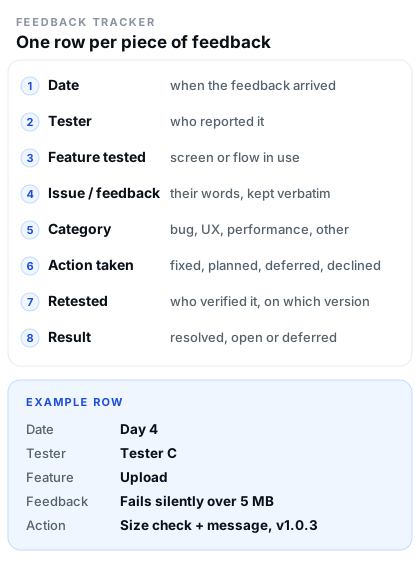 Figure 2 — One row per piece of feedback. Eight columns is enough to cover the whole test.
| Date | Tester | Feature tested | Issue / feedback | Category | Action taken | Retested | Result |
|---|---|---|---|---|---|---|---|
| Day 1 | Tester A | Onboarding | "Skip" label unclear — unsure what was being skipped | UX | Reworded to "Set up later" | Day 13, v1.0.3 | Resolved |
| Day 2 | Tester B | Sign-in | Session lost after force-closing the app | Bug | Token refresh fixed in v1.0.2 | Day 12, v1.0.2 | Resolved |
| Day 4 | Tester C | Upload | Upload failed for files over 5 MB, no message shown | Bug | Added size validation and an error message | Day 13, v1.0.3 | Resolved |
| Day 6 | Tester D | List scrolling | Noticeable stutter after roughly 40 items | Performance | Enabled view recycling; measured again | Day 12, v1.0.2 | Improved |
| Day 9 | Tester E | Notifications | Tapping the reminder opened the home screen | Bug | Deep-link intent corrected | Day 13, v1.0.3 | Resolved |
| Day 10 | Tester F | Settings on tablet | Switches and labels far apart on a wide screen | Compatibility | Max-width applied to the settings column | Day 14, v1.0.4 | Resolved |
| Day 11 | Tester B | Search | Search by category name returns nothing | Feature | Logged as post-launch candidate | Not retested | Deferred, documented |
| Day 12 | Tester A | Sign-up | "Fastest sign-up I have used on Android" | Positive | No action; noted as tested evidence | — | Confirmed working |
Illustrative entries, written to show the level of detail that is useful. Replace them with your own testers' observations; do not copy these into a real summary.
How to use the table during the test
- Write the row when the feedback arrives, not the following week. A row added while the context is fresh takes a minute; the same row reconstructed later takes half an hour and loses detail.
- Keep the tester's wording in the "issue / feedback" column. Your own rewrite loses the signal about what actually confused them.
- Leave the last two columns empty until you have something to put there. An empty "retested" cell is a useful to-do list; a filled-in "retested" cell that is not true is worse than nothing.
- Record deferred and rejected items too. "Seen, evaluated, and deliberately not changed" is a decision, and being able to explain it is part of a credible summary.
- Sort or group by category once a week to see the pattern. Three unrelated complaints about empty screens are one fix, not three.
How to document a bug properly
A bug entry is only useful if someone — you, in two weeks — can reproduce the problem from the description alone. The eleven fields below are the minimum for that. None of them are required by Google; all of them save you time.
- Short title — one line a person can scan: "Upload fails for files over 5 MB".
- Steps to reproduce — numbered, starting from a known state, no shortcuts.
- Expected result — what should have happened.
- Actual result — what did happen, including any message on screen.
- Device — manufacturer and model, plus screen size if the layout is involved.
- Android version — including the API level, since behaviour differences cluster there.
- App version or build — the version code from your closed-test release.
- Screenshot or screen recording — if the tester can produce one. A ten-second recording beats three paragraphs of description.
- Frequency — always, sometimes, or once out of several attempts.
- Severity and impact — does it block the core task, is there a workaround, how many testers are affected.
- Developer action and retest result — the fix, the version it shipped in, who retested it, and the outcome.
Sample bug report
Notice what the last two fields do. They turn a complaint into a closed loop, and they give you the exact sentence you will want when you write the feedback summary: "Testers reported a silent upload failure for files over 5 MB; validation and an error message were added in v1.0.3 and the original reporter confirmed the fix."
How to handle tester feedback: a practical workflow
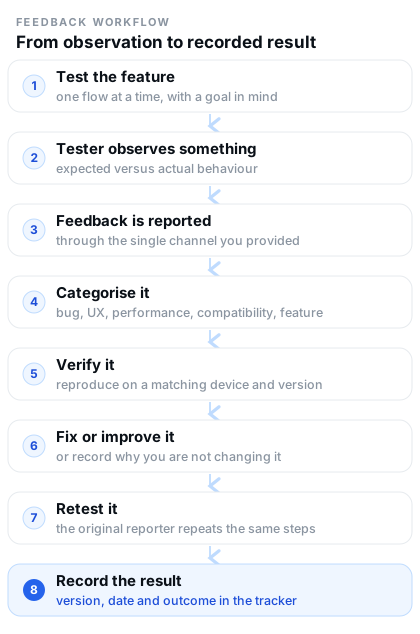 Figure 3 — The loop that makes fourteen days of feedback worth something.
- A tester finds something. Give them a fixed place to report it — one email address, one form, or one group chat. Splitting feedback across three channels is how items get lost.
- You categorise it. Bug, UX, performance, compatibility, feature request, or positive. This takes seconds and decides what happens next.
- You verify it. Try to reproduce it on a matching device and version. If it does not reproduce, record that — "could not reproduce on Pixel 6a / Android 14, asked tester for a recording" is a legitimate and useful entry.
- You fix or evaluate it. Some items get fixed immediately, some get scheduled, some get declined. All three are fine; undocumented is not.
- You ship an update if appropriate. Closed-test releases reach your testers through Google Play, the same way production updates will. Roll out a build, then tell testers what changed in one short message.
- Testers retest. Ask the original reporter to repeat the exact steps. Feedback from a different tester on a different device is weaker evidence that your fix worked.
- You record the result. Version, date, tester, outcome. Then close the row in the tracker.
Practical guidance: reply to every report, even when the answer is "we are not changing this". Testers who get no response stop testing. Testers who get a reply on day 2 are still finding things on day 12 — which is exactly what "encourage testers to use as many features as possible" looks like in practice.
Where to find and review testing feedback in Play Console
Some feedback never arrives in your inbox. When testers use the private feedback option available in a closed test, their comments go to Play Console instead. Google documents exactly where to read them, and its own closed testing overview describes the same two channels: a feedback route you provide (email, a website or a message forum), plus private feedback gathered inside Play Console.
- Location: Play Console → Monitor and improve → Ratings and reviews → Testing feedback. You can browse with filters — date, language, reply state, app version, or device type — or search for specific keywords.
- Notifications: Play Console preferences can email you when testers submit new testing feedback or update existing reviews, so you are not relying on remembering to check.
- What testers cannot do: testers cannot leave public reviews on a test version, and their feedback does not affect your app's public rating. This is why you need your own feedback channel on top of Play Console.
- What Google tells you to do with it: maintain a record of received feedback, review it regularly to identify recurring themes, prioritise improvements, and summarise the feedback when applying for production access.
- Cross-check with automation: a pre-launch report tests your app on real devices before users see it and groups findings into stability, performance and accessibility issues. It is not a substitute for tester feedback, but it catches a category of problem testers may not think to mention.
Do not rely on Play Console as your only record. Testing feedback in the console is a list, not a project tracker: it has no column for the fix you shipped or the retest that confirmed it. Copy each item into your own table, then use the console filters to make sure nothing was missed.
How to document changes made from feedback
The tracking table records what testers said. A change log records what you did about it. Keeping the two apart makes the second one short enough to actually maintain — and it becomes the backbone of your production access summary.
| Feedback | Problem confirmed? | Change made | Version | Retested? | Final result |
|---|---|---|---|---|---|
| Session lost after force-closing the app | Yes | Token refresh corrected so the session survives a restart | 1.0.2 | Yes, day 12 | Resolved |
| Upload failed silently over 5 MB | Yes | Pre-flight size check plus a clear error message | 1.0.3 | Yes, day 13 | Resolved |
| List stutters after about 40 items | Yes | View recycling enabled; frame times measured again | 1.0.2 | Yes, day 12 | Improved |
| "I could not tell what Sync would overwrite" | Not a defect | Added a one-line explanation under the toggle | 1.0.4 | Yes, day 14 | Resolved |
| Search by category name returns nothing | Yes | No change before launch; logged for the first update | — | No | Deferred |
This is a practical documentation method, not a Google requirement. Google does not ask for a change log in this format. What it does ask for is a summary of your testing feedback when you apply for production access, and a change log is the fastest honest way to produce one — because every row is already a sentence in that summary.
Why this creates a clear testing history
Read the table top to bottom and you have a narrative: testers found real problems, the problems were confirmed or evaluated, specific changes shipped in named versions, and the fixes were verified by the people who reported them. That is what "we tested the app" means in evidence. It also protects you in the other direction — if something was deliberately left alone, the row explains it, so the gap does not look like an oversight.
What should you have ready before applying for production access?
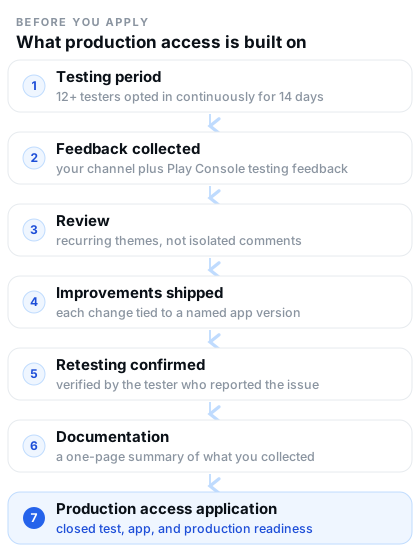 Figure 4 — Documentation is the step between testing and the application, not an afterthought.
Google's production access application has three sections: About your closed test, About your app/game, and About your production readiness. Every one of them is easier to answer from a written record. Before you press "Apply for production", make sure you can state all of the following without guessing:
- The testing period — when your closed test started, how long it has been running, and the current app version on the closed track.
- Tester engagement — how many testers are opted in, how they were recruited, and what they actually did. Observations here should be factual: which features were exercised, and how often you heard from testers.
- A feedback summary — the recurring themes, in your own words, including how the feedback was collected.
- The important issues you found — the bugs that mattered, not the cosmetic ones, with the flows they affected.
- The important issues you fixed — what changed, and which version carried the change.
- Retesting results — confirmation that fixes were verified, ideally by the testers who reported the problems.
- How feedback was collected — the channel you provided, plus the private feedback you reviewed in Play Console.
- Whether testers used the important features — because Google's guidance explicitly asks you to encourage testers to use as many features as possible, and the questionnaire asks how the app was tested.
- Whether testing behaviour represented expected production use — whether your testers resemble the audience the app is built for.
- Anything you deliberately did not change, and the reason.
- Why you consider the app ready — a short, concrete statement grounded in the rows above.
Meeting the requirement makes you eligible. It does not approve you.
A closed test with at least 12 testers opted in continuously for the preceding 14 days unlocks the application. Google then reviews the submission — usually within about seven days — and can ask you to continue testing; Google names fewer than 12 opted-in testers and insufficient tester engagement during the testing period as documented reasons. There is no published threshold for "sufficient" engagement, which is precisely why a written record of what testers did is worth more than an assumption about what reviewers count.
If you are at this stage, two companion articles go deeper on the specifics: how to answer the closed testing questionnaire section by section, and why production access is still rejected after 14 days for the failure modes worth checking before you apply.
Feedback summary template
This is the one-page summary you will want when you fill in the application. Copy it, replace the placeholders, and keep it next to your tracker.
Not a Google-mandated template. Google requires that you summarise your testing feedback; it does not prescribe the fields or the order. What matters is that every statement in your summary traces back to something a tester actually reported and something you actually did.
Ten common closed testing feedback mistakes
- Collecting feedback but never reviewing it. Google's guidance is explicit that reviewing feedback regularly is how you spot recurring themes. A group chat nobody re-reads produces no themes.
- Recording only "works fine". A summary of eight identical one-line replies tells you nothing about the app and reads as though the test barely happened.
- Not recording which feature was tested. Without the feature, you cannot show coverage, and you cannot tell whether the core flow was ever exercised.
- Documenting bugs as a single sentence. "Upload is broken" cannot be reproduced, verified, or reported as fixed.
- Losing tester feedback across channels. Email, DMs, a WhatsApp group and a Play Console list is four places to check and three places to forget.
- Not tracking fixes. If you cannot say which version carried a change, you cannot describe the change clearly later.
- Not retesting fixes. Shipping a fix is not the same as confirming it works. Retesting by the original reporter is the strongest evidence you can hold.
- Treating all feedback as equally important. A crash in the main flow and a preference about button colours do not deserve the same hour of work; triage keeps the important work finishing.
- Confusing tester count with testing evidence. Twelve opted-in testers satisfy a requirement. Twelve testers who exercised your main features and reported what they found is what makes the test useful.
- Inventing Google's hidden rules. Assuming a required number of sessions, minutes, or bug reports leads to wasted effort and, sometimes, to obviously artificial feedback. Google publishes no such numbers.
14-day closed testing feedback checklist
Practical, and deliberately short enough to finish. Nothing here is a Google-mandated step, and no single unchecked box will stop you applying — but a test where all of them are ticked is a test you can describe with confidence.
- ☐ Testing instructions prepared — how to test, and how to report a bug.
- ☐ Type of feedback specified — testers know what you are looking for.
- ☐ Single feedback channel provided — one place, easy to reach.
- ☐ Testers told to stay opted in for the full 14 days continuously.
- ☐ Important features tested — the core flow, plus the areas testers would not open unprompted.
- ☐ Feedback collected and logged in one tracker as it arrives.
- ☐ Issues categorised — bug, UX, performance, compatibility, feature, positive.
- ☐ Bugs documented with steps, expected, actual, device and version.
- ☐ Play Console testing feedback reviewed and filtered, not just skimmed.
- ☐ Fixes recorded with the version they shipped in.
- ☐ Fixes retested by the tester who reported them.
- ☐ Deferred items documented with a reason.
- ☐ Feedback reviewed for recurring themes at least once mid-test.
- ☐ Final feedback summary written before you apply.
- ☐ Production access questionnaire answers prepared — closed test, app, readiness.
Frequently asked questions
Does Google require testers to submit feedback?
There is no published rule saying every tester must submit feedback, and no minimum number of reports. What Google does document is that you should provide a clear feedback channel, specify the type of feedback you want, maintain a record of what you receive, and summarise it when you apply for production access. Practically, a test where nobody reports anything gives you nothing to summarise — the risk is to the quality of your application, not to a numbered rule.
What kind of feedback should testers provide?
Whatever reflects what they genuinely experienced, in their own words: what they tried, what confused them, what broke, what felt slow, and what worked well. Google's guidance asks testers to use as many features as possible to give holistic feedback, which is a useful instruction to pass on. The fourteen categories earlier in this article are a practical way to make sure the whole app gets covered rather than the first two screens.
Does Google require daily feedback?
No. Google does not require feedback every day, and nothing in its documentation sets a daily reporting expectation. A 14-day tracking plan is a practical organising tool so that important features get tested; it is not a Google schedule.
Does Google require a certain number of feedback reports or bugs?
No documented number exists for either. There is no published minimum number of feedback reports, no minimum number of bugs to find, and no target you must hit. What Google does publish is qualitative: respond to feedback, resolve identified bugs where appropriate, and summarise what you received.
Should I record every tester's feedback?
Record every distinct observation, even duplicated ones — the count is the signal that something is a recurring theme. For identical reports of the same issue, one row with the number of testers affected is usually enough, and it keeps the tracker readable.
What should I do if testers report no bugs?
First, treat it as useful information rather than a failure. Then check whether it is genuinely the case: ask testers to attempt specific tasks rather than to "look around", and give them a few concrete questions. Most "no bugs" reports come from testers who did not have anything specific to do. If the app really does hold up, record which flows were exercised and what testers completed — that is the evidence you will need, and it is more convincing than silence.
Does tester feedback help with production access?
Yes, and Google says so directly: acting on feedback is described as improving your app's user experience, increasing the likelihood of a successful production access application, and reducing negative reviews later. Feedback also feeds the summary that Google requires you to provide when you apply.
What should I include in my feedback summary?
The testing period, how many testers were opted in continuously, which features were tested, how feedback was collected, the recurring themes, the critical issues found and fixed, the versions those fixes shipped in, the retesting results, anything deliberately not changed, and your readiness assessment. The template above covers all of it.
Should I keep screenshots of tester feedback?
Keep screenshots and recordings where they carry information a description cannot — layout problems, visual glitches, error dialogs, and reproduction footage. For most text feedback, a written record with the tester's own wording is enough. Store them somewhere you will still be able to find them when you write the summary.
What should I record if a bug is fixed during testing?
The original report, the confirmed cause or the best available explanation, the change you made, the version it shipped in, who retested it, the date, and the outcome. That single row is usually the most valuable line in the whole tracker, because it is the clearest example of the loop working.
Does 14 days automatically guarantee production access?
No. Completing a closed test with at least 12 testers opted in continuously for the preceding 14 days makes you eligible to apply. Google reviews the application separately — usually within about seven days — and may ask you to continue testing if, for example, you have fewer than 12 opted-in testers or the testing period shows insufficient engagement. There is no published approval percentage, and no source can promise approval.
The test is the evidence, and the record is the proof
Reaching twelve testers and waiting fourteen days satisfies a requirement. It does not, by itself, tell you anything about your app. The value of a closed test comes from what happens in the middle: testers using the app the way real users will, you hearing what they found, fixing what matters, and confirming that the fixes worked.
Recording that process is what converts effort into something you can use. It makes bugs reproducible. It shows which parts of the app nobody has actually checked yet. It turns a scattered fortnight of messages into a summary you can stand behind, in the production access questionnaire and in your own decisions about what to launch with. And it costs far less than the alternative — trying to reconstruct fourteen days from memory the evening before you apply.
If organising that many testers, keeping them opted in, and collecting usable feedback is the part you would rather not run yourself, our Google Play closed testing service handles the tester side while you keep the product decisions. Either way, keep the tracker. It is the part of the test that outlives the fourteen days.
