
Last reviewed against Google's official Android developer verification and Google Play documentation: October 2026. Google updates these pages regularly, so confirm the current wording in your own Play Console and on the official pages linked through this article.
Search for “Android developer verification” and you will meet at least four different things wearing similar names: Google Play developer account verification, Android developer verification, app package registration, and the 12-testers, 14-day closed testing requirement. They are related, they sometimes appear in the same console, and for many developers one of them is already done — but they are not the same requirement, and one does not stand in for another.
The confusion is understandable, because a single Play Console notification can mention more than one of them in the same paragraph. It also has real costs. Developers have paid for closed testing they did not need, treated a verification notice as a deadline for a closed test, and assumed that finishing 14 days means their identity is verified. None of those conclusions follow from what Google actually publishes.
This article separates the four concepts, quotes Google's own wording, and labels every recommendation as practical advice rather than a rule. Two things up front. First, nothing here overrides what your own Play Console shows you — where an obligation depends on your account type or a specific app, the console and the official documentation decide. Second, no process described here guarantees approval of anything; several of them are eligibility gates that let you apply, not outcomes.
Quick answer: are developer verification and closed testing the same?
No. They are separate requirements that answer different questions, they exist for different reasons, and neither one automatically satisfies the other. Each one asks a distinct question:
- Closed testing answers: can I apply for production access on this app yet? For the personal developer accounts the rule covers, Google requires at least 12 testers opted in continuously for at least 14 days before you can apply.
- Play Console developer account verification answers: is my developer account's identity and contact information verified?
- Android developer verification answers: is this app traceable to a verified developer, so it can be installed on certified Android devices?
- App package registration answers: is this package name formally linked to my verified developer account and signing keys?
Google's requirement: the closed-testing rule is a gate on applying for production access. Google's wording is that once you meet the criteria “you can apply for production access.” Meeting it is not approval, and it is not identity verification.
The rest of this article takes each concept in turn, then compares them directly and answers the two questions developers ask most: does closed testing complete my verification, and does verification remove the 12-testers rule. If you are in a hurry, the comparison table and the checklist carry most of the practical value.
What is Google Play closed testing?
Closed testing is a Google Play testing track. Google describes it as sharing your app with a targeted group of users that you control, so you can fix issues and confirm the app complies with policy before launch. Alongside internal testing and open testing, it is one of the three ways to distribute a pre-release build. You can start a closed test after completing your app setup, and — importantly for the rule below — internal testing does not count toward the closed-testing requirement.
For a defined set of accounts, closed testing also carries a specific, measurable obligation. Google states that developers with personal accounts created after November 13, 2023 must run a closed test for their app with a minimum of 12 testers who have been opted in continuously for at least 14 days. The Production and Pre-registration features in Play Console remain disabled until those criteria are met. Once they are met, you apply for production access from the Play Console Dashboard and answer questions about your closed test, your app, and its production readiness.
Three details in that requirement are routinely misread, and Google's own documentation settles each one:
- It counts testers who are opted in, not invitations sent. Adding an email address to a list is not the same as the person completing the opt-in step.
- The 14 days must be continuous for each tester. Google's documentation says testers who opt in, test for fewer than 14 days, and then opt out do not count toward the requirement — and that if a tester opts out and later opts back in, the 14 days must run consecutively again.
- Meeting the rule makes you eligible to apply. It is not a promise of approval. After you apply, Google reviews the submission and emails the account owner; review usually takes seven days or less, but can take longer. If the app needs more testing, Google may ask you to keep running the closed test, naming fewer than 12 opted-in testers or insufficient tester engagement as reasons.
Closed testing is also the subject this site covers in the most depth, so it is worth reading the dedicated guides rather than relying on this summary. 12 testers and 14 days explained is the precise version of the rule, and the complete 14-day closed testing guide walks through running the test. Whether the requirement applies to your account at all is covered in does the 12-tester requirement apply to organization accounts, and the three tracks are compared in internal vs closed vs open testing.
What is Google Play developer account verification?
Play Console developer account verification is about you, the account holder — not your apps, and not your testing history. Google requires all Google Play developer accounts to have verified contact details (an email address and a phone number), and it collects additional information depending on the type of account you chose. The point is that the contact information Google holds is accurate and that a real, accountable person or organization is behind the account.
Google Play offers two account types, and both can use the same features, including monetizing with a payments profile. The only difference Google documents is the information it collects when you set the account up:
- Personal account — intended for personal use, for example a student, hobbyist, or semi-professional developer. Google collects a public developer name, legal name, legal address, a contact email address (must be verified), a contact phone number (must be verified), a developer email address shown on your profile, and a developer website.
- Organization account — intended for an organization or business, including commercial, industrial, professional, or governmental activity. Google collects a public developer name; the D-U-N-S number, organization name and organization address from your linked Google Payments profile; an organization phone number and website; a contact name; a contact email and phone number (both must be verified); and a developer email and phone number shown on your profile.
Two practical points follow from that. First, you can change your account type if your circumstances change, so an early choice is not permanent. Second, an organization account is not a shortcut around other requirements. Google's Play Console Requirements policy actually requires the organization type for certain categories — financial products and services, health apps, apps approved to use the VPN service class, and government apps — and it holds organization accounts to the same testing and verification requirements as everyone else. Choosing organization purely to avoid closed testing is not what the policy is for, and it does not remove the testing gate. We cover that question directly in does the 12-tester requirement apply to organization accounts.
Where to check it: in Play Console, open Settings → Developer account to review your account type and the information on file. Google's own guidance for Android developer verification says that for most Play developers no new action is required for identity verification, because an existing verified identity already meets the requirement — but it also tells developers to confirm their current account information there.
What is Android developer verification?
Android developer verification is the wider Google initiative — bigger than Google Play — that links real-world entities (individuals and organizations) with their Android apps. Google's stated goal is that apps can be traced to a verified developer so that bad actors cannot repeatedly publish harm anonymously. Google's documentation puts it plainly: Android requires all apps to be registered by verified developers for users to install them on certified Android devices.
It is not another name for the 12-testers rule. Closed testing is about proving an app has been tested before you apply for production access on Google Play. Android developer verification is about proving who made an app, and registering its package names, so the app can be installed on certified devices. They overlap only in that both live partly inside Play Console.
Google says its analysis found more than 90 times as much malware from sideloaded sources as on Google Play — the context behind the change, and the reason the protections extend beyond the Play Store to apps installed from other participating stores. The initiative has three developer-facing steps:
- Sign up for a console. If you distribute apps only outside Google Play, you can create an account in the Android Developer Console. If you distribute on Google Play, you use the Play Console, and Google says you are automatically registered if you distribute through Play.
- Verify your identity. Provide information and documents that confirm your identity as an individual or an organization. Requirements differ by account type and region.
- Register your package names. Prove ownership of your apps by providing an APK signed with your private key, linking the app to your developer account. This is covered in its own section below.
Two distinctions matter more than anything else here, and both are places where coverage online goes wrong.
Tool availability is not the same as regional enforcement
Google has been rolling the verification tools out to all developers through the Android Developer Console and Play Console, so that developers can verify and register their apps ahead of any user-facing change. That is global and available now. The user-facing protections, by contrast, started regionally. Google says protections began on September 30, 2026 for apps installed from participating stores in a limited set of countries, with a global expansion planned for 2027. The next section sets out the exact scope.
There are different paths, and not every developer takes the same one
Google offers more than one route. Organizations and professional developers with wide distribution verify their identity in full. Students and hobbyists can use a free limited distribution account that needs no government ID and shares apps with up to 20 devices. Power users can install apps from unverified developers through an advanced flow, and installing with ADB (Android Debug Bridge) continues to work without registration for development and testing. That spread of options is the reason a blanket statement like “every Android developer must now upload a government ID” is wrong.
What does app package registration mean?
App package registration is the step that creates a formal, verifiable link between your app's unique package name and your signing keys. Google's own definition is a process that connects a package name to the verified developer account that controls it. It is narrower than “Android developer verification” — registration is one part of that wider initiative — and it is entirely separate from running a closed test.
On Google Play, package registration is now part of the Play Console requirements. Google's Play Console Requirements policy tells developers to register their app package names via Play Console to comply with Android developer verification. The good news is that most of this happens automatically:
- Google Play automatically registers 99% of apps. Google's guidance on the Play Console path says that Play automatically registers 99% of apps, and that you should use Play Console to manually register the remaining apps, or apps you distribute outside Google Play.
- New apps are registered when you create them. Google says that when you create an app in Play Console, Play automatically registers the package name and links it to your account. If another developer is already using that name, the console prompts you to choose a different one.
- A small remainder needs a manual claim. Google's announcement notes that where it is unable to register an app for you, you follow a manual app claim process; details appear in Play Console and by email.
If you also distribute outside Google Play, registration happens in the Android Developer Console instead. Google's steps there are: enter the package name; add the SHA-256 certificate fingerprint from your app's signing key (the status becomes In review); then prove ownership by signing an APK with your private key and uploading it, using a snippet the console provides. When that completes you are notified by email and the status becomes Registered.
Where two developers genuinely use the same package name, Google assigns the right to register it by install share: a developer whose keys account for more than 50% of known installs holds priority; failing that, any developer with a “sizeable cluster” of 50 or more installs can register; and failing that, registration is first come, first served.
The four concepts compared
The table below is the quickest way to see where each concept lives and what it is for. Read the last row carefully — it is the answer to the “does this replace that?” question that causes most of the confusion.
| Play closed testing | Play Console account verification | Android developer verification | App package registration | |
|---|---|---|---|---|
| Purpose | Prove an app has been tested before you apply for production access. | Confirm the developer account's identity and contact details. | Link real-world developers to their Android apps so harm is traceable. | Create a verifiable link between a package name and its signing keys. |
| What it verifies or requires | For covered accounts, a closed test with at least 12 testers opted in continuously for at least 14 days. | Verified contact email and phone, plus the information your account type requires (legal name and address; D-U-N-S and organization details for organizations). | Identity verification as an individual or organization, plus app registration so apps are installable on certified devices. | The package name, its SHA-256 signing fingerprint, and proof of ownership (a signed APK). |
| Who may need to complete it | Personal developer accounts created after November 13, 2023 that want production access on a new app — and the app itself. Not every account is in scope. | All Google Play developer accounts; the difference between account types is the information collected. | Developers distributing on certified Android devices — mostly Play developers, plus those distributing outside Play. Different paths exist for hobbyists, power users and enterprise-managed apps. | Developers with apps on Play (many already registered automatically) and developers distributing outside Play who want their apps to remain installable. |
| Where to check the status | Play Console: Dashboard, and Test and release → Testing → Closed testing. | Play Console: Settings → Developer account. | Play Console (Android developer verification area, and the Home page) or the Android Developer Console, plus Google's email notifications. | Play Console for Play apps; the Packages page in the Android Developer Console for apps distributed outside Play. |
| Does it replace any of the others? | No. It gates production access; it does not verify your identity or register your package names. | No. Verified account details do not run a closed test and do not register package names. | No. Verification does not satisfy the closed-testing rule for accounts it applies to. For Play developers it does mean identity verification is usually already met. | No. Registration is not a test, and it is not identity verification on its own. |
Figure 1 below is a conceptual overview of how the concepts relate. It is deliberately not a mandatory sequence: which parts apply depends on your account type, where you distribute, and the app itself, and some developers never touch every box.
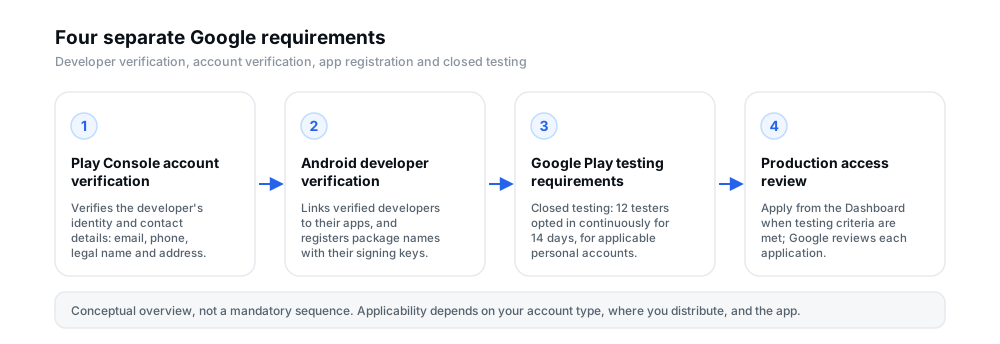
Figure 1 — Four separate requirements. A conceptual overview, not a mandatory workflow: applicability depends on the developer and the app.
Practical note: treat the arrow between “testing requirements” and “production access review” as the only hard directional link in the diagram. It reflects Google's documented rule that, for the accounts the rule covers, the closed test must be completed before you can apply for production access. The other connections describe what each requirement concerns, not a required order.
What changed on September 30, 2026?
September 30, 2026 is the date the user-facing Android developer verification protections began, but only in a specific scope. Google's documentation states it directly: protections begin for users who install apps from participating stores in Brazil, Indonesia, Singapore, and Thailand, on certified Android devices running Android 7 or later. Google then plans to expand these protections globally in 2027.
The participating stores in this phase are Google (Google Play), Honor (HONOR App Market), OPlus (OPPO App Market), Samsung (Galaxy Store), Transsion (Palm Store), vivo (V-Appstore), and Xiaomi (GetApps). Apps installed from other stores, or sideloaded directly, are outside this initial enforcement phase.
| Milestone | What it means |
|---|---|
| Now | Verification tools are available to developers globally in the Android Developer Console and Play Console, so you can verify and register ahead of enforcement. |
| August 2026 | Developer APIs, limited distribution accounts, and the power-user advanced flow launched. |
| September 30, 2026 | Protections begin for users installing apps from participating stores in Brazil, Indonesia, Singapore and Thailand, on certified devices running Android 7+. |
| 2027 and beyond | Google plans to expand the verification capability globally for all apps on certified Android devices. |
Because the enforcement is regional and store-specific, several common readings of the date are simply incorrect. It is not a universal deadline for every Android developer worldwide: enforcement in this phase is limited to the listed stores and regions. It is not the case that every app on Google Play stops working if you see a verification notice. And it is not a deadline for closed testing — it has nothing to do with the 12-testers rule.
What it does mean is that now is a reasonable time to check your status even if you are outside the initial regions, because Google's stated plan is to expand the protections in 2027. Developers with apps distributed only through stores outside the participating list, or installed by sideloading, are not in scope yet — Google's own FAQ says the September 30, 2026 deadline applies only to the participating stores, and recommends planning to complete verification before the global rollout.
What Google Play developers should check in Play Console
The exact list depends on your account and your apps, so treat this as a map of where to look rather than a list of chores every developer must complete. Start with whatever your console flags, and follow the current instructions rather than an older article or a social-media post.
- Your developer account information. Open Settings → Developer account and confirm your account type and that your legal and contact information is present and verified. Google asks organization accounts to keep their details consistent with their Dun & Bradstreet profile.
- App package registration status. Check the Android developer verification area of Play Console for each app, and the Play Console Home page for outstanding items. Google's Play Console guidance says to check the Home page because most apps are registered automatically but the status is per app.
- Any outstanding task or notice. Google says details are surfaced in Play Console and by email over the weeks after the rollout begins. Use those, not assumptions, to decide what is outstanding.
- Whether a manual claim is needed. If Play was unable to register an app for you, the console and email point you to the manual app claim process. Most developers will not need this.
- Your testing tracks. In Test and release → Testing → Closed testing, confirm whether your app has the closed-testing release and tester list in the state Google's requirement expects — if the requirement applies to your account at all.
- Production access status. The Dashboard shows whether production is still gated and whether an application is available to submit. Remember the requirement is about being able to apply, and that production access and open testing unlock together, after approval.
- Play Console Requirements compliance. Google's policy requires accurate developer and app information, and registration of app package names, before you submit. Providing accurate details and an active demo account (with working sign-in details where your app needs them) avoids avoidable delays.
If you are mid-way through a closed test, the practical mechanics — the opt-in link, tester lists and Google Groups, keeping testers opted in — are covered in the closed-testing guides linked throughout this article and summarised in the checklist below.
Does passing closed testing mean your developer verification is complete?
No. Running a successful closed test does not verify your developer identity, and it does not register your app's package name. Those are separate requirements, and finishing a 14-day test does not tick either box.
The two are connected only in a limited, useful way. Google's Play Console guidance for Android developer verification says that for most Play developers no new action is required for identity verification, because an existing verified identity — including one established for Play's own developer verification requirements — already meets it. In practice that means the identity half of Android developer verification is often already satisfied for Play developers who completed account verification, whether or not they have ever run a closed test.
What closed testing does not do is register package names. Registration happens in Play Console (and is automated for the large majority of apps) or in the Android Developer Console for apps distributed outside Play. So the honest answer is: closed testing affects your eligibility to apply for production access; identity verification and package registration are handled elsewhere, and a completed closed test does not stand in for them.
Does developer verification remove the 12-testers requirement?
No. Android developer verification does not replace closed testing, and it does not exempt a covered account from the 12-testers, 14-day rule. The two requirements are not even aimed at the same thing: verification is about whether your app is traceable to a verified developer and installable on certified devices; closed testing is about whether you may apply for production access on Google Play.
It is worth being precise about the direction people usually get backwards. The requirement to run a closed test applies to certain personal developer accounts created after November 13, 2023. Verifying your identity does not change which account type you have, so it does not change whether that testing rule applies to you. Conversely, completing a closed test does not register your package name or verify your identity. Google's documentation does not describe either requirement as satisfying the other, and no article — including this one — should claim it does.
Where the two genuinely meet is Play Console itself: both surface there, both can appear as outstanding tasks, and both can be checked from the same account. That shared home is a large part of why developers conflate them.
Common misunderstandings
These are the specific conclusions people draw most often, and the correction for each.
- “Android developer verification is just the new name for the 12-testers rule.” No. Verification is Google's wider initiative to link developers to apps and make apps installable on certified devices; the 12-testers rule is a Play Console gate on applying for production access.
- “My closed test is finished, so I am verified.” No. A finished closed test affects eligibility to apply for production access. Identity verification and package registration are separate, and for Play developers identity verification is usually already met through account verification.
- “Verifying my identity means I can skip closed testing.” No. Verification does not change your account type, and it does not remove the testing gate for accounts the rule covers.
- “The September 30, 2026 date is the deadline for everyone.” No. In this phase the user-facing protections apply to participating stores in Brazil, Indonesia, Singapore and Thailand, on certified devices running Android 7+, with a global expansion planned for 2027. The developer tools themselves have been rolling out to all developers.
- “Every Play app now needs manual package registration.” No. Google Play automatically registers 99% of apps, and new apps are registered when you create them. Manual registration is for the remainder and for apps distributed outside Play.
- “I have to switch to an organization account to avoid the whole thing.” No. Organization accounts are held to the same testing requirements, and Google actually requires the organization type for several sensitive categories. Pick the account type that matches reality; you can change it later if circumstances change.
- “A verification notification means my app will stop working.” No. For the vast majority of users the install experience is unchanged; the mitigations only affect installing apps that are not registered by a verified developer, and ADB and the advanced flow remain available.
- “Nobody enforces any of this yet, so I can ignore it.” It is true that enforcement is regional and phased, and that some apps are out of scope today. It is also true that Google plans the global rollout in 2027, and recommending that developers prepare early is the guidance Google itself gives.
A practical developer checklist
Work through the items that apply to you, and skip the ones that do not. This is a practical aid, not a Google requirement.
- Open your Play Console and read the outstanding tasks. Google communicates deadlines and required actions here and by email. Do this before acting on anything you read elsewhere.
- Confirm whether your account is personal or organization. Settings → Developer account. This single fact decides whether the 12-testers rule is likely to apply to you, and what information Google expects.
- Confirm your account and contact information is complete and verified. A verified contact email and phone number are required for all Play accounts; organization accounts also need the details from their payments profile.
- Check your app package registration status. Look per app in Play Console. If an app is not registered and Play could not do it automatically, follow the manual claim process in the console.
- If you distribute outside Google Play, check the Android Developer Console. Register package names there if you want those apps to remain installable on certified devices.
- Confirm whether the 12-testers and 14-day rule applies to your app. The rule targets personal accounts created after November 13, 2023; if that is not you, do not pay for or schedule testing on that basis.
- Review production-access requirements and any outstanding app declarations. Accurate app information, working sign-in details for reviewers where your app needs them, and a compliant listing all belong to the submission you will eventually make.
- Follow the current official instructions. These rules changed during 2026, and older blog posts and social-media summaries are frequently out of date. When in doubt, trust Play Console and Google's official pages.
Frequently asked questions
Is Android developer verification the same as Google Play closed testing?
No. Android developer verification is Google's wider initiative to link developers to their apps and register package names so apps can be installed on certified Android devices. Closed testing is a Google Play testing track, and the 12-testers, 14-day rule is a condition on applying for production access for certain personal accounts. They share a home in Play Console and nothing more.
Does completing the 12-testers and 14-day requirement verify my developer identity?
No. Completing a closed test does not verify your identity. Identity verification is handled through your developer account (and, for most Play developers, an already-verified identity satisfies Android developer verification). If you need to check that, look at Settings → Developer account in Play Console.
Does developer verification remove the closed testing requirement?
No. Google's documentation does not describe verification as replacing or removing the closed-testing requirement for accounts it applies to. Verifying your identity does not change your account type, and the testing rule is tied to account type and creation date, not to verification.
Do Google Play developers need to register app package names manually?
Mostly no. Google says Google Play automatically registers 99% of apps, and that new apps are registered when you create them in Play Console. Manual registration — or the manual app claim process — applies to the remaining apps, or to apps you also distribute outside Google Play. You should still verify the status per app in Play Console.
Which regions are affected by the September 30, 2026 rollout?
Google says protections begin for users installing apps from participating stores in Brazil, Indonesia, Singapore, and Thailand, on certified Android devices running Android 7 or later. Enforcement in this phase is limited to those regions and the listed stores; sideloading and other stores are not in scope yet.
When is Google planning the global rollout?
Google says it will expand the verification protections globally in 2027, for all apps on certified Android devices. Google also recommends developers complete verification before that global rollout, even if their current distribution is outside the initial scope.
Where can I check my app's registration status?
For Play apps, in Play Console — Google points developers to the Android developer verification area for each app and to the Play Console Home page, which surfaces outstanding items. For apps distributed outside Google Play, check the Packages page in the Android Developer Console, where the status moves to In review and then Registered.
What should I do if Play Console shows an outstanding verification task?
Follow the task in the console, and match it to the concept it belongs to — an account-information task is not a testing task. If it concerns package registration and Play could not register an app automatically, use the manual app claim process the console links to. If anything is unclear, use the console's own support paths rather than an older third-party guide.
Does an existing published app automatically need to repeat closed testing?
The 12-testers, 14-day rule is a gate on obtaining production access, not a condition attached to each update of an app that is already in production. Google's guidance is to keep testing thoroughly before publishing production updates, but it does not require repeating the closed test for every update. If you have not yet obtained production access, the test is the gate you are working through.
Can an organization account skip all Google Play requirements?
No. Organization and personal accounts have access to the same functionality; what differs is the information Google collects. Organization accounts still have to meet Play Console requirements, including accurate information and package registration, and Google actually requires the organization type for several categories such as financial, health, VPN and government apps. Choosing organization to sidestep a requirement is not a supported approach.
Conclusion
The four concepts are easier to keep straight once you remember what each one is for. Closed testing is about proving your app has been tested before you may apply for production access on Google Play, and it applies to a specific set of accounts. Play Console account verification is about your identity and contact details. Android developer verification is about tying apps to accountable developers so they can be installed on certified devices. App package registration is the link between a package name and its signing keys. They sit near each other in Play Console, and none of them stands in for another.
The practical takeaway is short. Check your own console, match each outstanding task to the concept behind it, keep your account information current, and expect the verification rules to expand in 2027. If the closed-testing rule does apply to your account, the part most developers underestimate is not recruiting testers once — it is keeping at least 12 of them opted in, continuously, for the full 14 days.
If your app is working through closed testing
12 Testers Community helps Android developers run a managed closed test with real testers who opt in and stay opted in for the full 14 days — the part Google's rule actually measures. It is a practical option alongside recruiting from your own network, and it makes no promise of production approval: the application and its outcome always belong to Google.
Official resources
These are Google's own pages. Where anything in this article and those pages disagree, the official pages and your Play Console win.
- Android developer verification — overview, timeline, and the “Choose your verification path” guide.
- Android developer verification guides — the three steps, participating stores, and key concepts.
- Distributing on and outside Google Play — identity verification and package name registration for Play developers.
- Distributing exclusively outside Google Play — the Android Developer Console path and duplicate package name rules.
- Google's rollout announcement — the September 30, 2026 regional protections, automatic registration for Play apps, and the plan for 2027.
- App testing requirements for new personal developer accounts — the 12-testers, 14-day closed testing requirement and the production access application.
- Set up an open, closed, or internal test — the testing tracks and how to configure each one.
- Google Play developer account contact and verification requirements — account types and the information each one requires.
- Play Console Requirements — the policy covering account information, package name registration, and organization-only categories.
