Last reviewed against Android Developers and Google Play Console Help documentation on 14 November 2026.
For most of Android's history, an app holding INTERNET could talk to anything on the local network. It could send an mDNS query, listen for SSDP broadcasts, open a socket to a smart bulb, or resolve a .local hostname.
That convenience had a cost. The set of reachable devices helps fingerprint a user, and a home network is a decent proxy for location. Android 17 (API level 37) gates LAN access behind a new runtime permission, ACCESS_LOCAL_NETWORK, and Google Play is adding a declaration requirement on top.
Quick answer
- Android 17 is API level 37. LAN access is blocked by default only for apps that target API 37 or higher. Apps targeting 36 or lower keep the old behaviour through an implicit grant tied to
INTERNET. - The permission is enforced in the networking stack. Raw sockets, TCP, UDP, multicast, mDNS, SSDP, OkHttp, Cronet and WebView traffic are all covered.
- Two paths exist: a system-mediated picker (NsdManager or the Cast Output Switcher), or the broad runtime permission for core functionality a picker cannot serve.
- Do not add the permission when targeting 36 or lower. The grant is implicit at that level, and Google says not to declare or request it.
- Play's declaration requirement takes effect on 25 August 2027. The policy was announced on 29 October 2026; the October 2026 policy roundup covers the full set of changes.
What the permission actually is
ACCESS_LOCAL_NETWORK gates traffic to local addresses. Google's documentation lists outgoing and incoming TCP connections, UDP unicast, multicast and broadcast in both directions, and framework APIs such as NsdManager. Because the check sits deep in the networking stack, libraries built on sockets inherit it.
It does not affect internet access: private ranges, link-local addresses, multicast groups and .local names are gated. It is a runtime permission, so the manifest entry is only the first step and the user can revoke it later. And it is a target-level behaviour, not a device-wide switch: a phone running Android 17 does not break apps that still target API 36.
It belongs to NEARBY_DEVICES: if the user already granted a Bluetooth permission in that group, the local network permission is presented as already allowed.
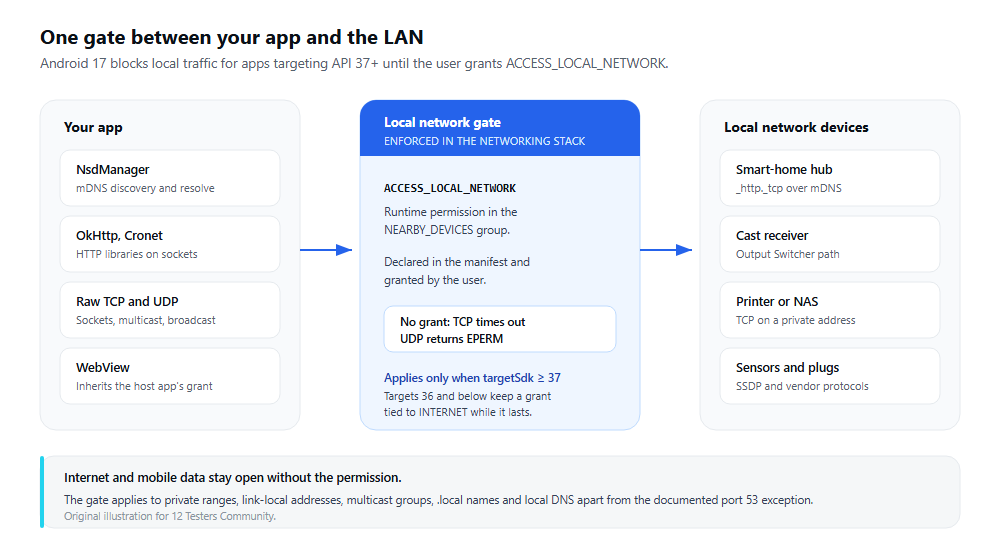
Figure 1 — One gate covers every networking surface. Original illustration for 12 Testers Community.
Android 16 versus Android 17
Android 16 shipped an opt-in preview: enable the RESTRICT_LOCAL_NETWORK compat flag with adb, reboot, and grant NEARBY_WIFI_DEVICES to restore access. Android 17 replaces that experiment with an enforced runtime permission.
| Feature | Android 16 | Android 17 |
|---|---|---|
| Target SDK | 36 | 37 or higher |
| Permission | NEARBY_WIFI_DEVICES, temporarily | ACCESS_LOCAL_NETWORK |
| Default access | Open; restrictions only by opt-in | Blocked by default for apps targeting 37+ |
| Enforcement | Developer opt-in and reboot | Mandatory; no opt-in or opt-out |
| Runtime behaviour | Socket errors while the flag is enabled | System prompt; traffic blocked until granted |
| Migration | Testing only; guidance now deprecated | Permission or picker before raising the target level |
New and updated apps targeting 37+ are blocked by default. Legacy apps targeting 36 or lower receive an implicit grant while they hold INTERNET, and lose it when they finally raise the target level.
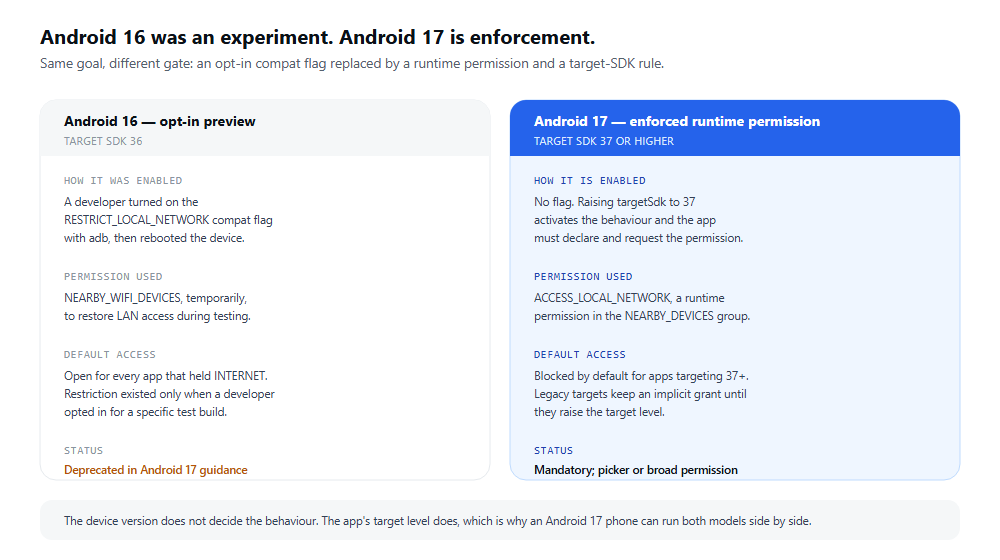
Figure 2 — A developer experiment replaced by a platform rule. Original illustration for 12 Testers Community.
Which applications are affected
Any feature that treats the LAN as a data source is in scope.
- Smart home and IoT controllers that discover bulbs, plugs, cameras or hubs over mDNS, SSDP or vendor protocols and then connect directly.
- Local multiplayer games that host or join a session on the same Wi-Fi.
- File-sharing and media-server clients that browse SMB, DLNA or local HTTP endpoints.
- Discovery and network tools that scan subnets, resolve hostnames or report online devices.
- Casting apps that locate receivers before handing playback to them.
- Local server apps that accept inbound connections from another device.
- Browsers and WebView pages that load local addresses; WebView inherits the host app's permission state.
Casting is a special case. Google says many casting scenarios depend on LAN access and will be affected, while not every casting app needs the new permission. The Output Switcher is the documented route, but it is not a blanket exemption for custom discovery stacks.
The permission architecture
Four parts, each of which must work.
Manifest. Declare the permission only when targeting API 37 or higher.
<uses-permission android:name="android.permission.ACCESS_LOCAL_NETWORK" />Status check. Check at the moment of use, because the permission can be revoked between sessions.
private fun hasLocalNetworkAccess(): Boolean =
    ContextCompat.checkSelfPermission(
        this, Manifest.permission.ACCESS_LOCAL_NETWORK
    ) == PackageManager.PERMISSION_GRANTED
Runtime request. The standard Activity Result contract works. Google also documents a counter-reset strategy: a prior denial in the NEARBY_DEVICES group no longer permanently blocks the prompt.
private val launcher = registerForActivityResult(
    ActivityResultContracts.RequestPermission()
) { granted -> if (granted) startDiscovery() else showRationale() }

fun requestLocalNetworkAccess() {
    if (hasLocalNetworkAccess()) return startDiscovery()
    launcher.launch(Manifest.permission.ACCESS_LOCAL_NETWORK)
}
Denial and revocation. Blocked TCP connections usually time out rather than fail fast, while UDP operations typically return EPERM. That asymmetry matters for timeouts and retries.
Play's User Data policy requires apps to respect a declined restricted permission and to accommodate users who do not grant it. Manual address entry, a picker, or a read-only mode are all reasonable fallbacks.
| Step | Action | If skipped |
|---|---|---|
| 1 | Explain the feature before the prompt | Users deny a request they do not understand |
| 2 | Check checkSelfPermission | Blocked sockets and misleading errors |
| 3 | Request the runtime permission | Local traffic stays blocked |
| 4 | Handle denial with a fallback | Dead-end UI; policy risk |
| 5 | Re-check after resume | Stale state after revocation |
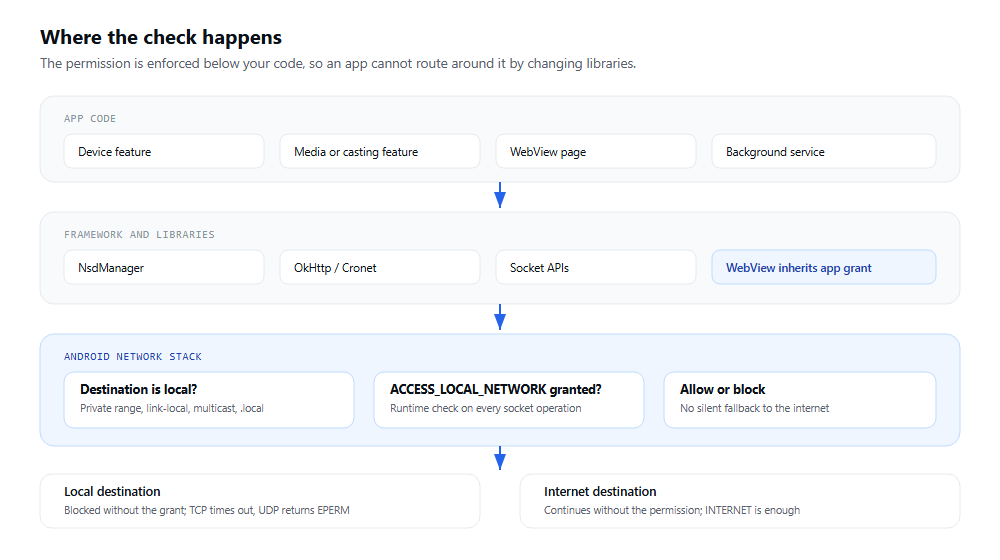
Figure 3 — The check sits below your code, so changing libraries does not avoid it. Original illustration for 12 Testers Community.
Understanding local network traffic
TCP. Both directions are gated: an outgoing connection to a printer and an inbound connection accepted by a local server. A blocked connection typically appears as a timeout, not an offline device.
UDP. Unicast, multicast and broadcast all need the permission in both directions. Discovery traffic to 255.255.255.255 or a multicast group fails with EPERM when access is denied. A multicast lock does not substitute for the grant.
mDNS and DNS-SD. Resolving .local names requires the permission, and framework discovery through NsdManager is covered too. That is why the picker exists.
SSDP. M-SEARCH datagrams go to multicast and responses come back by unicast, so broad SSDP scanning is firmly inside the restriction. There is no general SSDP picker, which makes UPnP-heavy apps realistic candidates for broad access.
Local DNS. Google documents one exception: traffic to a DNS server on the local network, on port 53, does not require the permission. Name resolution keeps working, but the hosts those names point to are still gated.
| Protocol or API | Typical use | Needs permission | Picker alternative |
|---|---|---|---|
| TCP to a private address | Device control, file transfer, local APIs | Yes, both directions | Only for picker-selected addresses |
| UDP unicast | Control, discovery replies | Yes | Picker-scoped exception |
| UDP multicast or broadcast | SSDP, custom discovery | Yes | No general picker |
| mDNS / DNS-SD | .local names, service discovery | Yes for raw sockets | NsdManager with FLAG_SHOW_PICKER |
| HTTP client on LAN | OkHttp, Cronet, Dart sockets | Yes; libraries inherit it | Only picker-selected addresses |
| WebView | Local dashboards, router pages | Inherits the host app's grant | No separate exemption |
| DNS to a local resolver, port 53 | Name resolution | No | Not applicable |
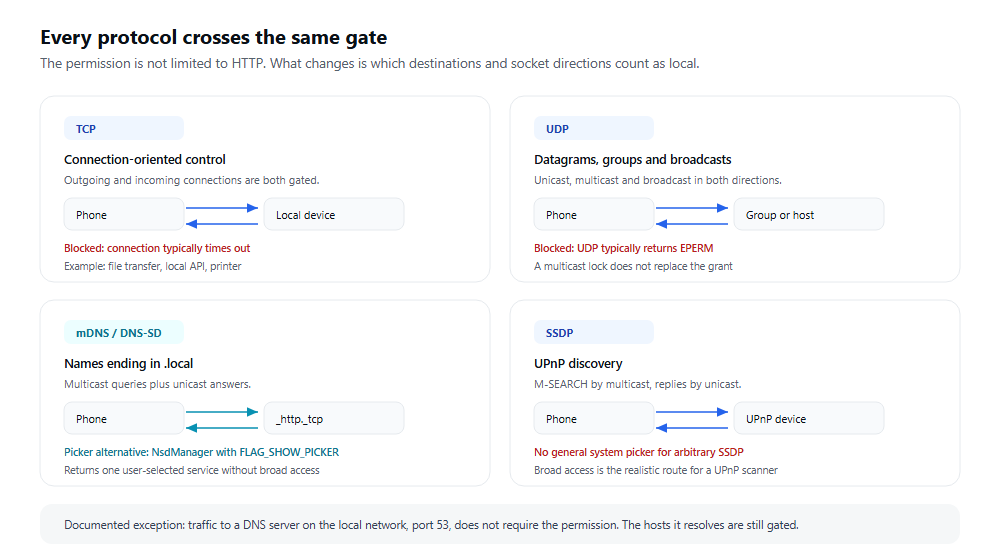
Figure 4 — The permission is protocol-agnostic; the picker is not. Original illustration for 12 Testers Community.
Privacy-preserving device pickers
A picker lets the system show the discovered services and returns only the user's choice. The app never sees the rest of the LAN. For controlling a device the user owns, the narrow grant is usually enough. For listing, monitoring or comparing devices, it is not.
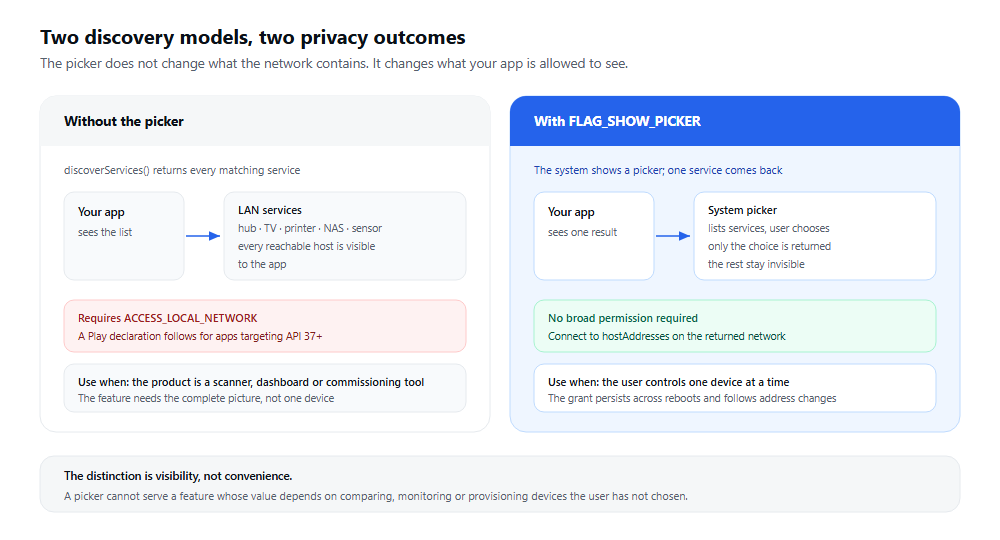
Figure 5 — Visibility, not convenience, separates the two models. Original illustration for 12 Testers Community.
NsdManager and FLAG_SHOW_PICKER
NsdManager is Android's DNS-SD client. Historically an app called discoverServices(), received every matching service and resolved addresses itself — a model that sees the whole network.
DiscoveryRequest added flags that change this. FLAG_SHOW_PICKER requires the system picker and returns only the selected service; FLAG_NO_PICKER never shows it; FLAG_USER_APPROVED_ONLY returns services the user already approved without UI. registerServiceInfoCallback() combines discovery and resolution and keeps properties up to date. It is available from SDK extension 22 (Android 14+); older devices need the legacy discovery and resolve calls.
suspend fun findService(serviceType: String): NsdServiceInfo? =
    suspendCancellableCoroutine { cont ->
        val request = DiscoveryRequest.Builder(serviceType)
            .setFlags(DiscoveryRequest.FLAG_SHOW_PICKER)
            .build()

        val callback = object : NsdManager.ServiceInfoCallback {
            override fun onServiceUpdated(serviceInfo: NsdServiceInfo) {
                if (cont.isActive) cont.resume(serviceInfo) // selected service only
            }
            override fun onServiceInfoCallbackRegistrationFailed(errorCode: Int) {
                if (cont.isActive) cont.resumeWithException(DiscoveryException(errorCode))
            }
            override fun onServiceInfoCallbackUnregistered() {
                if (cont.isActive) cont.resume(null) // picker dismissed
            }
        }

        nsdManager.registerServiceInfoCallback(request, Runnable::run, callback)
        cont.invokeOnCancellation { nsdManager.unregisterServiceInfoCallback(callback) }
    }
Connect to an address from serviceInfo.hostAddresses on serviceInfo.network; those connections need no broad permission, and the grant survives reboots. Do not store the IP address because it can change. Re-register the callback after a network change so the grant is applied to the fresh address, and use checkPermissionForService() to confirm access to a previously selected service.
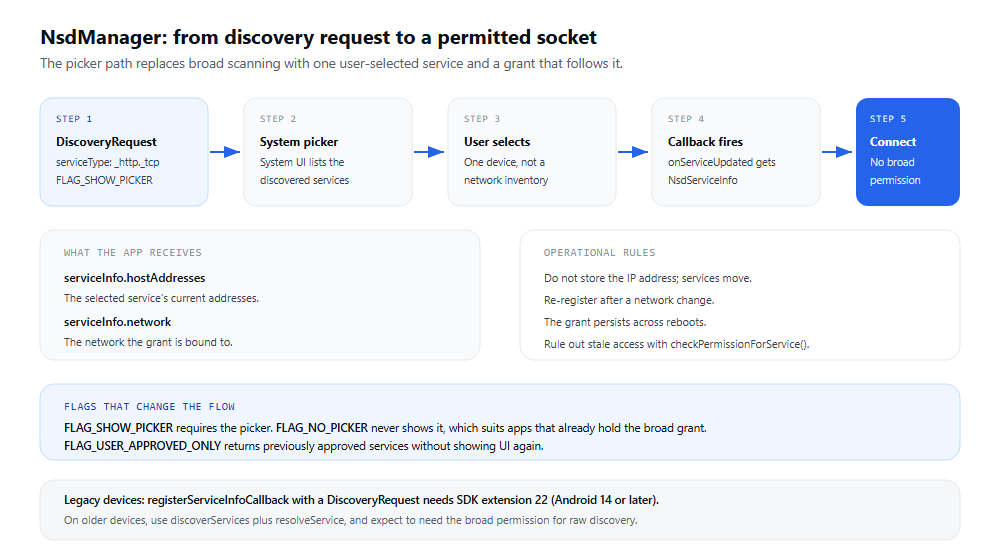
Figure 6 — The picker path returns one service and a grant that follows it. Original illustration for 12 Testers Community.
Google Cast and the Output Switcher
The Output Switcher is the Cast SDK's system-mediated route for moving playback between the phone speaker, Bluetooth devices and Cast receivers. Google's local network documentation states that apps using the Output Switcher as their in-app picker will not need local network permission.
It does not exempt custom cast stacks. An app that runs its own discovery or opens its own socket to a receiver address still needs broad access. Google says many casting scenarios will be impacted and that further APIs are coming.
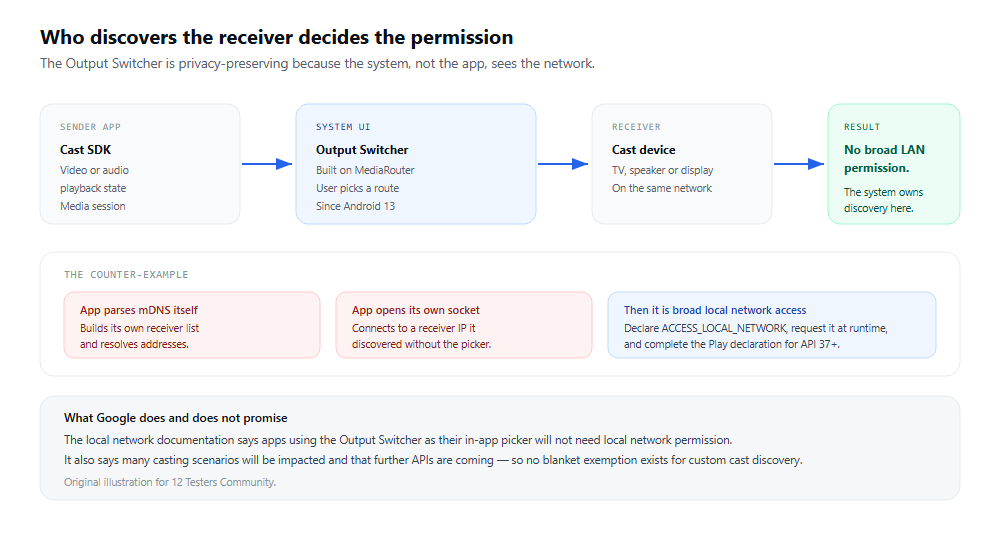
Figure 7 — Who discovers the receiver decides the permission. Original illustration for 12 Testers Community.
When broad access is justified
The policy language is narrow: the permission must be necessary for core functionality, and device pickers must be insufficient.
Justified cases include home automation that keeps persistent connections to many devices, IoT commissioning that scans for unprovisioned hardware, diagnostics tools whose product is network visibility, and peer-to-peer apps where either side may initiate. In each case, the feature depends on seeing more than one selected device.
Weak cases are equally recognisable: a novelty ping to a TV, LAN scanning for analytics, or custom casting discovery that could use the Output Switcher.
| Use case | Recommended approach | Permission consideration |
|---|---|---|
| Control one user-chosen smart device | NsdManager picker | No broad permission |
| Live dashboard of every LAN device | Broad permission | Picker cannot provide the core view |
| Provision unnamed IoT hardware | Broad permission | Unknown-device discovery is core |
| Cast video to a TV | Output Switcher | Usually no broad permission; verify discovery |
| Local multiplayer | Join code or picker first | Depends on whether listing sessions is core |
| Network scanner | Broad permission | Visibility is the product |
| File transfer to a chosen device | Picker where discoverable | Grant covers only that address |
| Accessory companion app | Bluetooth or vendor SDK first | Do not use LAN as a Bluetooth shortcut |
| Dimension | System picker | Broad permission |
|---|---|---|
| Visibility | One user-selected service | All reachable local hosts |
| User action | Chooses a device in system UI | Accepts a runtime prompt |
| Persistence | Grant persists across reboots | Grant persists until revoked |
| Play declaration | Not required | Required for API 37+ |
| Fits | Single-device control, casting | Monitoring, commissioning, scanning |
Google Play declaration guide
Android's runtime permission and Play's declaration are separate gates. The platform checks whether the user granted access; Play reviews whether the app may ask at all.
The policy takes effect on 25 August 2027. The 29 October 2026 announcement sets a 30-day notice period, but the Policy Deadlines page sets this policy's compliance date at 25 August 2027. The later date governs releases. For the declaration mechanics themselves, see the restricted-permission declaration guide.
Scope. Apps targeting API 37+ that request ACCESS_LOCAL_NETWORK. Apps targeting 36 or lower are outside the requirement because they are not permitted to request the permission for this purpose.
Core functionality. Play allows a restricted permission only when it implements a current feature promoted in the listing. Roadmap features and capabilities users would not recognise do not qualify. Local network data is also personal and sensitive user data, so the User Data policy applies.
Pickers. The declaration must explain the specific capability a picker cannot provide, not merely that broad access was easier to build.
| Element | What reviewers need |
|---|---|
| Feature | The exact flow that depends on LAN access, in plain language |
| Core link | How the feature is promoted and why the app is limited without it |
| Picker analysis | Which picker was evaluated and what it cannot do |
| Data handling | What is observed, whether it leaves the device, retention, disclosure |
| User control | Pre-prompt disclosure, graceful denial, route to revoke |
| Evidence | Build notes, screenshots or a demo path a reviewer can follow |
Write the listing first: if the store description never mentions the LAN feature, a declaration claiming it is core will not read as consistent. The privacy policy must disclose local network data and discovery identifiers where collected.
Illustrative justification — not an approval template.
Feature: Dashboard and automation for the user's own smart-home hub and accessories.
Why LAN access is core: The main screen lists every hub, sensor and plug on the home network and keeps live control connections open. Without LAN visibility the advertised product cannot function.
Why the picker is insufficient: The NsdManager picker returns one selected service. The dashboard must discover every device, show offline state and group devices by room.
Data handling: Discovery results stay on-device, are used only for the dashboard, and are not sold or shared. Users can clear saved devices.
User control: A pre-prompt explains the purpose, denial leaves manual setup available, and revocation degrades the app to manual control.
Check policy status before submitting. Play Console surfaces declaration requirements per app, and a release can be blocked while an unresolved alert exists even when the build is valid.
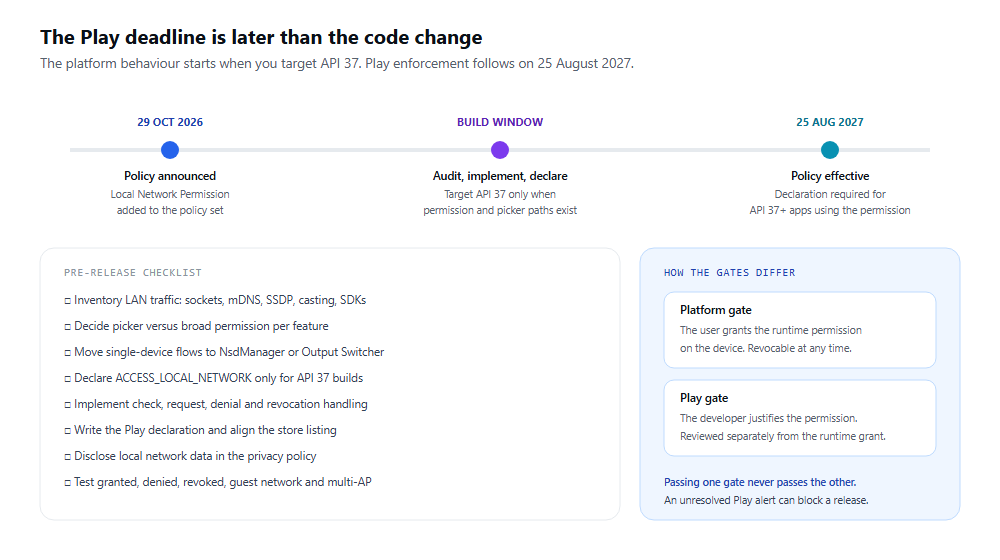
Figure 8 — The code change and the policy deadline are separate dates. Original illustration for 12 Testers Community.
Kotlin implementation tutorial
Use an Android Studio release that supports API 37 and set compileSdk = 37; the permission constant does not exist on older compile SDKs. Raise targetSdk only when the change is handled.
android {
    compileSdk = 37
    defaultConfig { targetSdk = 37; minSdk = 24 }
}
Keep the launcher as an activity property: it must be registered before the activity is created. Wrap check, request and denial in one class.
class LocalNetworkGate(private val activity: ComponentActivity) {
    private var onResult: ((Boolean) -> Unit)? = null

    private val launcher = activity.registerForActivityResult(
        ActivityResultContracts.RequestPermission()
    ) { granted -> onResult?.invoke(granted) }

    fun ensureAccess(callback: (Boolean) -> Unit) {
        if (ContextCompat.checkSelfPermission(
                activity, Manifest.permission.ACCESS_LOCAL_NETWORK
            ) == PackageManager.PERMISSION_GRANTED
        ) return callback(true)
        onResult = callback
        launcher.launch(Manifest.permission.ACCESS_LOCAL_NETWORK)
    }
}
Connect only after access is granted. Requesting permission after opening the socket is too late: the blocked attempt has already failed.
gate.ensureAccess { granted ->
    if (!granted) return@ensureAccess showMessage("Enable local network access to find devices.")
    lifecycleScope.launch {
        val host = findService("_http._tcp")?.hostAddresses?.firstOrNull()?.hostAddress
            ?: return@launch showMessage("No device selected.")
        withContext(Dispatchers.IO) {
            URL("http://$host:8080/status").openConnection().getInputStream().use { it.readBytes() }
        }
    }
}
On resume, re-check the grant. Cancel discovery callbacks in onStop and register once in onStart; a picker left registered across a configuration change produces duplicate results.
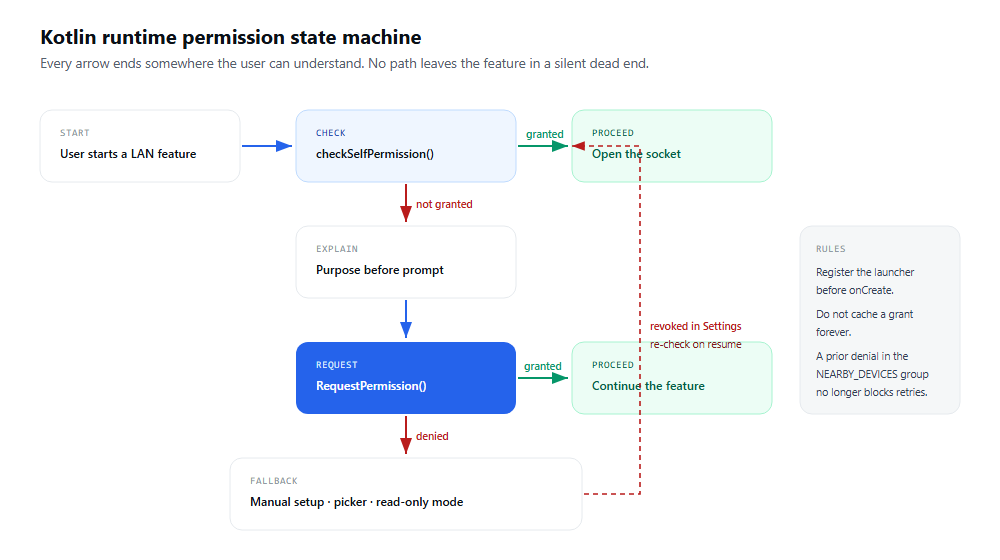
Figure 9 — Every denial path ends somewhere the user can act. Original illustration for 12 Testers Community.
Flutter integration
Flutter does not bypass the restriction: Dart's HttpClient and package:http use the same native sockets, so private-address requests are blocked without the permission. Dart cannot request Android permissions directly, so a platform channel is required. Flutter ships no official plugin for this permission.
Android side. Register a channel in MainActivity and keep the launcher there.
class MainActivity : FlutterActivity() {
    private var pending: MethodChannel.Result? = null
    private val launcher = registerForActivityResult(
        ActivityResultContracts.RequestPermission()
    ) { granted -> pending?.success(granted); pending = null }

    override fun configureFlutterEngine(flutterEngine: FlutterEngine) {
        super.configureFlutterEngine(flutterEngine)
        MethodChannel(flutterEngine.dartExecutor.binaryMessenger, "app/local_network")
            .setMethodCallHandler { call, result ->
                when (call.method) {
                    "check" -> result.success(ContextCompat.checkSelfPermission(
                        this, Manifest.permission.ACCESS_LOCAL_NETWORK
                    ) == PackageManager.PERMISSION_GRANTED)
                    "request" -> { pending = result
                        launcher.launch(Manifest.permission.ACCESS_LOCAL_NETWORK) }
                    else -> result.notImplemented()
                }
            }
    }
}
Dart side. Treat the channel as an async capability check, not onboarding.
const _channel = MethodChannel('app/local_network');

Future<bool> ensureLocalNetwork() async {
  if (await _channel.invokeMethod<bool>('check') ?? false) return true;
  try {
    return await _channel.invokeMethod<bool>('request') ?? false;
  } on PlatformException {
    return false;
  }
}
Two traps. Internet HTTP still works when the permission is denied, so the app can look healthy while LAN features silently fail; surface the state. And picker results arrive on the Android side, so bridge the selected host, port and service name to Dart as data rather than a success flag.
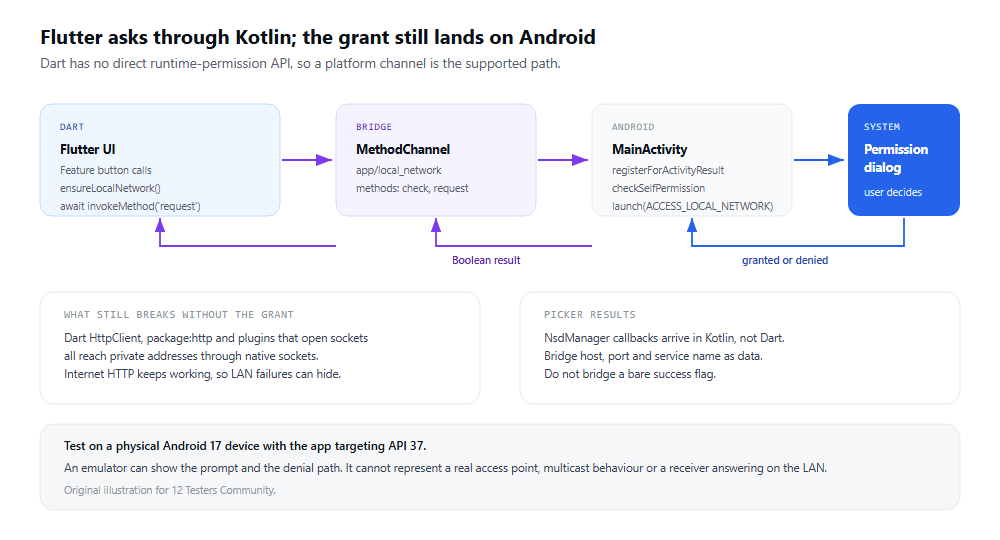
Figure 10 — Dart asks; Android grants. Original illustration for 12 Testers Community.
| Concern | Kotlin app | Flutter app |
|---|---|---|
| Permission request | Activity Result API directly | MethodChannel to the host activity |
| Manifest | AndroidManifest.xml | android/app/src/main/AndroidManifest.xml |
| Target SDK | build.gradle | Android module build.gradle.kts |
| Lan sockets | OkHttp, sockets, NsdManager | Dart sockets plus native channel |
| Denial UX | Activity or Compose screen | Dart UI driven by the channel result |
| Picker results | Callback in Kotlin | Callback bridged to Dart as data |
Security and privacy best practices
Ask late and narrowly. Request at the moment the LAN feature starts, after explaining why.
Minimise discovery data. Service names, hostnames and TXT records can be sensitive. Keep what the feature needs, and do not upload LAN inventories to analytics.
Secure the connection. Local does not mean trusted: use TLS where supported, pin vendor certificates, and never assume a device on the Wi-Fi is the one the user expects.
Avoid scanning for its own sake. Subnet sweeps and port scans are hard to justify as core functionality; if the product needs them, document the purpose.
Log responsibly. Strip IP addresses, device names and discovery payloads from release logs, and disclose local network data even when it stays on the device.
Device compatibility and testing
No emulator replaces physical network testing. The prompt can be exercised in an emulator, but discovery depends on a real access point, real multicast behaviour and real devices responding. The same logic applies to building a device matrix.
| Scenario | Expected result | Verification |
|---|---|---|
| Android 17, targets API 36 | LAN works through the implicit grant | Connect to a known local device |
| Targets API 37, permission granted | Discovery and connections succeed | Picker and direct TCP test |
| Targets API 37, permission denied | TCP times out; UDP returns EPERM | Deny, retry both protocols |
| Permission revoked while running | Next operation fails; re-check on resume | Revoke in Settings, return to app |
| Picker selection | Only the selected service is returned | Run picker against two devices |
| Picker dismissed | Unregistered callback; no crash | Dismiss the system dialog |
.local resolution | Blocked without permission; allowed with it | Resolve a known name |
| SSDP discovery | Blocked without permission; works when granted | Send M-SEARCH, watch replies |
| Wi-Fi to mobile data | LAN features stop; callbacks re-register on Wi-Fi | Toggle radios during discovery |
| Guest network or AP isolation | No devices found even with permission | Test on an isolated SSID |
| Multiple access points | Inconsistent discovery, no crash | Move between APs |
| Background and foreground | No duplicate callbacks | Background during discovery |
Include a low-end device and two manufacturers. Multicast behaviour, battery savers and vendor network stacks vary enough that one flagship result proves little. Pre-launch reports catch crashes, but they do not test your LAN.
Common errors and troubleshooting
| Symptom | Likely cause | Verified fix |
|---|---|---|
| Device never appears | Permission denied, or AP isolation | Check the grant, then test on an open network |
| Prompt never appears | Target below 37, or permission not declared | Raise the target only when intended; declare it |
| TCP hangs | Traffic blocked by the permission | Treat as a permission failure; verify the grant |
UDP fails with EPERM | Local access denied | Grant access or use the picker |
| mDNS returns nothing | Raw multicast blocked | Use the NsdManager picker |
.local fails | Local name resolution is gated | Grant access or resolve through NsdManager |
| Nsd callback silent | Unregistered early or picker dismissed | Keep it alive until a result |
| Duplicate results | Callback registered twice | Unregister in onStop |
| Picker unavailable | SDK extension too old | Fall back to legacy discovery |
| Flutter LAN fails, internet works | Native permission missing | Bridge check and request |
| Release blocked | Restricted permission without declaration | Complete the declaration |
When a failure is a real defect rather than a permission state, the bug report template keeps the network conditions with the report.
Production migration checklist
| Area | Action |
|---|---|
| Target SDK | Record the current level and schedule API 37 |
| LAN audit | Find raw sockets, mDNS, SSDP and discovery SDKs |
| Third-party libraries | Check casting, IoT and networking dependencies |
| Feature impact | List what breaks when the LAN is blocked |
| Picker fit | Move single-device flows to NsdManager or Output Switcher |
| Manifest | Add the permission only to API 37 builds |
| Runtime handling | Implement check, request, denial and revocation |
| Play declaration | Complete it and align the listing and privacy policy |
| Physical testing | Test granted, denied, revoked, guest and multi-AP cases |
| Release | Resolve policy alerts before staged rollout |
Frequently asked questions
1. What is ACCESS_LOCAL_NETWORK? A runtime permission introduced with Android 17 that gates traffic to local network devices.
2. Which version introduces it? Android 17, API level 37.
3. Does INTERNET still provide LAN access? Only for apps targeting API 36 or lower, through a temporary implicit grant.
4. Is the LAN blocked by default on Android 17? For apps targeting API 37 or higher, yes.
5. Does this affect apps targeting API 36? Not yet; the grant ends when the target level rises.
6. What is NsdManager? Android's DNS-SD client for discovering and resolving mDNS services.
7. What is FLAG_SHOW_PICKER? A DiscoveryRequest flag that shows the system picker and returns only the selected service.
8. Can Google Cast avoid the broad permission? Apps using the Output Switcher as their in-app picker are documented as not needing it; custom discovery is not covered.
9. Do Flutter apps need native Kotlin? For this permission, yes; Dart cannot call the runtime-permission API directly.
10. What happens on denial? TCP typically times out and UDP typically returns EPERM; the app must degrade gracefully.
11. What happens on revocation? The next local operation fails the same way; re-check on resume.
12. Does OkHttp need the permission for LAN requests? Yes; the restriction is below the library layer.
13. Does mDNS need it? Yes for raw multicast sockets; the NsdManager picker is the supported alternative.
14. Is SSDP affected? Yes; it uses multicast plus inbound unicast.
15. When is the Play declaration required? For apps targeting API 37+ that request the permission, from 25 August 2027.
16. Does every Wi-Fi app need the permission? No; internet-only apps and picker-based flows do not need broad LAN access.
Academic research and further reading
The permission is too new for peer-reviewed study; Android 17 shipped after the work below. None of these papers evaluates ACCESS_LOCAL_NETWORK.
- Fine, Z. and Hirschprung, R. (2026). Mapping Privacy Vulnerabilities in Local Area Network (LAN) Environments. Sensors. DOI: 10.3390/s26030763. A meta-analysis and interviews identifying 18 LAN privacy vulnerabilities, assessed with FMEA across 13 real networks; more than half were high risk.
- Liu, K. et al. (2019). Security Analysis of Mobile Device-to-Device Network Applications. IEEE Internet of Things Journal. DOI: 10.1109/jiot.2018.2877174. Examines security in apps that talk directly to nearby devices.
- Monaco, J. V. (2022). Device Fingerprinting with Peripheral Timestamps. IEEE Symposium on Security and Privacy. DOI: 10.1109/sp46214.2022.9833612. Shows that peripheral timing can fingerprint a device.
- Wang, J. and Poet, R. (2020). Permission Management and User Privacy Based On Android. ACM SIN. DOI: 10.1145/3433174.3433610. Reviews Android permissions as a privacy control.
- Stolikj, M. et al. (2016). Context based service discovery in unmanaged networks using mDNS/DNS-SD. IEEE ICCE. DOI: 10.1109/icce.2016.7430565. Explains why mDNS/DNS-SD dominates consumer device discovery.
- Gashi, E. (2018). Permission-based Privacy Analysis for Android Applications. Master of Science thesis, University for Business and Technology. DOI: 10.33107/ubt-etd.2018.2. A verified master's thesis linking permission counts to privacy risk; it predates the LAN permission.
Master's theses. One verified MS thesis on Android permission privacy is listed. No thesis specifically studying ACCESS_LOCAL_NETWORK was found, which is expected for a permission introduced with Android 17.
Official sources. Android Developers: Local network permission, Android 17 behaviour changes, NsdManager and DiscoveryRequest references, Android 17 release notes. Google Play Console Help: policy announcement of 29 October 2026, Policy Deadlines, Permissions and APIs that Access Sensitive Information. Google Cast: Output Switcher documentation.
Conclusion
Android 17 turns the local network into a permissioned resource. The scope is narrow — apps targeting API 37 or higher — but the effect is deep, because every socket, library and WebView that reaches a LAN address is covered. Teams that raise their target level without an audit will see discovery fail in ways that look like network problems.
The order is clear: audit traffic, move picker-compatible flows onto NsdManager or the Output Switcher, keep broad access only where needed, declare accurately, align the listing and privacy policy, and test denial and revocation on physical hardware.
Action plan. Inventory LAN traffic, prototype the picker for one flow, implement permission handling and denial UX, then complete the declaration and confirm the app still makes sense when the user says no.