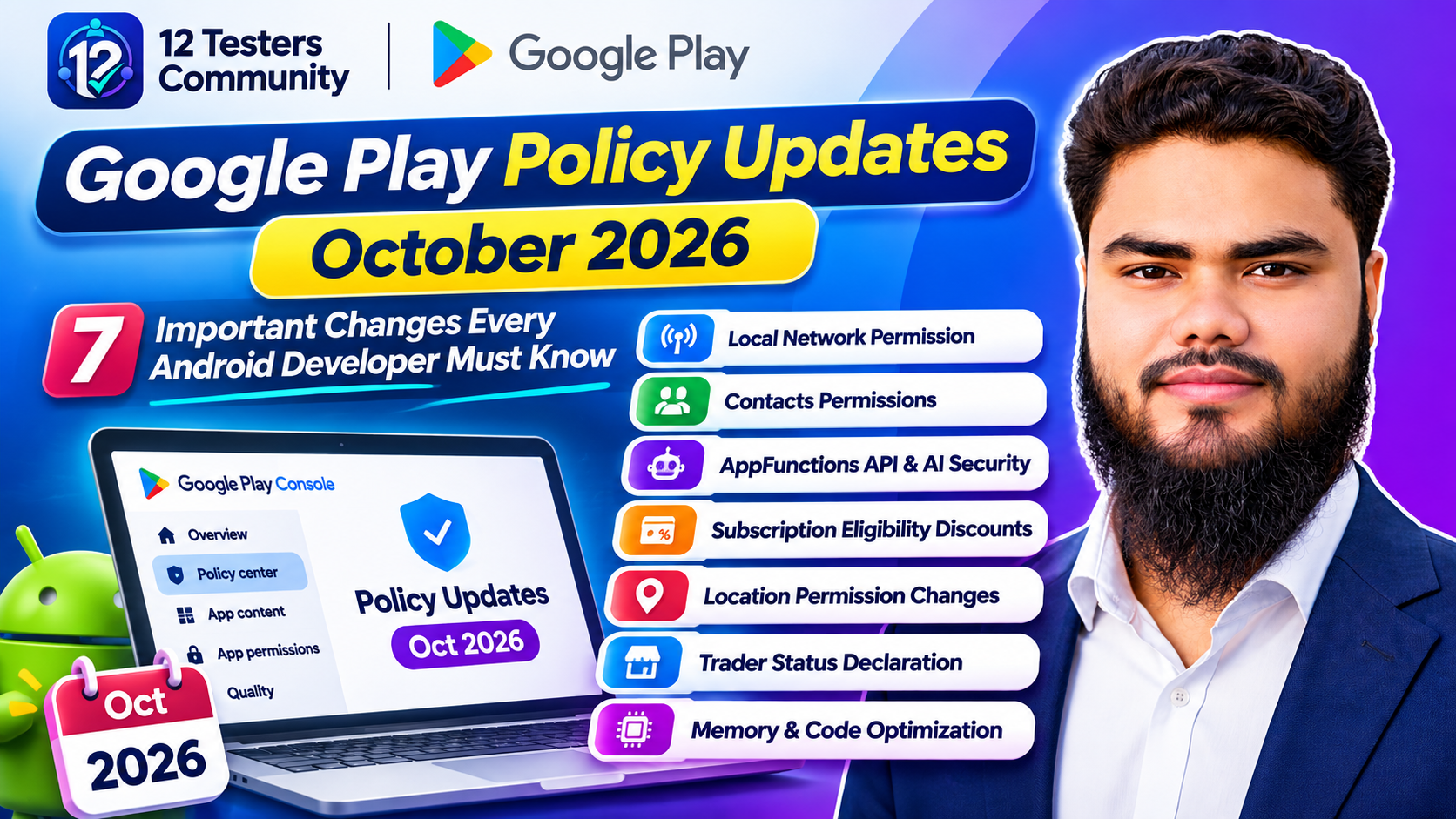
Google Play Policy Updates October 2026: 7 Important Changes Every Android Developer Must Know
Google Play announced a bundle of policy changes on 29 October 2026: three new permission rules, new limits on how apps may participate in the AI-agent ecosystem, tighter subscription disclosure, and a reminder that a consumer-law declaration is now a Play Console requirement. Two technical quality requirements announced in August 2026 also become binding in February 2027.
This is not a regulatory curio. Permission declarations decide whether a release can ship, subscription disclosure affects revenue, and memory and DEX thresholds affect visibility. This guide separates new policy from older policy merely clarified, with an accurate deadline for each action. Dates were verified against Google's official Policy Deadlines page on 11 November 2026.
Overview of the October 2026 Policy Updates
Google structures the announcement deliberately: three new policies, one updated policy, and clarifications where it states that enforcement standards have not changed. That distinction decides what needs work.
| Policy area | Main change | Developer action | Effective date |
|---|---|---|---|
| Local Network Permission | New. LAN access limited to core functionality where pickers are insufficient. | Declare ACCESS_LOCAL_NETWORK only if justified (API 37+). |
25 August 2027 |
| Manage Contacts Permission | New. MANAGE_CONTACTS limited to core functionality where intents are insufficient. |
Prefer insert/edit intents; declare if needed (API 38+). | 25 August 2027 |
| AppFunctions API | New. Must not deceive AI agents, bypass security controls or interfere with apps. | Review every agent-facing function. | 14 April 2027 |
| Eligibility-based discounts | Updated. Disclose criteria, verification and post-eligibility pricing. | Rewrite offer screens and renewal messaging. | 27 January 2027 |
| Location Permission | Clarified. Minimum scope; location button for one-time requests on API 37+. | Audit precision use; adopt the button; declare fine location. | 27 January 2027 |
| Trader status declaration | Console requirement for every active developer account. | Declare at account level, then confirm per app. | 1 February 2027 |
| Memory and DEX optimisation | Technical thresholds announced August 2026. | Meet P90 limits; reach 25% optimisation. | February 2027 |
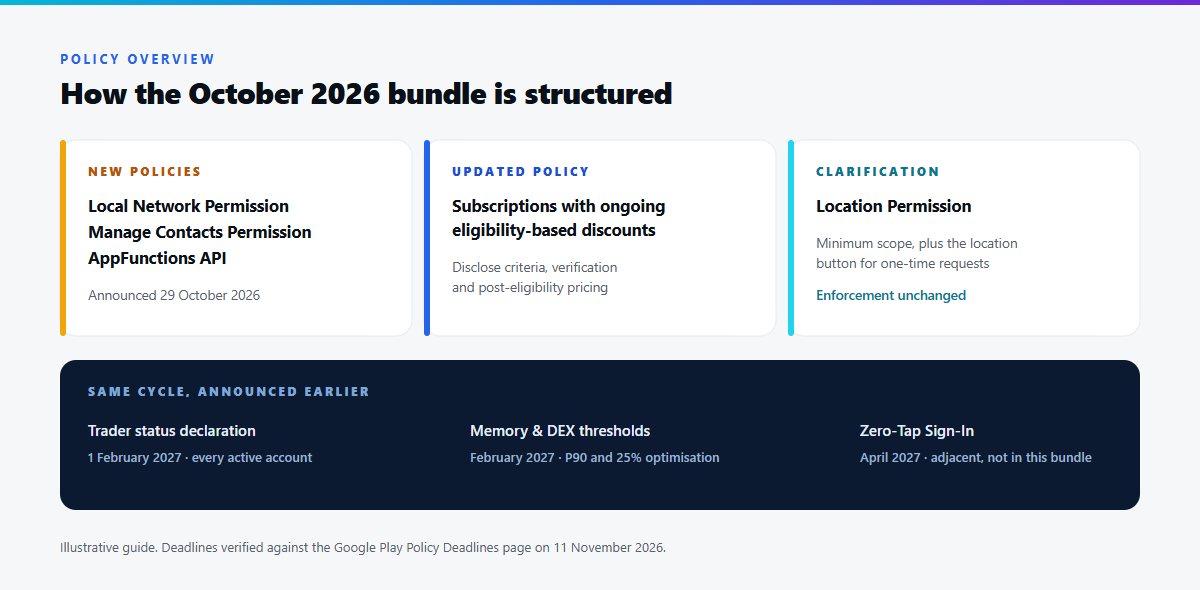
Figure 1 — The seven changes at a glance. The "30 days" notice period is standard language; the Policy Deadlines dates govern publishing.
1. Local Network Permission: A New Gate on LAN Access
An app could previously scan the local network — finding smart TVs, printers, speakers and cameras on the same Wi-Fi — with little friction. That now sits behind a restricted permission, ACCESS_LOCAL_NETWORK.
What the policy requires
Apps targeting Android 17 or higher (API level 37+) may only request it if both conditions hold: it is necessary for core functionality, and device pickers — Google names NsdManager as the example — are not sufficient. Every app that requests it must submit a Play Console declaration justifying access and explaining why the pickers fall short.
Which apps genuinely need it
A legitimate case. A companion app for a hearing-aid brand must find the aids paired to a user's home network, hold a persistent socket to stream settings, and fall back across protocols. No picker surfaces "the hearing aids in this house" for a continuous session, so the app needs the permission and can document why. By contrast, a media app that scans the whole subnet at launch is doing discovery by brute force — a narrow, user-initiated selection is sufficient.
Development considerations
Design for the restricted world now: make discovery an optional accelerator rather than the only entry point. Add manual entry, QR pairing or a system selection surface alongside scanning code, and ensure a denied permission yields a usable app rather than an empty screen. Budget for the declaration too — it argues the feature, the platform alternatives and what data leaves the device. See our walkthrough of Google Play sensitive permissions declarations.
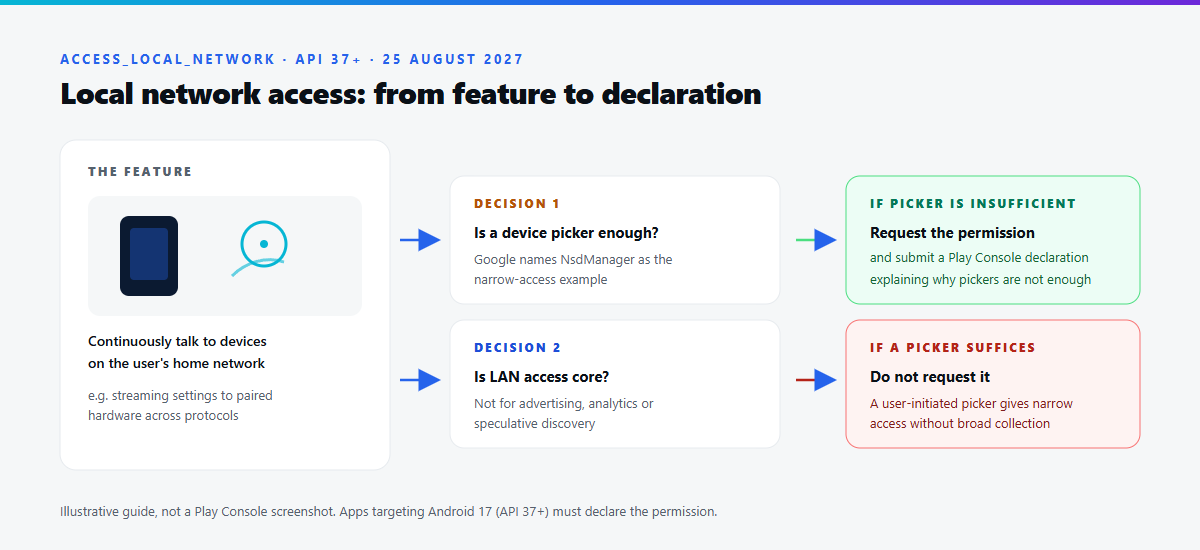
Figure 2 — Illustration: from a feature that needs the local network to the declaration that justifies it.
2. Contacts Permissions: READ_CONTACTS and MANAGE_CONTACTS
Contacts is the clearest example of a policy split across two dates, and it catches people out.
| Permission | What it grants | Required alternative | Deadline |
|---|---|---|---|
READ_CONTACTS |
Reading the user's contact list. | Android Contact Picker for a user-selected contact. | 27 January 2027 |
MANAGE_CONTACTS |
Creating and editing contacts on the device. | Narrowly scoped intents such as ACTION_INSERT and ACTION_EDIT. |
25 August 2027 |
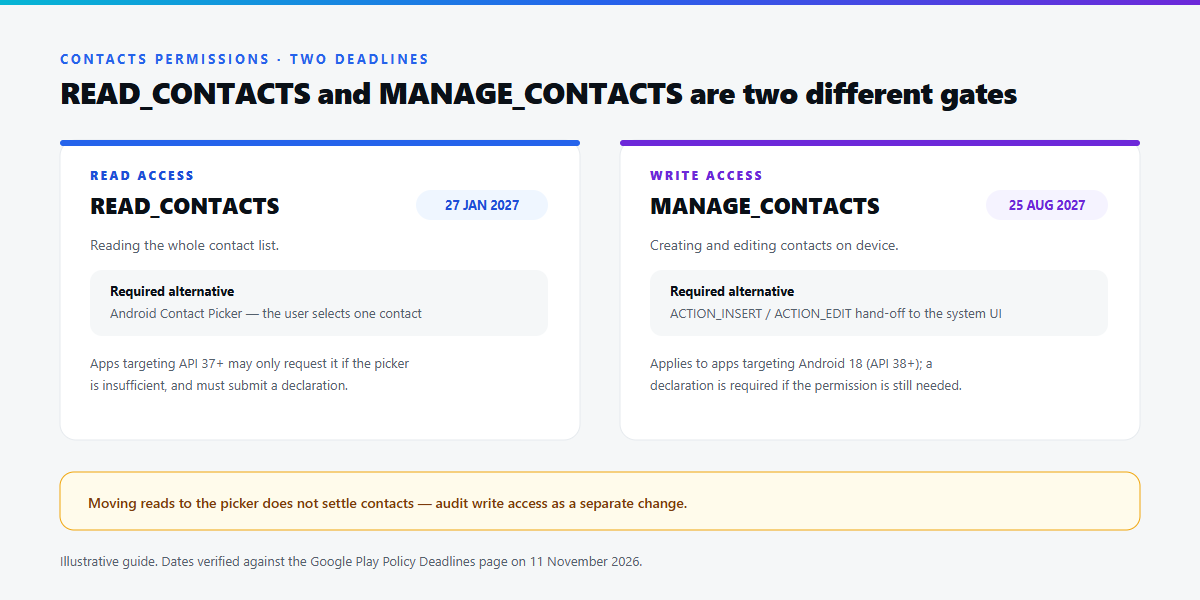
Figure 3 — Two gates, two dates. Migrating reads does not settle write access.
READ_CONTACTS: broad access now needs justification
From 27 January 2027, apps targeting Android 17 (API level 37+) may only request READ_CONTACTS if the Android Contact Picker is insufficient for core functionality, and must submit a declaration explaining the need. Apps may not disclose non-public contact data unless those contacts authorise it.
The picker is the right default for most features. Inviting a friend, splitting a bill or sharing an item needs one contact — the one the user chooses — which is exactly what the picker provides.
// Illustrative, not production-ready.
// The Contact Picker returns only the contact the user selects.
private val pickContact = registerForActivityResult(
    ActivityResultContracts.PickContact()
) { contactUri: Uri? ->
    if (contactUri != null) {
        contentResolver.query(contactUri, null, null, null, null)?.use { cursor ->
            // read the display name / number you actually need
        }
    }
}
MANAGE_CONTACTS: write access must be provably necessary
Apps may only request MANAGE_CONTACTS if ACTION_INSERT and ACTION_EDIT are insufficient for core functionality, and any app that still needs it must submit a declaration covering editing, writing and management needs plus why the alternatives fail. Because it applies to apps targeting Android 18 (API level 38+), it lands after the read restriction.
An intent-based write is a hand-off: the system contacts UI opens pre-filled, the user confirms, and your app never holds write access. For a CRM syncing hundreds of records that hand-off is insufficient; for an app saving one supplier number it is not.
3. AppFunctions API and AI Agent Security
The AppFunctions API lets an app expose discrete capabilities so AI agents can invoke them as tools rather than guessing at UI. An app publishes a function with a name, typed parameters and an explicit contract about what it changes; an agent composes those functions to answer a request, and the app keeps the output its own.
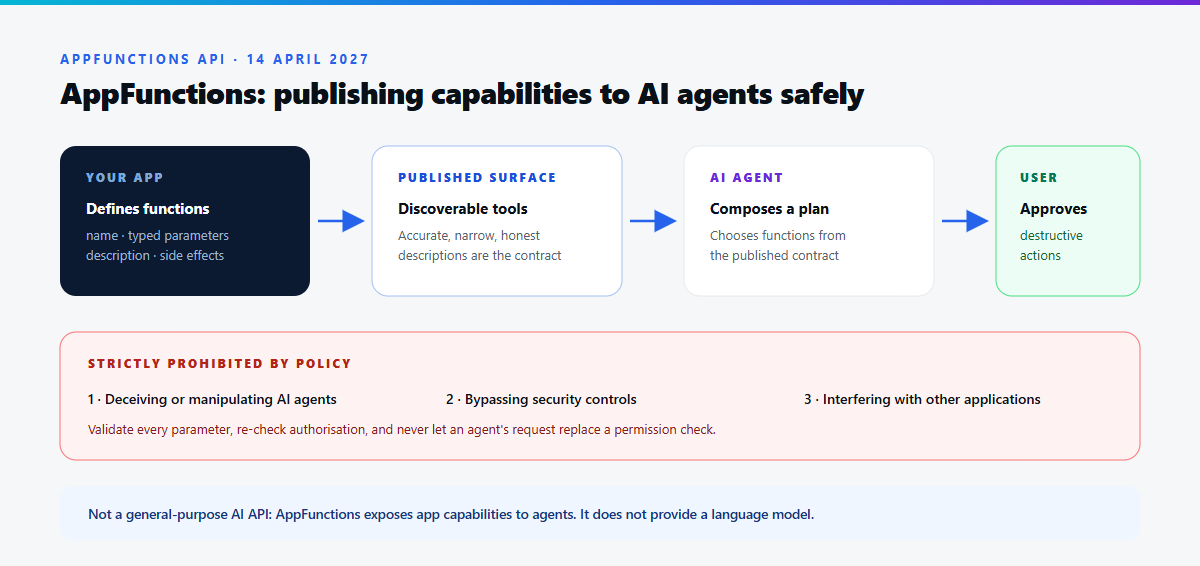
Figure 4 — Illustration: how an AppFunction is published, discovered and invoked, and where the security boundaries sit.
What the policy prohibits
Developers building AppFunctions must comply with all existing Google Play policies, and AppFunctions are strictly prohibited from deceiving or manipulating AI agents, bypassing security controls, or interfering with other applications.
Each prohibition maps onto a foreseeable failure. Misleading description text is the classic: if a function described as "check order status" also cancels the order, an agent will eventually cancel someone's order while trying to help. Bypassing controls covers functions that quietly widen their own privileges. Interference covers writing into another app's data.
Designing trustworthy integrations
Describe functions accurately and narrowly, and treat the description as the contract rather than marketing copy. Keep destructive actions behind confirmation the user provides, not the agent. Validate parameters, check authorisation, and never let an agent's assertion replace a permission check.
Terminology matters. AppFunctions is not a general-purpose AI API: it provides no model and is not a way to call an LLM from your app, but a mechanism for exposing app capabilities to agents safely. The policy takes effect on 14 April 2027 and formalises rules that already apply in spirit.
4. Subscription Discounts Based on Ongoing Eligibility
The one genuinely updated policy concerns subscriptions that stay discounted while the subscriber keeps meeting a condition. Student plans are the canonical example; senior and organisational plans follow the same logic.
From 27 January 2027, ongoing-eligibility subscriptions must clearly disclose the offer terms: how eligibility is determined and verified, the non-discounted price or alternative plan the user moves to, and any change in benefits on that alternative. The policy also requires clear and valid eligibility criteria — a "student discount" granted to anyone who ticks a box is not valid.
| Requirement | What developers should disclose |
|---|---|
| Eligibility criteria | Exact conditions: enrolment status, institution type, verification provider, territory limits. |
| Verification process | How eligibility is checked, how often, and what the user must provide. |
| Post-eligibility price | The price the user moves to — a specific figure, not "standard pricing". |
| Benefit changes | Any difference in features, limits or entitlements on the alternative plan. |
| Timing | When the change happens and how the user is told before the first full-price charge. |
| Exit options | How the user can cancel or downgrade instead. |
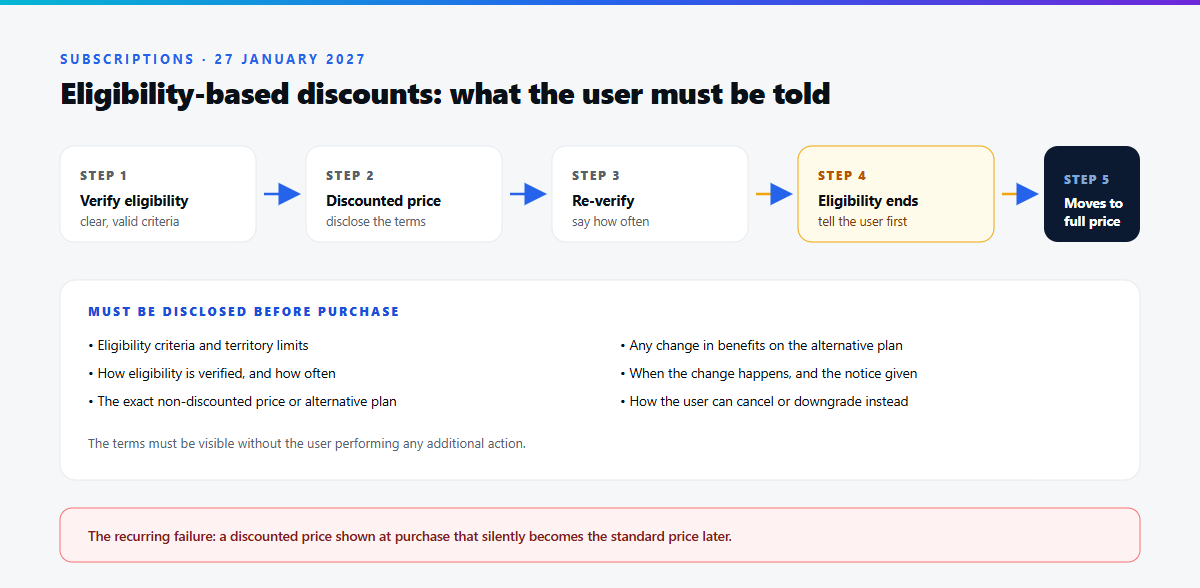
Figure 5 — Illustration: an eligibility-based discount, from verification to the post-eligibility price.
The classic failure is a plan showing a discounted price at purchase that silently becomes the standard price later, with the explanation buried in a terms page. Users experience that as a price rise, and the policy now treats the omission as a misleading offer.
5. Location Permission Changes
Google is explicit that this is a clarification, not a new announcement: it was announced in April 2026 and becomes mandatory on 27 January 2027. The October bundle added detail and made minimum-scope expectations harder to misread.
Apps must use the minimum location scope necessary for core functionality. For apps targeting Android 17 (API level 37+) that includes the Android location button for one-time or infrequent requests, with the onlyForLocationButton manifest flag declared. Apps using ACCESS_FINE_LOCATION must complete a Play Console declaration justifying why coarse location or the button is insufficient.
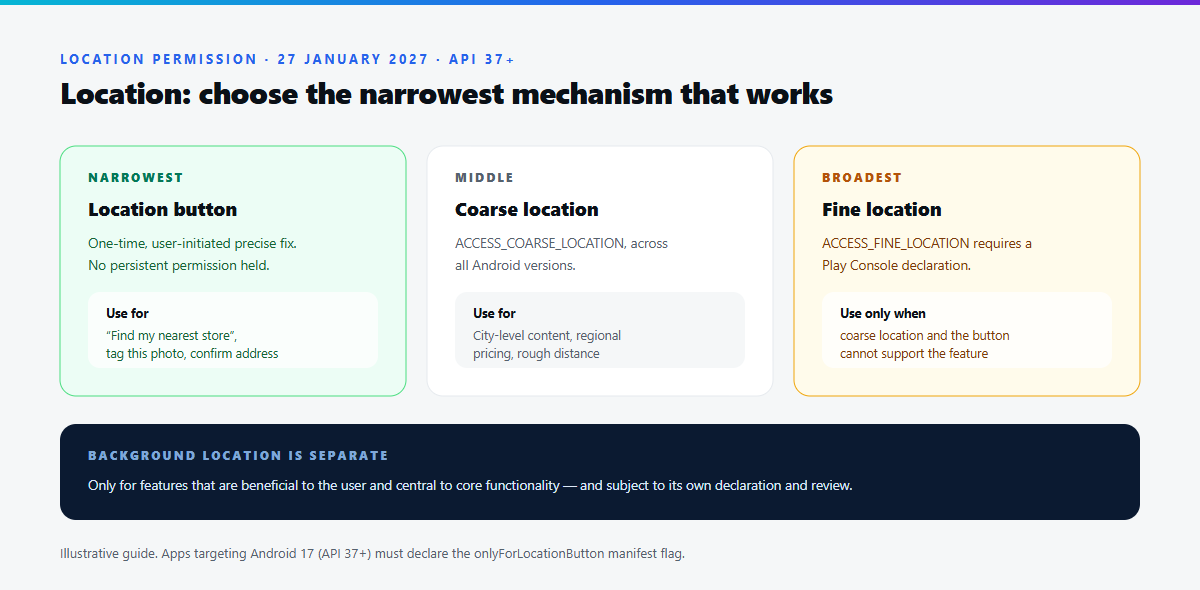
Figure 6 — Illustration: choosing between the location button, coarse and fine location.
A pharmacy locator opens, shows the nearest branch, and the user taps "find my nearest store" once. That is a single, user-initiated request: on API 37+ the location button is correct, and the app should not hold a persistent precise-location permission for it. A tracker recording a route over forty minutes is not a one-time request, and persistent foreground location is defensible with a declaration.
Verify the exact manifest syntax for onlyForLocationButton against the current location button guide; the policy names the flag, but the platform documentation governs its declaration. And never request location solely for analytics or advertising.
6. Google Play Trader Status Declaration
Under Google Play's global developer policies, all active developer accounts must declare whether they are a trader or non-trader under EEA and UK law by 1 February 2027, regardless of where apps are targeted or distributed.
What the two statuses mean
A trader is any natural or legal person acting for purposes relating to their trade, business, craft or profession; acting outside those purposes makes you unlikely to be a trader. Google cites European Commission guidance and lists non-exhaustive criteria: profit-seeking motive (paid apps, ad sponsorship), transaction volume, whether publishing is run as a business, and legal status such as a D-U-N-S number.
If you do not distribute in the EEA or UK, you can declare as a non-trader. Declaring non-trader while distributing there tells consumers that consumer protection rights do not apply to contracts with you. Falsely claiming non-trader status is prohibited under the EU Unfair Commercial Practices Directive and the UK DMCCA, and may result in global removal.
This article is not legal advice. Google cannot determine your status, and neither can a blog post. If your circumstances are unclear, take professional advice.
How to complete it
The account-level declaration is at Manage account → Account details → About you. Then confirm per app under Monitor and improve → Policy and programs → App content. As a trader you self-certify that your products comply with applicable laws, provide a terms-of-service link per app, and — on a personal developer account — supply a public contact phone number, with your address also shown.
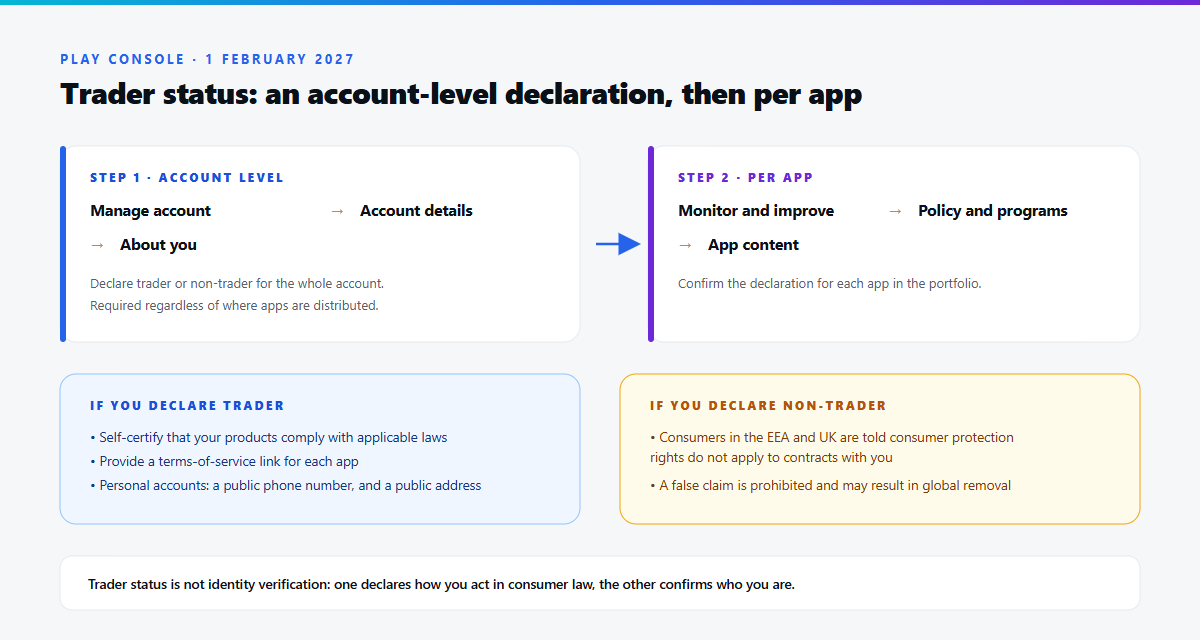
Figure 7 — Illustration: the two-step trader status declaration in Play Console.
Trader status is not identity verification
These are separate obligations and are commonly conflated. Identity verification confirms who you are and gates your ability to distribute. Trader status declares how you are acting in consumer law and determines what consumer information is displayed in the EEA and UK. Completing one does not satisfy the other. Google describes the declaration as part of its move to an online marketplace model in the EEA and UK from 1 March 2027.
7. Memory Usage and DEX Code Optimisation
This has the largest engineering footprint and is the most often misreported. Precisely: the requirements were announced on 26 August 2026, Google restated the February 2027 deadline in October, and they are not enforced as of November 2026.
Anonymous RSS + Swap
Memory usage becomes a core vital, measured as Anonymous RSS plus swap: memory your app allocates directly — Java/Kotlin heap, native allocations, anonymous mappings — that cannot be paged out without swap. Play evaluates the last 28 days from opted-in devices at the 90th percentile, against thresholds that depend on app state and device RAM tier. Only mobile and tablet form factors are covered.
| Physical RAM tier | Foreground | User-perceived services | Background |
|---|---|---|---|
| 0–4 GB | — | — | — |
| 4 GB | 2 GB | 1 GB | 1 GB |
| 6 GB | 2.25 GB | 1.25 GB | 1.25 GB |
| 8 GB | 2.25 GB | 1.5 GB | 1.5 GB |
| 12 GB | 3.25 GB | 1.75 GB | 1.75 GB |
| 16 GB | 4.25 GB | 2 GB | 2 GB |
Games have higher thresholds; read your app's own numbers in Play Console.
Bitmap memory usage
Bitmaps are the second new core vital: they should not be held for long periods in states where they cannot be rendered. Google publishes thresholds for user-perceived services, background and cached states — roughly 200 MB, 200 MB and 400 MB — deliberately above zero, because sampling can land shortly after a state change while your app responds to onTrimMemory.
DEX code optimisation
From February 2027, uploads must reach a minimum of 25% optimisation, obfuscation and shrinking, enforced only where DEX size is non-negligible: apps above 10 MB of DEX code and games above 50 MB. DEX size and per-bundle percentages appear in the app bundle explorer.
// app/build.gradle.kts — illustrative configuration. Check your own bundle's
// reported optimisation percentages rather than assuming this is sufficient.
android {
    buildTypes {
        release {
            isMinifyEnabled = true        // shrinking + obfuscation via R8
            isShrinkResources = true
            proguardFiles(
                getDefaultProguardFile("proguard-android-optimize.txt"),
                "proguard-rules.pro"
            )
        }
    }
}
For Flutter the same levers apply, because the Android build goes through R8: build with flutter build appbundle --obfuscate --split-debug-info=build/symbols, then check the DEX optimisation insights for the uploaded bundle.
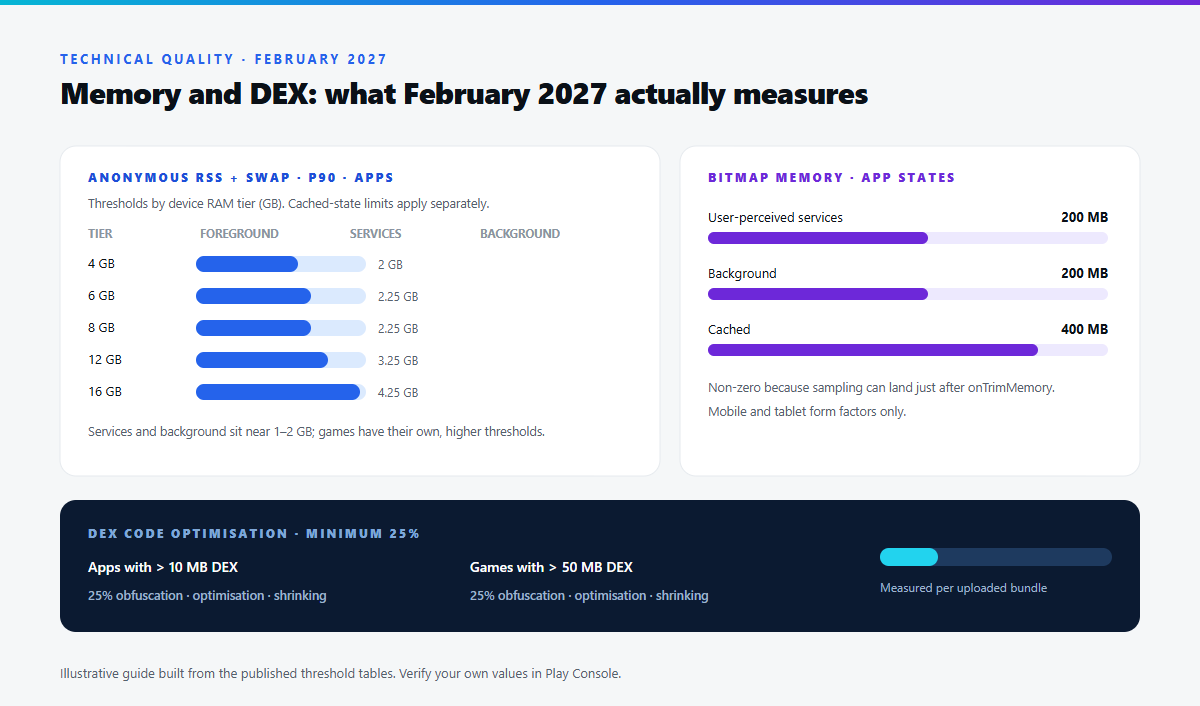
Figure 8 — Illustration: memory thresholds by app state and RAM tier, and the 25% DEX requirement.
Practical memory work
Most wins here are ordinary discipline: scope work to lifecycles, keep no static references to activities, remove listeners you registered, release image references when a screen is destroyed, and honour onTrimMemory by dropping caches. Profile allocations in Memory Profiler or DevTools for Flutter, comparing before and after a navigation loop, then watch the P90 lines in Vitals.
Two caveats. Bitmap.recycle() is no longer a general-purpose answer on modern Android, where bitmaps often live in native memory; dropping your reference is the dependable action. And none of this is a February surprise for teams already tracking Vitals. For a hands-on workflow see testing memory usage, bitmap efficiency and DEX performance.
Complete Google Play Policy Deadline Table
Verified against the Policy Deadlines page on 11 November 2026.
| Requirement | Effective date | Developer action |
|---|---|---|
| Contacts Permissions — broad access must use the Contact Picker | 27 January 2027 | Migrate reads; declare if still needed. |
| Location Permissions — minimum scope and location button | 27 January 2027 | Adopt the button; declare fine location. |
| Eligibility-based subscription disclosure | 27 January 2027 | Disclose criteria and post-eligibility price. |
| Trader status declaration | 1 February 2027 | Declare at account level, then per app. |
| Memory and DEX optimisation thresholds | February 2027 | Meet P90 limits; reach 25% optimisation. |
| AppFunctions API policy | 14 April 2027 | Review agent-facing functions. |
| Local Network Permission | 25 August 2027 | Justify ACCESS_LOCAL_NETWORK; declare on API 37+. |
| Manage Contacts Permission | 25 August 2027 | Prefer insert/edit intents; declare on API 38+. |
Two adjacent requirements fall outside this bundle and are easy to miss: Zero-Tap Sign-In Restoration from April 2027, and the removal of phone-call verification via READ_CALL_LOG on 27 January 2027. See Zero-Tap Sign-In and the Restore Credentials API.
Practical Developer Action Checklist
Not every app is affected by every requirement. A single-purpose utility with no location, no contacts and no subscriptions might only need the trader declaration and a Vitals check.
| # | Action | Why |
|---|---|---|
| 1 | Audit AndroidManifest.xml for sensitive permissions | You cannot justify what you have not inventoried. |
| 2 | Remove permissions you no longer use | Unused permission means unexplained collection. |
| 3 | Replace contacts reads with the Contact Picker | Removes the January 2027 declaration. |
| 4 | Replace contacts writes with insert/edit intents | Avoids the August 2027 declaration. |
| 5 | Adopt the location button for one-time requests | Mandatory from January 2027 on API 37+. |
| 6 | Check every location request for minimum scope | Coarse or button access is often enough. |
| 7 | Rewrite eligibility-based subscription disclosure | Pricing changes must be visible before purchase. |
| 8 | Review AppFunctions security boundaries | Validate parameters; confirm destructive actions. |
| 9 | Complete the trader status declaration | Applies to every active account. |
| 10 | Watch Android Vitals memory metrics weekly | P90 trends beat a February cliff. |
| 11 | Enable R8 shrinking, optimisation and obfuscation | Measured on your uploaded bundle. |
| 12 | Track upcoming Play Console declarations | Declarations gate releases. |
If you plan a release in early 2027, put the January items on the critical path now: declarations are reviewed by humans, and a rejected one blocks an upload. Our guides to Google Play closed testing and target API level requirements help you sequence platform changes.
Frequently Asked Questions
What changed in Google Play policies in October 2026?
Three new policies — Local Network Permission, Manage Contacts Permission and the AppFunctions API — plus one updated policy on subscription discounts based on ongoing eligibility. Google also clarified location, all-files access, accessibility, deceptive behaviour, families ads SDK, cryptocurrency and SMS/call log policy, and reminded developers about trader status and the February 2027 optimisation deadline.
When does the Local Network Permission policy take effect?
25 August 2027. Apps targeting Android 17 (API level 37) or higher must submit a Play Console declaration to use ACCESS_LOCAL_NETWORK, and may only request it where device pickers such as NsdManager are insufficient for core functionality.
Do all apps need READ_CONTACTS?
No. From 27 January 2027, apps targeting API 37+ may only request it if the Android Contact Picker is insufficient for core functionality, and must submit a declaration. If a user picks one contact, the picker is correct and no permission is needed.
What is the Android Contact Picker?
A system-provided, privacy-preserving way for a user to select a single contact and hand it to your app, without granting access to the whole address book. It replaces broad read access for the common "pick someone to share with" case.
What is the AppFunctions API?
A way for an app to expose discrete, described capabilities so AI agents can invoke them as tools. It is not a general-purpose AI API and provides no language model. The October policy prohibits AppFunctions from deceiving or manipulating AI agents, bypassing security controls or interfering with other applications, from 14 April 2027.
Does the new subscription policy affect all subscriptions?
No. The October change covers subscriptions with ongoing eligibility-based discounts, such as student plans, requiring disclosure of criteria, verification, and post-eligibility pricing and benefit changes from 27 January 2027. The general rules — transparent price, billing frequency and renewal, sustained recurring value — still apply to every subscription.
When must developers declare trader status?
By 1 February 2027 for existing accounts, worldwide, regardless of where apps are distributed. Declare at Manage account → Account details → About you, then confirm per app under Monitor and improve → Policy and programs → App content.
Is trader status the same as developer identity verification?
No. Identity verification establishes who you are and gates your ability to distribute. Trader status is a consumer-law declaration of whether you are acting for business purposes and determines what consumer information is displayed in the EEA and UK. Completing one does not complete the other.
How can developers check memory usage?
Use the Memory section of Android Vitals in Play Console, which reports Anonymous RSS plus swap and bitmap usage across percentiles and RAM buckets, plus the Play Developer Reporting API. The 90th percentile over the last 28 days is compared against the thresholds from February 2027.
Will failing the technical quality requirements affect Play Store visibility?
Google states that apps and games not meeting the memory and DEX thresholds may see reduced app visibility and publishing capabilities. Enforcement begins in February 2027.
Conclusion
The October 2026 bundle carries one message: Google Play is shifting the burden of proof to the publisher. Broad contact access, unconditional local network scanning and persistent precise location are no longer permitted by default — each needs a justification a reviewer can accept. AppFunctions extends that logic to capabilities callable by software agents.
The timeline is generous but not forgiving: two requirements in January 2027, the trader declaration days later, memory and DEX thresholds in February, AppFunctions in April, and the two newest permissions in August. Work starting in December will be comfortable; work starting in January will be a scramble.
Start where delay costs most: inventory your permissions, migrate contacts and location to the narrower mechanisms, rewrite eligibility-based pricing copy, complete the trader declaration, and watch your memory percentiles now.
Sources. Google Play policy announcement (29 October 2026); Policy Deadlines; Permissions and APIs that Access Sensitive Information preview; Subscriptions; Trader status declaration; Play Console technical quality requirements; Android Developers Blog. Verified 11 November 2026 — confirm current wording before you ship.