
Last reviewed against the official Google Play Console documentation. Where this article and your own Play Console disagree, your Console is authoritative — it reflects the requirements applied to your account and your app.
Your first app is through the closed test. Production access is approved. Now you are starting the second one, and a practical question appears that the documentation never quite answers in one sentence: do you have to do all of that again?
The confusion is understandable, because the rule is written at the level of your account and then applied to an app. Google's testing-requirements page is addressed to "personal developer accounts created after November 13, 2023" — an account-level scope. But what it asks for is a closed test for "their app", and the application is submitted from that app's Dashboard. Two different levels in the same paragraph.
That gap is where most of the wrong assumptions live. This guide works through what is genuinely documented, what Google does not publish an answer for, and how to read the requirement conservatively when the documentation leaves you to decide.
Quick answer: per app, or per account?
The short version
- Whether the rule applies at all is an account question. It is documented for personal developer accounts created after November 13, 2023.
- The gate itself is applied to an app. You apply for production access from that app's Dashboard, and approval gives you access to that app's Production page.
- Google publishes no rule that carries one app's testing record over to another app. Treat a second app as needing its own closed test.
- Testers can be the same people, and Google explicitly documents reusing a tester list across apps.
- But the opt-in and the 14 days do not transfer, because each tester opts in through a specific app's link.
- Ordering is your choice. You can run closed tests for more than one app at the same time.
- An update to a published app is not a new gate. It is ordinary release work.
One qualification belongs at the top, because it prevents the most common misreading. "Treat a second app as needing its own test" is the conservative practical reading, not a quoted Google rule. Google does not publish a sentence that says either "each app must run its own closed test" or "completing one app satisfies the requirement for the next". This article follows the brief that whenever the documentation is silent, the answer should say so and lean the cautious way. That is what the rest of this guide does.
Who has to run a closed test at all?
Start with eligibility, because for a large number of developers the whole question is moot — and for another group it is genuinely different from what the folklore suggests.
Google's testing-requirements article describes who it is for: developers with personal Google Play Console accounts created after November 13, 2023. It then states the requirement itself, and the two pieces belong together:
Developers with personal accounts created after November 13, 2023, must run a closed test for their app with a minimum of 12 testers who have been opted in continuously for at least 14 days.
That date is the one calendar date worth carrying in an otherwise evergreen guide, because it is the boundary of the rule itself rather than a sign of recency. If your personal account predates it, or your account is an organisation account, the specific 12-testers and 14-consecutive-day gate is not what the documentation describes for you — a question with its own treatment in whether the 12-testers requirement applies to organization accounts.
Two more documented points matter for the multiple-app question. Some Play Console features stay disabled until the requirement is met: Google states that Production and Pre-registration "remain disabled until developers meet these testing requirements", and Production is accessed inside a specific app. And closed testing requires completed app setup, which the testing-tracks documentation lists as the access requirement for that track, while internal testing has no requirement at all.
Three mechanics of the 14 days are worth knowing before you plan, because they are what quietly breaks a second run. A short opt-in does not count — testers who opt in, test for fewer than 14 days and then opt out do not count toward the requirement. The days must be consecutive — if someone opts out and opts back in, the 14 days must run consecutively to count toward the minimum of 12 continuous opted-in testers. And the requirement is checked when you apply, so at that moment at least 12 testers must be opted in and have been so for the preceding 14 days.
Does your second app need its own closed test?
Here is the honest answer, split into what Google says and what it does not.
What Google says. The requirement is phrased around an app gaining access, not around a developer completing a rite of passage. The article's opening sentence is that accounts "must test their apps before those apps are eligible for distribution on Google Play" — plural apps, each needing to be eligible. The application is submitted from the Dashboard of the app in question. And the outcome is described per app: when the application is approved, "you can access your app's Production page and distribute your app to users on Google Play".
What Google does not say. There is no published sentence stating that completing a closed test for one app satisfies the requirement for a second app on the same account. There is also none stating that it does not. The documentation simply does not address the carry-over scenario.
Why the conservative reading follows anyway. The mechanics decide it. A closed test is configured inside an app — you set it up by selecting an app and opening that app's closed testing page. The tester opt-in is per app: Google's instructions say to share the opt-in link and note that "each tester needs to opt in using the link". And the 14 days are counted against testers being opted in to your closed test continuously. None of those three has an account-level equivalent.
Put together, the position is that the opt-in for app A has no effect on app B. Nobody becomes opted in to app B by participating in app A's test. And if the 14 days are counted from continuous opt-in to a specific app's closed test, app B needs a continuous run of its own.
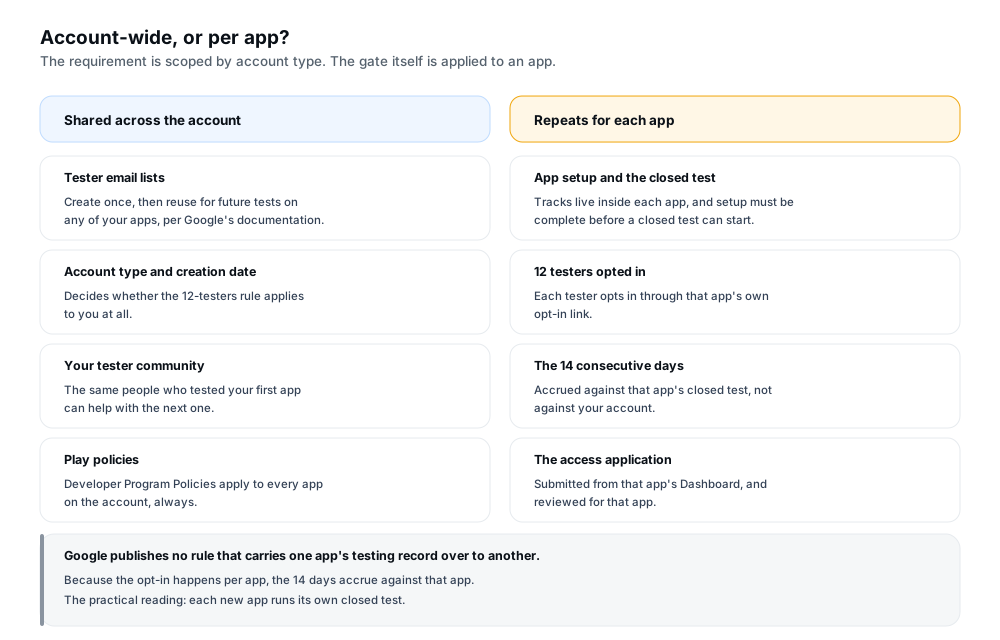
Figure 1 — The requirement is scoped by account. The gate is applied to an app.
So the working assumption is straightforward: a new app gets its own closed test, its own 12 opted-in testers and its own 14 continuous days. For certainty about your specific account and app rather than a well-reasoned general answer, read your own Play Console — the Dashboard for that app says whether you can apply and what remains outstanding.
One warning, because this is where optimistic readers go wrong. "The requirement is evaluated per app" is not the same as "Google has confirmed your second app is exempt", and not the same as "Google has confirmed your second app is covered". It means the decision is made per app, so the evidence you need is the evidence for that app.
What does not carry over from your first app
It is easier to plan against a list of things that stop at the app boundary than to hold one abstract principle in mind. Four items do not transfer.
| Item | Why it stops at the app boundary |
|---|---|
| The 14-day opt-in run | The days are counted from continuous opt-in to a specific app's closed test. Time accrued against your first app's test is not documented as counting towards a different app. |
| The opt-in itself | Testers opt in through an app's own opt-in link. Being opted in to one app's test does not make anyone opted in to another's. |
| The production access approval | The documented outcome of approval is access to that app's Production page and Open testing, plus distribution of that app. No account-wide switch is described. |
| The application itself | It is submitted from a specific app's Dashboard and answers questions about that app's closed test, that app's value proposition and that app's production readiness. |
One thing people expect to see in that table is deliberately absent. Your production access for an app does not lapse when you keep updating it. The four items above are about a new app's eligibility; they say nothing about an app that already has access, which is the subject of the next two sections.
Can the same people test your second app?
This is the good news, and it is also the clearest case in the documentation of something that legitimately carries over. Google states that you can use the same tester list for future tests on any of your apps — the wording appears in both the internal testing and closed testing instructions, and it means the list is a reusable asset.
So recruiting does not have to start from zero. The list you built for the first app can be assigned to the second app's closed test, and the same people can test both.
What does not happen automatically is the opt-in. The distinction is worth stating precisely, because "can I reuse my testers" has two different answers depending on which part of the process is meant.
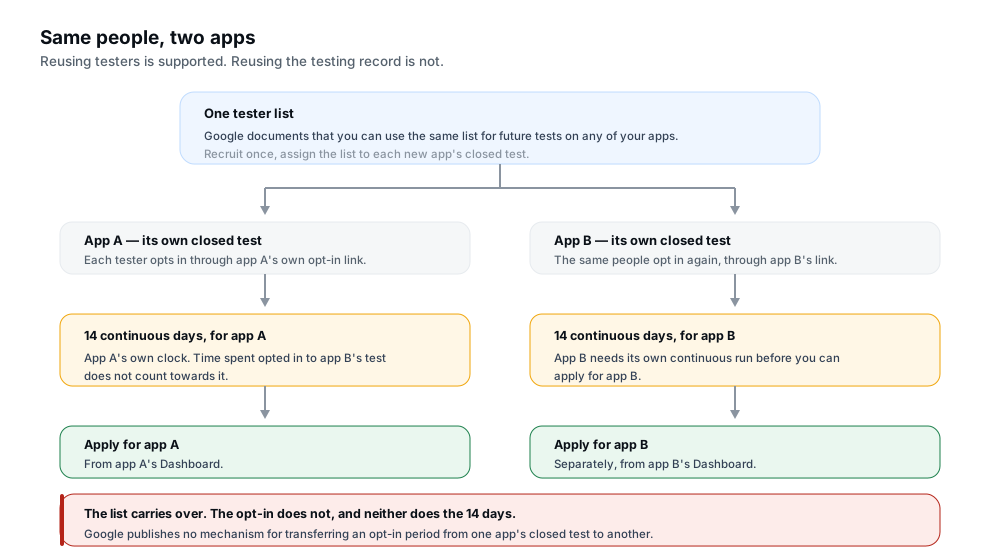
Figure 2 — The list is an asset. The opt-in is an event that happens per app.
| What you are reusing | Documented position |
|---|---|
| The same people as testers | Supported. Google states you can use the same list for future tests on any of your apps, and nothing restricts a person from testing more than one of your apps. |
| The tester email list itself | Supported. The list is created at account level and assigned to a test inside an app. Closed testing allows up to 200 lists, each holding up to 2,000 users, with up to 50 lists per track. |
| The opt-in | Not transferable. Each tester opts in through the specific app's opt-in link, so a second app needs a second round of opt-ins from the same people. |
| The previous 14-day record | Not transferable. No mechanism is documented for carrying an opt-in period from one app's closed test to another. Do not assume the clock is already running. |
| The feedback and release history | Yours to keep as working material. It is useful context for the second app's feedback summary, but the application asks about the closed test for the app you are applying for. |
Two mechanics that catch people out with reused testers
Internal and closed opt-ins conflict within the same app. Google states that a user who opts into your app's internal test is no longer eligible to receive an open or closed test for that app, and must first opt out of the internal test and then opt in to the closed test. If you warm up with internal testing on the new app and use the same people, expect that handover to be a deliberate step.
Testers must be told, every time. Google's guidance for a first test is to inform testers that they need to remain opted in continuously for at least 14 days. Reused testers have done it once and may assume they are still covered. Say it again for each new app, in the message that carries the new opt-in link — that one sentence prevents most of the dropouts that quietly restart a clock.
What carries over and what repeats, by scenario
Individual situations are where the general rule either fits or does not. Find the row that describes you, and read the middle two columns as a pair.
| Scenario | What carries over | What must be checked or repeated | Recommended next step |
|---|---|---|---|
| Second app, same personal account, first app already in production | Your tester list, and the people on it. | The new app's own app setup, closed test, 12 opted-in testers, 14 continuous days, and its own application. | Open the new app's Dashboard and read what it says is outstanding for that app. |
| Second app, organisation account | Tester list and community. | Confirm whether the numbered requirement is part of your picture at all, then complete app setup for the new app. | Treat the Dashboard and your account type as authoritative rather than applying the personal-account rule by default. |
| Three or more apps on one account | The same tester list can serve all of them. | A separate closed test and a separate continuous 14 days for each app, and a separate application per app. | Stagger the runs rather than starting them together, so one application is not waiting on another app's testers. |
| New app replacing or superseding an existing one | Tester list, and whatever you learned the first time. | A new package name is a new app, so its own track setup and its own requirement check apply. | Plan the closed test as though it were your first, and reuse the list to save the recruiting effort. |
| Update to an app already in production | Everything. Access already exists. | A higher version code, testing scaled to the risk of the change, and the usual submission rules such as target API level. | Build, test, create the production release and roll out — with a staged rollout if you want to limit exposure. |
| Same app, new build during its closed test | The app's track setup and its testers' opt-ins. | Nothing documented as resetting, provided the existing opt-in is not broken by the change. | Upload a higher version code to the same track and keep the continuous run intact — Google advises updating during closed testing. |
| Asked to keep testing after applying | Nothing to carry — the instruction is about the current app. | Whatever the console and Google's email ask for. Insufficient tester engagement is one documented reason for a continuation request. | Continue the test as instructed and use the time to fix what was reported, rather than treating it as a fixed waiting period. |
| Two apps, testing at the same time | The tester list, if the same people are willing to run two opt-ins. | Two independent opt-in runs and two continuous 14-day periods, tracked separately. | Allowed, but only attempt it with a buffer of extra testers and a way to see each app's opt-in state separately. |
Two qualifications belong with that table. It describes what Google publishes for personal accounts created after November 13, 2023; where your Console shows something different for your account, your Console is authoritative. And the rows are the situations developers most often ask about, not an exhaustive map of every account and app combination.
Do updates to a published app need another closed test?
No, and separating this from the new-app question is the most useful thing you can do when planning a release schedule. Google's testing requirement is a gate on gaining production access in the first place. Once an app has it, releasing an update is ordinary release work, not a re-entry into the gate.
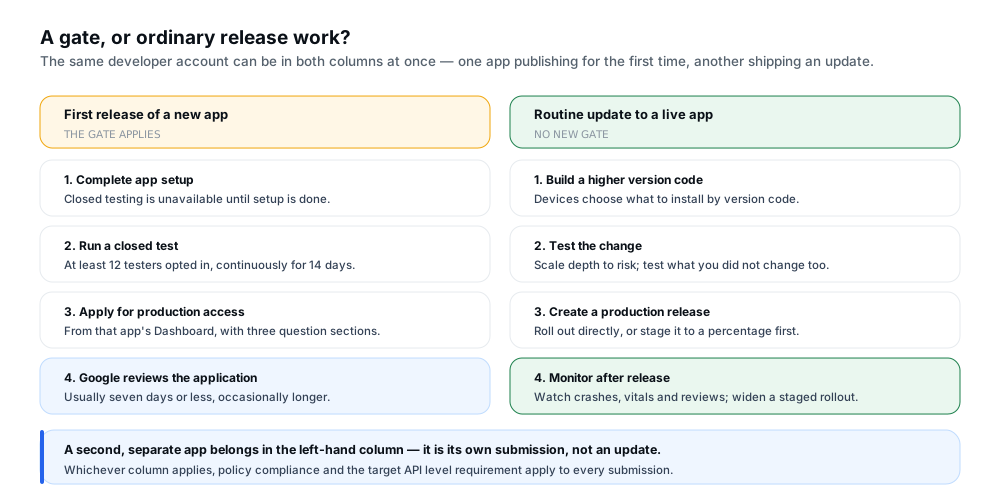
Figure 3 — Two different jobs that happen on the same account.
The workflow for an update is short. Build the new version with a version code higher than the live one, test the change in proportion to its risk, create the production release, and roll it out — optionally as a staged rollout first. No part of that is a 12-tester closed test.
Three things do still apply, and conflating them with the testing gate is a common error: policy compliance, which applies to every submission; the target API level requirement, which applies to new apps and updates alike, covered in the target API level requirements; and review, which still happens and can take longer, since Google notes certain apps may be subject to extended reviews of up to seven days or longer.
Google's advice after approval is to "continue testing your app thoroughly before publishing production updates". That is a recommendation about quality, not a second gate — testing more is encouraged, but you are not re-qualifying for access each time. The app updates guide covers the update workflows in detail.
How to sequence closed testing across two apps
The requirement is per app; the ordering is yours. Three patterns cover most situations, and the choice is really about how much you want to manage at once.
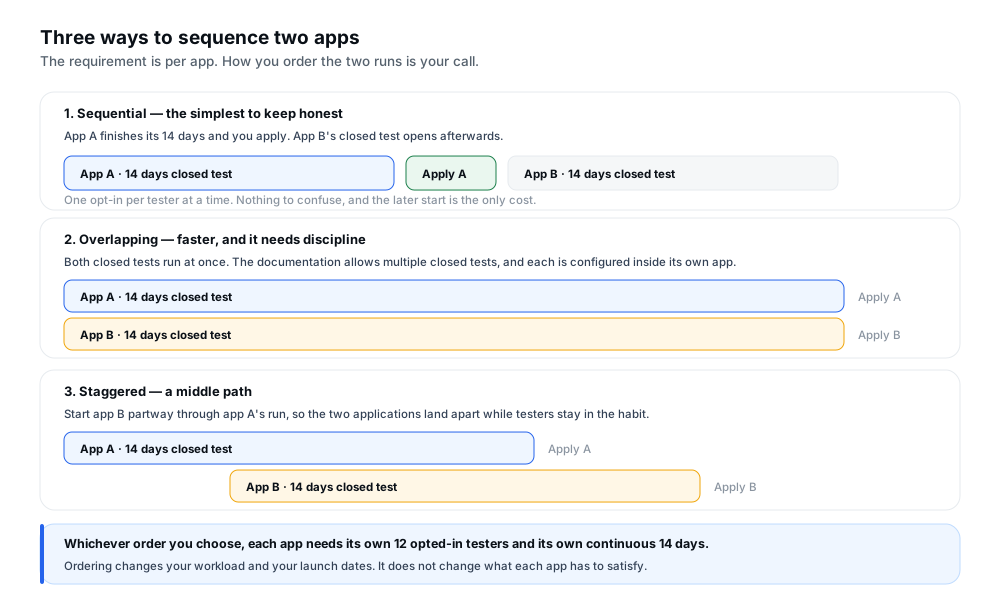
Figure 4 — Ordering changes your workload and your dates, not what each app must satisfy.
Sequential. Finish one app's 14 days and apply, then open the second app's closed test. Every tester only ever holds one opt-in, and an opt-in problem is unambiguous because there is only one test it could refer to. The cost is that the second app waits.
Overlapping. Run both closed tests at once. The documentation permits this — it states you can run multiple closed tests at the same time, and each is configured inside its own app. What it asks of you is discipline: every tester holds two separate opt-ins and can lose one without losing the other, and the two application reviews arrive close together. If you choose this route, use a tester buffer and check each app's opt-in state independently.
Staggered. Start the second app partway through the first app's run. The applications land a few days apart, no tester is juggling four things at once, and testers stay in the habit of using both apps. This is the pattern most developers settle on once they have run two or three.
What to set up before the second test starts
Most of the cost of a second test is front-loaded, and it is nearly all communication. Recruit a buffer, not the minimum, so a dropout does not push you under 12 when you apply. Give each app its own opt-in link and its own message, and state the 14-day expectation again in the message that carries the new link rather than assuming anyone has inferred it. Keep both apps' feedback separate, since the application asks you to summarise the testing feedback for the app you are applying for. And track opt-in state per app, because a single friendly spreadsheet listing "testers" stops being useful the moment there are two tests.
Common mistakes when testing a second app
Assuming the first app's approval covers the second. This is the mistake the whole article exists to address. The approval unlocked one app's Production page; nothing documented extends it to a different app.
Assuming the 14 days are already banked. Because the clock is counted from continuous opt-in to a specific app's closed test, a tester who has been opted in for months starts from zero on the second. Treating that time as credit puts your planning off by a fortnight.
Reusing the tester list without re-confirming the opt-in. The subtle version of the same error, and the more likely one in practice, because reusing the list is genuinely supported. The list carries; the opt-in does not. Sending the new link to the same people and assuming they are already opted in leaves you counting testers who never joined the second test.
Not telling reused testers about the second 14 days. People who have already done it once are the most likely to assume they are covered. The requirement has to be stated for each app, not once per relationship.
Mixing up internal and closed opt-ins. A user opted into an app's internal test is not eligible for that app's closed test until they opt out of the internal one and then opt in to the closed one. On a second app where you warm up with internal testing, plan that handover explicitly.
Starting two tests with no buffer. Running concurrently is permitted, but it means any dropout is a dropout from one of two running clocks. The margin that felt comfortable for one app is thinner when two are live.
Treating a second app as an update. A new package name is a new app with its own tracks, its own status and its own requirement check. The update workflow you know does not transfer to a differently named app.
Guessing instead of checking. Every question here has a definitive local answer in your own Console. A general guide — including this one — can tell you how the requirement is written; only the Dashboard for your app can tell you where that app stands.
A multiple-app testing checklist
- Confirmed the requirement applies to your account by checking its type and creation date, rather than assuming the personal-account rule covers you.
- Opened the new app's Dashboard and read what it says is outstanding, since that is authoritative for that app.
- Completed app setup for the new app, because closed testing is unavailable until it is done.
- Decided the sequencing — sequential, overlapping or staggered — before starting either test.
- Assigned your existing tester list to the new app's closed test rather than recruiting from scratch.
- Sent each tester the new app's own opt-in link, not a reminder of the previous one.
- Restated the continuous 14-day expectation for the new app specifically.
- Recruited a buffer above 12 so a dropout does not push you below the minimum at application time.
- Planned the internal-to-closed handover if you are using internal testing first, since the opt-in has to be switched deliberately.
- Tracked opt-in state per app, with the two apps' tester counts visible separately.
- Kept the second app's testing feedback separate from the first app's, ready for its own summary.
- Applied from the new app's own Dashboard once its 12 testers have completed their own continuous 14 days.
- Allowed for review time — usually seven days or less, occasionally longer — in whatever date you have promised.
Frequently asked questions
Do I need 12 testers for every new app?
Treat it that way. Whether the rule applies to you at all is decided by your account type and creation date, but the gate itself is applied to an app: you apply from that app's Dashboard and approval gives you that app's Production page. Google publishes no rule carrying one app's testing record to another, so plan on each new app running its own closed test with its own 12 opted-in testers.
Does production access from my first app carry over to a second app?
Google does not publish a rule that extends it. The documented outcome of approval is access to that app's Production page and Open testing, and distribution of that app — no account-wide switch is described. Read your second app's Dashboard for its actual status rather than assuming either way.
Can the same testers test multiple apps?
Yes — Google states you can use the same tester list for future tests on any of your apps. But each tester has to opt in again through the new app's own opt-in link, and nothing is documented that transfers an opt-in period between apps.
Does each app need its own 14-day testing period?
The 14 days are counted from testers being opted in continuously to your closed test, and the opt-in is per app. Time accrued during your first app's test is not documented as counting towards a different app, so treat each new app as needing its own continuous run.
Does a normal app update restart the closed-testing requirement?
No. The requirement is a gate on gaining production access in the first place, so an update to an app that already has access is ordinary release work. Policy compliance and the target API level requirement still apply to the submission, and Google recommends continuing to test thoroughly — but that is advice about quality, not a new gate.
Can multiple apps be tested at the same time?
The documentation states you can run multiple closed tests at the same time, and each is configured inside its own app, so overlapping runs are permitted. The constraints are yours: every tester maintains a separate opt-in per app, each app needs its own continuous 14 days, and a dropout now affects one of two running clocks. Give yourself a tester buffer.
Where should I confirm the requirement for my own account?
In Play Console — the Dashboard for the app you are asking about. The documentation states the rule and its scope; only your Console can tell you which requirements are being applied to your account and app, and what remains outstanding. If you believe a requirement should not apply, contact Google support through your Console's Help section rather than ignoring what it shows.
Official resources and further reading
- Google Play — App testing requirements for new personal developer accounts — the scope of the requirement, the 12-testers and 14-day rule, the testing tracks, and the production access application and its three sections.
- Google Play — Set up an open, closed, or internal test — how each track is configured, the tester-list limits, the reusable-list statement, the internal-versus-closed opt-in rule, and which tracks can run at the same time.
- Google Play — Publish your app — app, update and item publishing status, and standard versus managed publishing for updates.
- Google Play — Prepare and roll out a release — the release process for a new app and for an update.
One further guide is worth having open if your situation is the opposite of this article's core convenience. Everything above assumes you have a tester list to reuse; a developer publishing a first app does not, and how to get 12 testers covers where they come from. The account-type question and the update case are both linked earlier, at the points where they matter.
Conclusion
The multiple-app question turns on one distinction the documentation makes without ever stating it as a rule. Whether you must run a closed test at all is decided by your account — its type and creation date. Whether that app can go to production is decided per app, from that app's Dashboard.
Three things follow. Your tester list carries over, so the recruiting work you did once is not repeated. Your opt-ins and the 14 days do not, because the opt-in is an event that happens inside a specific app's test. And an app already in production keeps its access, so updates are release work rather than a return to the gate.
Where the documentation is silent — and on the carry-over question it is silent — the safe reading is the cautious one: plan on each new app running its own test, and let your Console tell you if your situation is different. That costs you a fortnight if you are wrong. Assuming the opposite costs you a delayed launch, discovered at the point where you try to apply.
Testing a second app?
12 Testers Community helps Android developers run a managed closed test with real testers who stay opted in for the full required period, including repeat runs for later apps on the same account. Deciding whether your account is affected, and applying for production access, remain yours: no testing service can make that decision for you, and nothing here guarantees approval or production access.
