
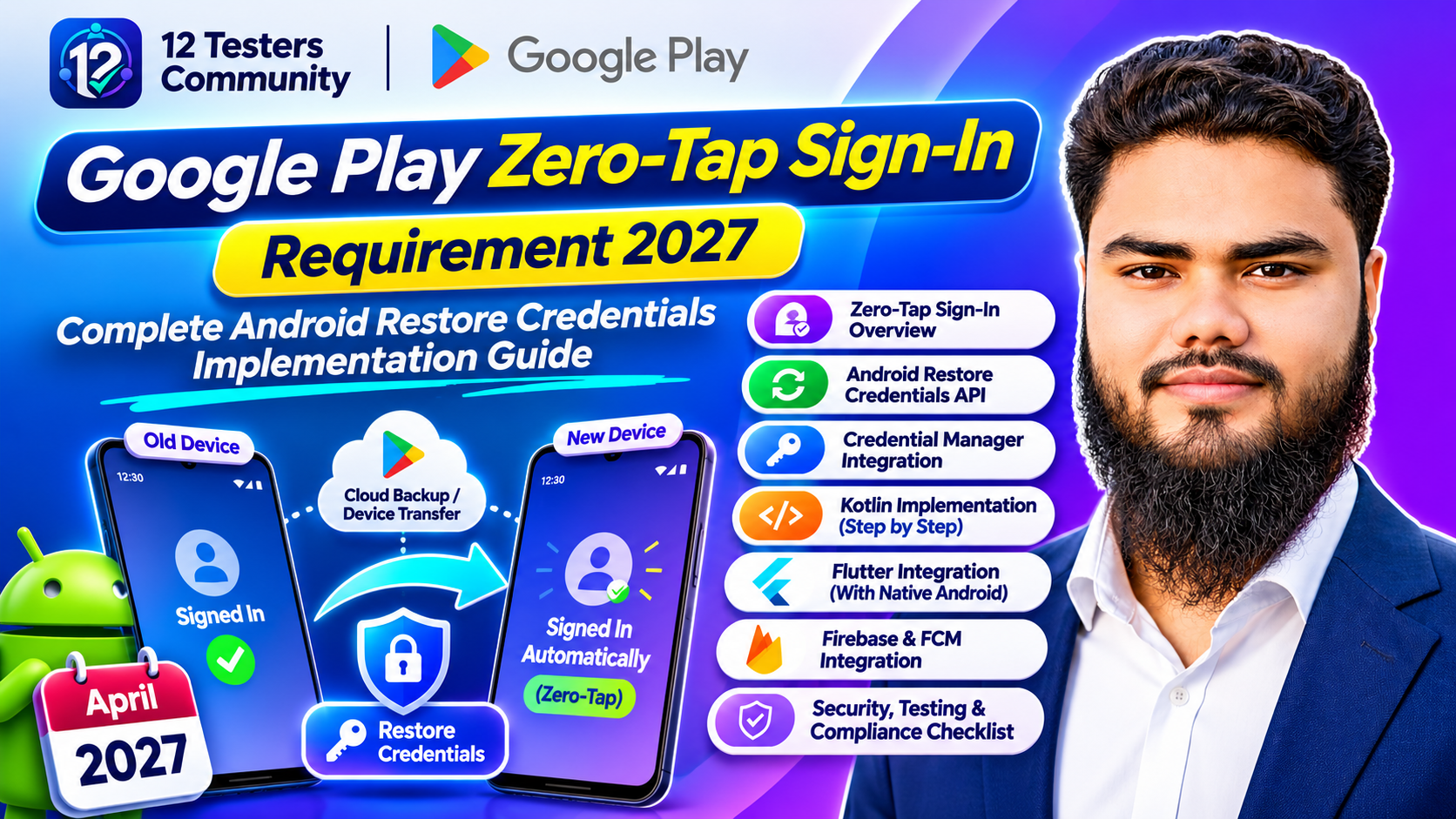
Every Android release cycle has one requirement that looks small in a policy summary and turns out to be an architectural change. For 2027, that requirement is Zero-Tap Sign-In. Starting in April 2027, Google Play will expect any app that supports user sign-in — optional or mandatory — to restore a signed-in user automatically when they move to a new Android device, using the Android Restore Credentials API. Not "offer a nicer login screen". Actually restore the session.
This guide is the implementation companion to the Android Restore Credentials documentation. It walks through the requirement itself, the three-stage credential lifecycle, the Kotlin code, the backup configuration that decides whether your integration works at all, the WebAuthn verification your server must perform, and the two areas developers most often get wrong: Flutter and Firebase. Every policy claim below was checked against Google's own documentation on 12 November 2026, and every implementation claim against the current Android developer guides. Where Google has not yet published guidance, this article says so instead of guessing.
Why manual sign-in after a device change is still a security problem
A new phone is an unauthenticated phone. Until the user signs in again, every app on it is a stranger: no session, no push token, no local drafts, no personalisation. The friction is obvious — an email, a password, sometimes an SMS code, often while standing in a shop with no patience for a password reset.
What is less obvious is the security cost. Sign-in flows during device setup are exactly where credential phishing, SIM-swap OTP interception and lookalike "restore your account" screens do their best work. The user has just moved devices, they are being asked to prove identity repeatedly, and they are primed to accept prompts they would normally question. Google's own framing of the requirement makes this point directly: manual sign-ins during device setup expose apps to "critical security vulnerabilities like phishing and credential theft".
The scale is not theoretical. In a case study published by the Android Developers Blog, Uber reported that a five-week A/B experiment with Restore Credentials, projected across its user base, is estimated to remove four million manual logins per year — in a market where roughly 40% of people in the United States replace their smartphone annually.
Zero-Tap Sign-In replaces that repeated proof-of-identity moment with a key pair that has already been provisioned, backed up end-to-end encrypted, and moved to the new device as part of the standard restore flow. The user taps nothing. The app verifies cryptographically. The session exists before the first screen paints.
What Zero-Tap Sign-In actually means
Zero-Tap Sign-In is Google Play's name for the developer requirement. Restore Credentials is the Android mechanism that satisfies it. A restore credential — also called a restore key — is a WebAuthn key pair created on the old device through Credential Manager, stored by Google Play services, and made available on the new device after a cloud restore or a device-to-device transfer. Your app then uses it to obtain a signed assertion, and your server turns that assertion into a session.
Three properties make this different from a saved password or an autofilled form:
- It is silent. After the initial sign-in on the old device, no user interaction is required to create or to use a restore key. There is no consent dialog, no biometric prompt, and no account chooser on the new device.
- It is authentication-shape, not token-shape. Older restoration tricks copied a bearer token from one device to another. A restore key is a private key that never leaves the secure storage of the device holding it; the server only ever sees a signature over a fresh challenge.
- It is transport-agnostic. The same key arrives whether the user restores from an end-to-end encrypted cloud backup or transfers data over a cable or Wi-Fi during setup.
A common real-world scenario: a user buys a new phone, signs into their Google Account during setup, and chooses to copy data from the old device. Your app is installed, its data restored. The user taps your icon for the first time expecting a login wall — and instead lands on their home screen, already signed in, with their previous session context intact. Nothing was handed over except a public key that had been registered months earlier.
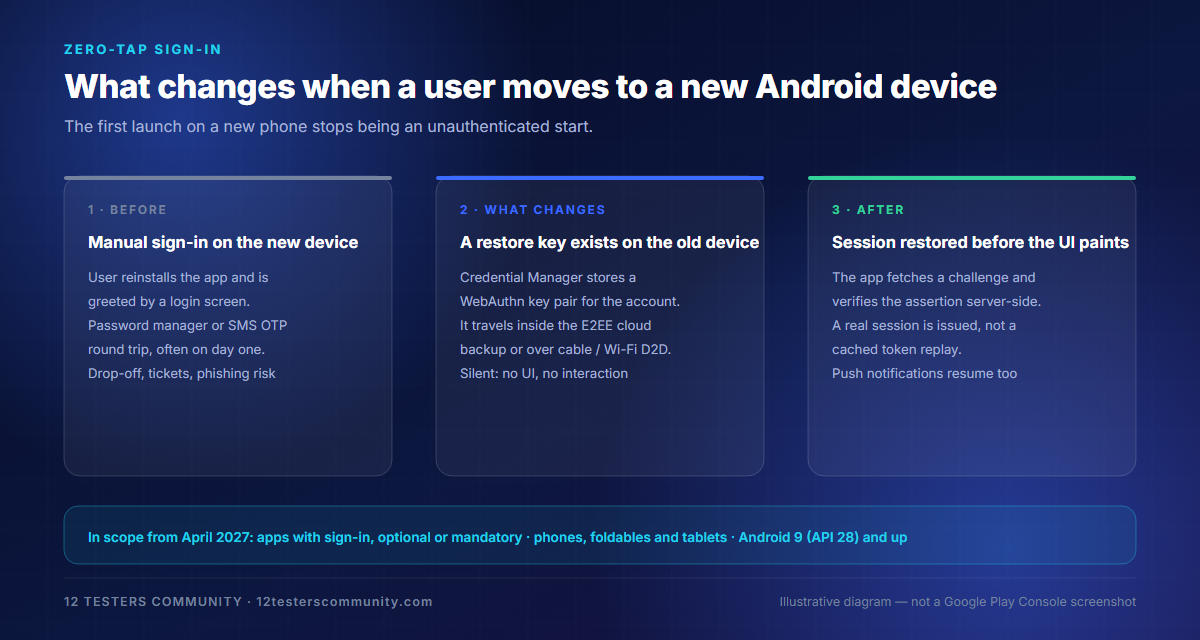
Figure 1 — The difference in one frame: an unauthenticated first launch versus a session restored from a key that was provisioned on the previous device.
What Zero-Tap Sign-In is not: it is not a bypass of authentication. Your server still verifies a signature, still validates a challenge, still issues a session under your own rules. It removes a repeated manual proof, not the proof itself.
The April 2027 requirement, precisely
The requirement lives in Play Console's technical quality requirements, not in the Developer Program Policy deadlines table. That distinction matters in practice: if you search the policy deadlines page for "zero-tap" you will not find it, because it is enforced through the technical quality standard announced on 26 August 2026 rather than through a policy change entry. Teams that only track the policy deadlines page will miss it.
As published, the scope is:
- Timing. From April 2027, apps must support Zero-Tap Sign-In restoration to maintain full publishing capabilities and optimal visibility on Google Play.
- Subject. Any app that supports user sign-in, whether sign-in is optional or mandatory, when a user moves from a previous Android device to a new one and chooses to restore data from either a device-to-device transfer or a cloud backup.
- Form factor. Mobile and tablet only — phones, foldables and tablets. The Restore Credentials API is not supported on other form factors today.
- Platform. Android 9 (API level 28) and above.
- Verification. Google states that meeting the requirement is determined by successful restore key retrieval resulting in the user being automatically signed in. Apps identified as not meeting it will be notified.
| App type | In scope? | What to do |
|---|---|---|
| App with mandatory login | Yes | Create a restore key after sign-in; restore silently on the new device. |
| App with optional login | Yes, for signed-in users | Same flow, but only for users who actually signed in. Never fabricate a session. |
| App with no user accounts | No | Nothing to restore; keep the first launch unauthenticated as before. |
| Guest or signed-out user | No | Launch in the same unauthenticated or guest state on the new device. |
| Games | Currently out of scope | Exempt while Google develops tailored guidance in 2027; single-account games are encouraged to adopt the API. |
| Permanently private / enterprise device management apps | No | Explicitly outside the scope of the requirement. |
| Apps under strict regulatory mandates (financial services, healthcare) | Possibly exempt | May be eligible, but you must submit an exemption request through Play Console before the enforcement date. |
| Apps live on a qualifying Block Store integration on or before 30 September 2026 | Considered compliant | Keep it. Integrations completed or started after that cutoff are not considered compliant. |
| Wear OS, Android TV, Android Auto, Android XR, ChromeOS | No | Cross-device-category restoration is not supported by the API. |
Table 1 — Requirement applicability. Compiled from Play Console technical quality requirements, verified 12 November 2026.
Two honest caveats. First, Google states that further detail on the requirement and on exceptions will be published in the coming months, so the exemption mechanics for regulated apps may still change. Second, if your product depends on an exemption, treat it as a submission you must make rather than a status you already have. Nothing in this article substitutes for Play Console's own notifications about your app.
Zero-Tap Sign-In versus traditional authentication
The comparison is not "fast login versus slow login". It is a difference in when identity is established and how it is proven.
| Dimension | Traditional sign-in | Zero-tap restoration |
|---|---|---|
| User interaction | Identifier, secret, possibly OTP, per device | None after the initial sign-in |
| Device migration | User must re-enter credentials | Key travels with app data |
| Credential form | Password, OTP or federated token | WebAuthn key pair registered to the account |
| Proof mechanism | Shared secret presented to the server | Signature over a server-issued challenge |
| Phishing surface | High during setup and recovery | None: no user input to phish |
| Backend requirements | Password or OTP verification | WebAuthn registration and assertion verification |
| Session restoration | New session after manual proof | New session after verified assertion |
| Failure mode | User abandons or resets password | Fall back to the standard sign-in screen |
Table 2 — Traditional sign-in versus zero-tap restoration.
Note what does not change: your authorisation model. A restored identity is an authenticated identity, not an authorised one. OAuth scopes, paid entitlements, role checks and step-up verification are untouched by the restore key, and Google says so explicitly.
Inside the Android Restore Credentials API
Four objects matter, and they belong to androidx.credentials:
CreateRestoreCredentialRequestwraps the WebAuthn creation options JSON from your server and creates the key. ItsisCloudBackupEnabledflag defaults totrue.CreateRestoreCredentialResponsereturnsregistrationResponseJson, which you post to your server for verification.GetRestoreCredentialOptionwraps the WebAuthn request options JSON and retrieves the transferred key. You must not combine it with other credential options in the same request.RestoreCredential— the returned credential, which exposesauthenticationResponseJson. It is deliberately not aPublicKeyCredential.
The key pair itself is managed by Google Play services, not by your app. Your app never sees the private key. Credential Manager is the API surface; Play services provides the storage and the transfer; your server holds the public key.
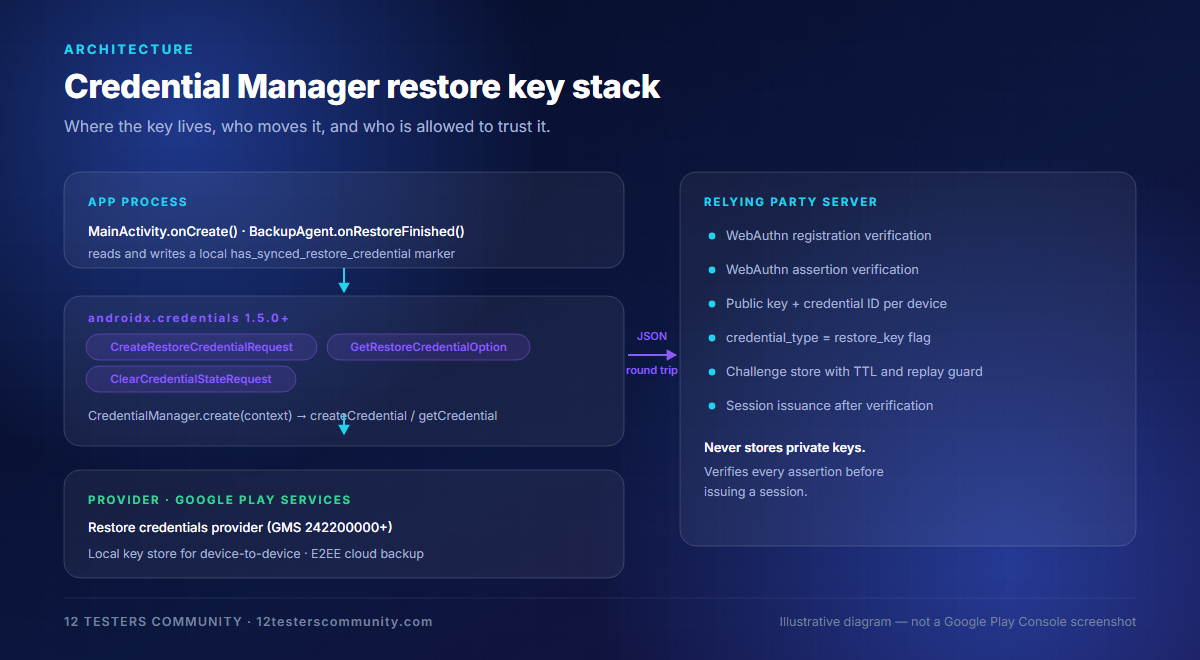
Figure 2 — Where each piece lives. The private key never leaves the device; the server stores only the public key and a credential identifier.
Because restore keys are WebAuthn credentials, everything you may already have built for passkeys — relying party configuration, challenge storage, signature verification — is reusable. Google recommends flagging restore keys distinctly in your database so they never appear in a user's passkey management screen and can be exempted from user-verification checks. An app can support restore keys without supporting user-facing passkeys at all.
The three stages of a restore key's life
Stage A — creating the key on the previous device
The key must exist for every signed-in user, not just users who happen to sign in again. Google specifies two triggers: right after a successful sign-in or registration, and at app startup for users who are already signed in. To avoid calling the API on every cold start, keep a local marker such as has_synced_restore_credential — and read the next section carefully, because that marker is the single most common source of broken integrations.
Stage B — restoring on the new device
After the operating system has restored the app's data, the key is available. The app asks its backend for a fresh challenge, calls getCredential(), and receives an assertion. The backend verifies the signature and issues a new session. Critically, the retrieval endpoint must be unauthenticated: on a brand-new device the app does not yet know which user is signing in. Your server identifies the user from the userHandle in the assertion and looks up the public key by credential ID.
Stage C — deleting on sign-out
Sign-out is not a UI state. It is a credential operation. Google's guidance is to call clearCredentialState() with TYPE_CLEAR_RESTORE_CREDENTIAL, clear the local sync marker, and invalidate the session server-side. If the user uninstalls the app, the OS deletes the restore key automatically — which is also why "reinstall on the same device" is not a restore scenario.
| Lifecycle event | Credential state | Who must act |
|---|---|---|
| Successful sign-in | Key created, public key registered | App + backend |
| App startup, already signed in, no marker | Key created if missing | App |
| Cloud backup or D2D transfer | Key copied to the new device | Android + Play services |
| First launch on the new device | Key asserted, session issued | App + backend |
| User signs out | Key cleared, marker reset | App + backend |
| App uninstalled | Key deleted automatically | Operating system |
| Session revoked by support | Key must be deleted server-side and on device | Backend + app |
Table 3 — Credential lifecycle, and which component owns each transition.
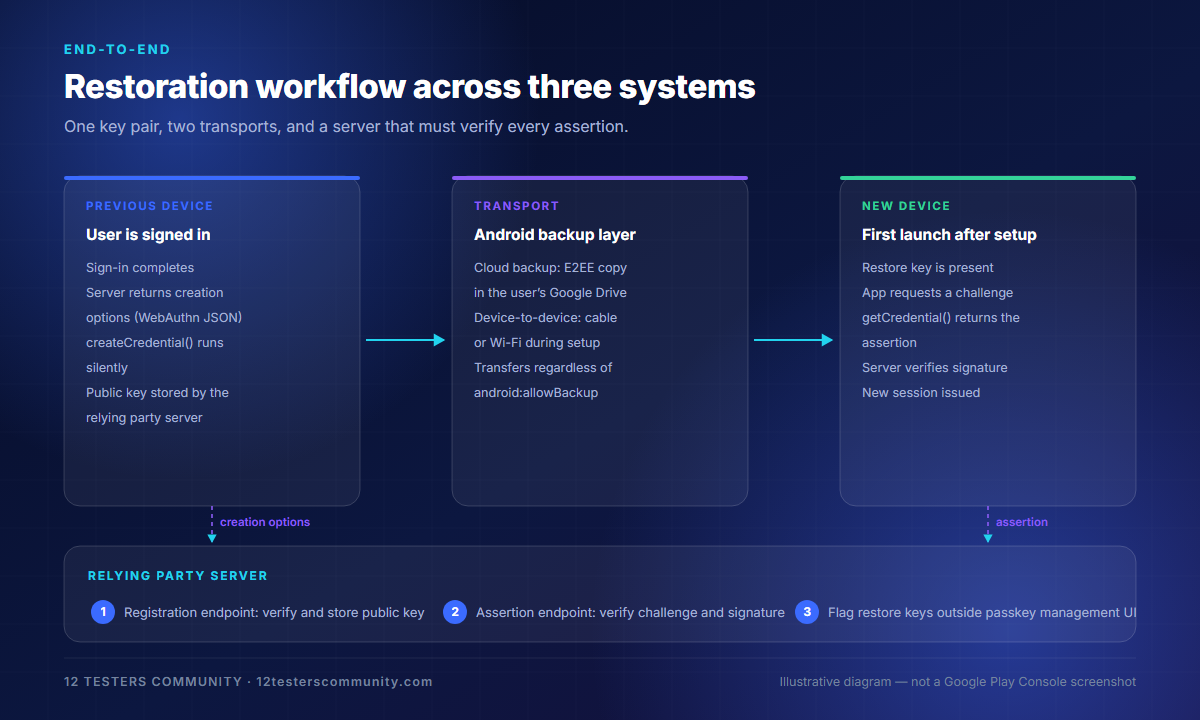
Figure 3 — The full route: creation options come from the server, the key travels through the backup layer, and the assertion returns to the server.
Technical requirements and compatibility
The support envelope is narrower than "all Android devices", and the failure modes are graceful if you handle them: on devices without Google Play services, or with an older Play services version, createCredential() and getCredential() can throw provider configuration exceptions, and your app should simply fall back to the standard sign-in screen.
| Requirement | Minimum | Notes |
|---|---|---|
| Android version | Android 9 (API level 28) | Phones, foldables and tablets |
| Google Play services | Core version 242200000 (v24.22) | Verify on real devices, not only emulators |
androidx.credentials | 1.5.0 | Restore Credentials first available here |
| Current stable at writing | 1.6.0 | Newest published: 1.7.0-alpha03, used in Google's guide |
| Companion artifact | credentials-play-services-auth | Must match the core library version |
| Relying party server | WebAuthn registration + assertion endpoints | Reusable from an existing passkey deployment |
| Screen lock and Google Account | Required for E2EE cloud backup | Without them, keys transfer over D2D only |
| Cross-form-factor restore | Not supported | No phone-to-TV, phone-to-Wear restoration |
Table 4 — Compatibility matrix, verified against the Restore Credentials integration guide on 12 November 2026.
Version pinning deserves a note. Google's implementation guide currently shows 1.7.0-alpha03 in its Gradle snippet, while the documented minimum is 1.5.0 and the newest stable on Google's Maven repository is 1.6.0. Choose deliberately: alpha for the newest API surface, stable for production discipline. Do not copy a version string from a blog post — including this one — without checking the repository.
Kotlin implementation, step by step
The whole integration is six calls. The order is not decorative: a key created before the server stores its public key can never authenticate, and it will silently occupy the "one key per app" slot that a working key would have used.
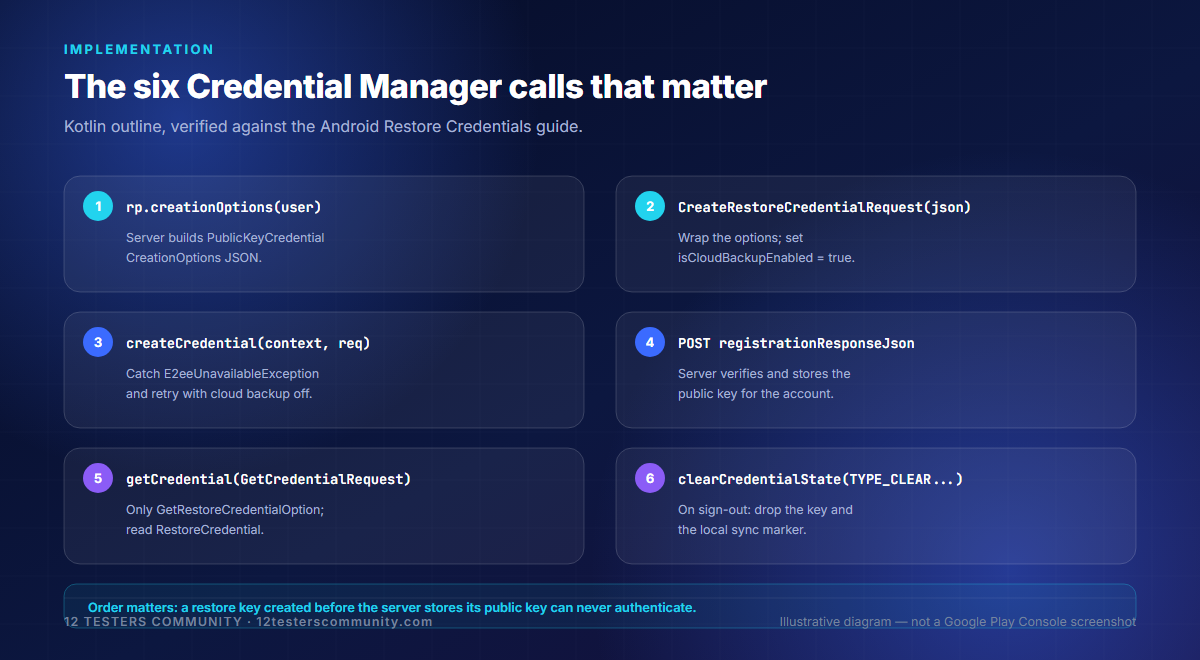
Figure 4 — The six calls, in the order that actually works.
Dependencies
dependencies {
    implementation("androidx.credentials:credentials:1.7.0-alpha03")
    implementation("androidx.credentials:credentials-play-services-auth:1.7.0-alpha03")
}
Creating the key
Your server must send creation options that look exactly like passkey registration options. Google's requirement list is specific: rp.id set to your domain, attestation of none, a resident key with userVerification of required, and both ES256 (-7) and RS256 (-257) in pubKeyCredParams.
class RestoreKeyManager(context: Context, private val api: AccountApi) {

    private val credentialManager = CredentialManager.create(context)

    suspend fun syncRestoreKey() {
        if (marker.hasSynced() || api.currentUser() == null) return

        val optionsJson = api.creationOptions()
        val response = try {
            credentialManager.createCredential(
                context,
                CreateRestoreCredentialRequest(optionsJson),
            )
        } catch (e: E2eeUnavailableException) {
            // No backup or no screen lock: keep a D2D-only key rather than no key.
            credentialManager.createCredential(
                context,
                CreateRestoreCredentialRequest(optionsJson, isCloudBackupEnabled = false),
            )
        } catch (e: CreateRestoreCredentialDomException) {
            return // malformed options JSON: fix the server response
        } catch (e: IllegalArgumentException) {
            return // empty, invalid, or non-Base64URL user.id
        }

        api.registerRestoreKey(response.registrationResponseJson)
        marker.setSynced()
    }
}
Set isCloudBackupEnabled = true on the first call and fall back to false only after E2eeUnavailableException. Reversing that order looks harmless and is a real bug: false writes a key that is unavailable to users who later restore from the cloud.
Restoring the session, and cleaning up on sign-out
suspend fun restoreSession(requestJson: String, api: AccountApi): Boolean {
    val request = GetCredentialRequest(listOf(GetRestoreCredentialOption(requestJson)))
    val response = try {
        credentialManager.getCredential(context, request)
    } catch (e: NoCredentialException) {
        return false // no key on this device: show the normal sign-in screen
    } catch (e: GetCredentialProviderConfigurationException) {
        return false // old or missing Google Play services
    }

    val credential = response.credential
    return if (credential is RestoreCredential) {
        api.createSession(credential.authenticationResponseJson)
    } else {
        false
    }
}

suspend fun signOut(api: AccountApi) {
    credentialManager.clearCredentialState(
        ClearCredentialStateRequest(ClearCredentialStateRequest.TYPE_CLEAR_RESTORE_CREDENTIAL),
    )
    marker.clear()
    api.revokeSession()
}
Two constraints are easy to trip over. Passing GetRestoreCredentialOption together with any other credential option throws IllegalArgumentException, so restore retrieval must be its own request. And because retrieval is a suspend function, the BackupAgent path needs runBlocking(Dispatchers.IO) — the only place in this design where blocking is the correct choice.
Manifest, backup rules and the marker that breaks everything
Restore key transfer and app data backup are separate mechanisms that happen to share a transport. Google's documentation is explicit that the RestoreCredential key pair is moved by Play services regardless of android:allowBackup. Device-to-device transfer therefore works even if backups are disabled, and cloud transfer works unless the user has opted out of cloud backup. What does depend on allowBackup is background restoration inside a BackupAgent, and the Android Studio cloud-backup test action.
<application
    android:allowBackup="true"
    android:fullBackupContent="@xml/backup_rules"
    android:dataExtractionRules="@xml/data_extraction_rules"
    android:fullBackupOnly="true"
    android:backupAgent=".backup.AppBackupAgent">
<data-extraction-rules>
<cloud-backup>
<exclude domain="sharedpref" path="restore_sync_marker.xml"/>
<exclude domain="sharedpref" path="auth_tokens.xml"/>
</cloud-backup>
<device-transfer>
<exclude domain="sharedpref" path="restore_sync_marker.xml"/>
<exclude domain="sharedpref" path="auth_tokens.xml"/>
</device-transfer>
</data-extraction-rules>Now the failure that costs teams a release cycle. If has_synced_restore_credential lives in default backed-up storage, Auto Backup copies the value true onto the new device. Your app then concludes it already has a key, skips creation, and never rotates one that may be stale or missing. Exclude the marker from backup — in both cloud-backup and device-transfer — or store it somewhere excluded. The same reasoning applies to raw auth tokens and to Keystore-bound ciphertext, which cannot be decrypted on the new device anyway.
Also set android:fullBackupOnly="true" when you declare a backup agent, or the platform may fall back to legacy key-value backup, where onRestoreFinished() behaviour differs. And never accept "silent background restore" as your only path: implement the foreground fallback in your launcher activity as well.
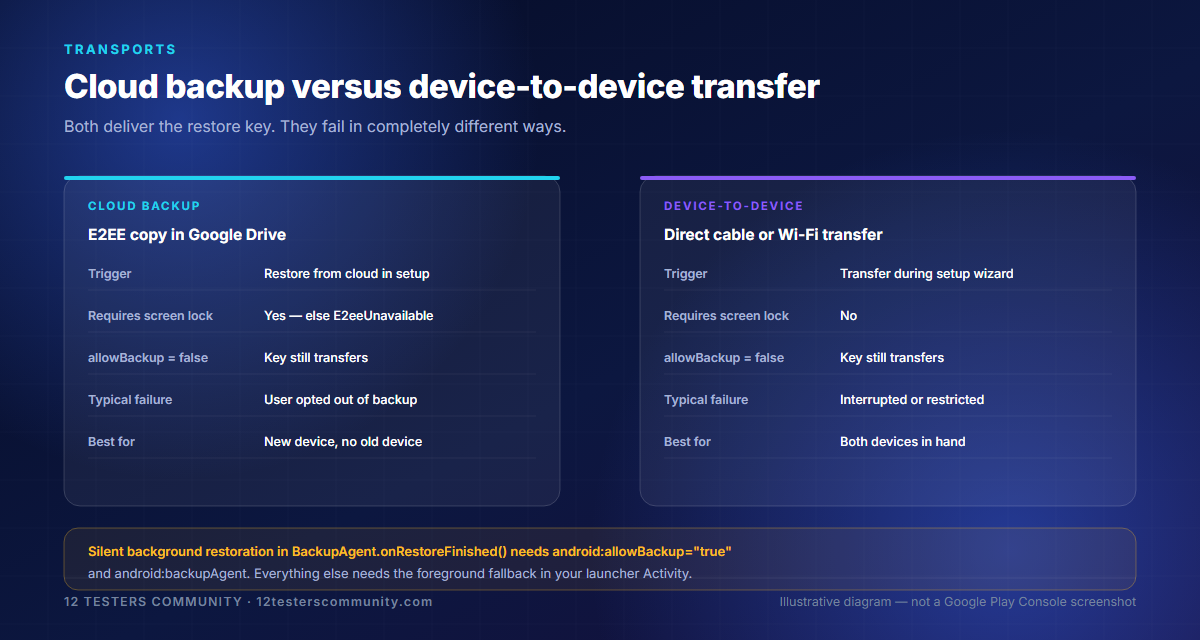
Figure 5 — Both transports deliver the key; they break for different reasons. Test both.
| Aspect | Cloud backup | Device-to-device |
|---|---|---|
| Trigger | Restore from cloud during setup | Cable or Wi-Fi transfer during setup |
| Key transport | End-to-end encrypted copy in Google Drive | Direct between the two devices |
| Requires Google Account | Yes | Not for the key itself |
| Requires screen lock | Yes, for E2EE | No |
Affected by allowBackup | No, for the key; yes for the agent path | No |
| Typical failure | User opted out of backup | Transfer interrupted or profile restricted |
Table 5 — Cloud backup versus device-to-device transfer, from the transport perspective.
A single line of advice before you change any manifest attribute: audit your current backup behaviour first. Turning allowBackup from false to true exposes every file in your app's data directory to backup, which is a privacy and compliance decision, not a one-line fix.
Backend integration and WebAuthn verification
Your server is the only component whose opinion about identity counts. The client's claim that it "restored successfully" is worth nothing until the assertion verifies.
The public-key model is straightforward: registration produces a key pair, the client keeps the private half, the server stores the public half along with a credential ID and the user handle. Later, the server issues a random challenge, the client signs it, and the server checks that the signature matches the stored public key over that exact challenge for that relying party ID.
| Step | Server responsibility | Failure if skipped |
|---|---|---|
| 1 | Issue a cryptographically random challenge and store it against the session | Replayable assertions |
| 2 | Accept an unauthenticated assertion endpoint for restore | Restoration impossible on a new device |
| 3 | Look up the user from userHandle, the key from credentialId | Wrong account signed in, or hard failure |
| 4 | Verify type, challenge, origin, rpIdHash | Phishing and cross-origin abuse |
| 5 | Verify the signature over authenticator data and client data hash | Anyone can mint a session |
| 6 | Accept uv = false for flagged restore keys only | All restorations fail validation |
| 7 | Consume the challenge, then issue your own session | Challenge reuse, session fixation |
Table 6 — Backend verification steps for a restore assertion.
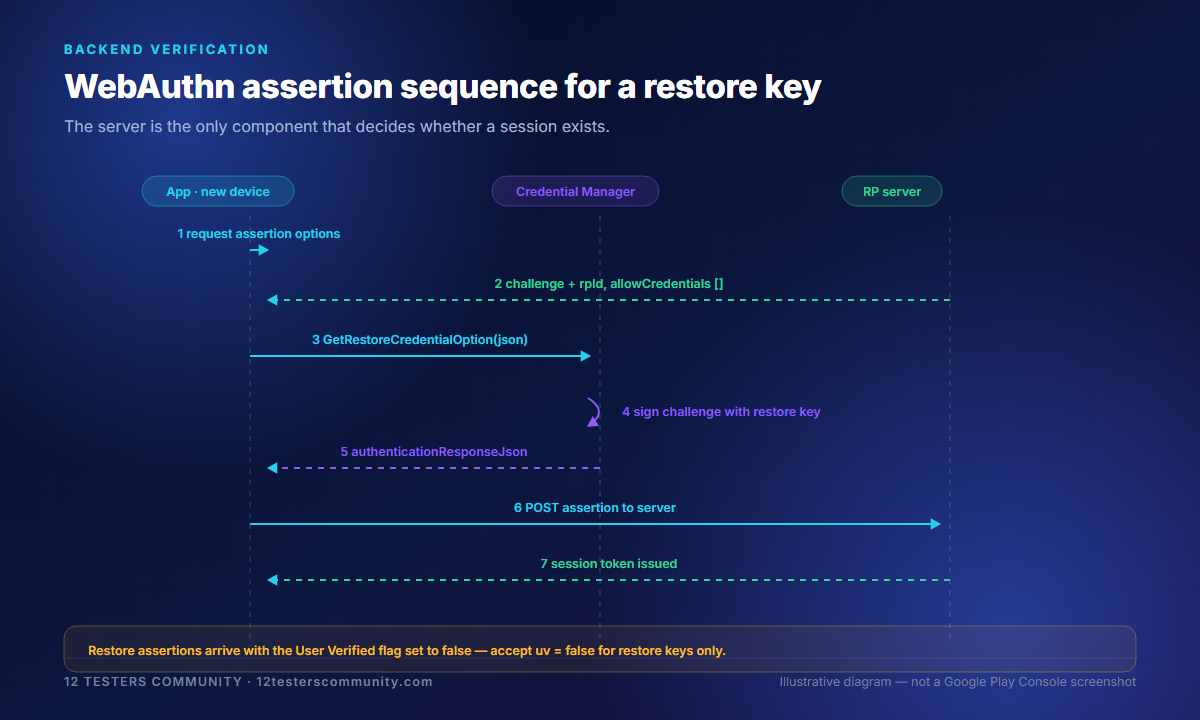
Figure 6 — The assertion round trip. Step 7 is the only place a session is created.
An illustrative server implementation using a FIDO-compliant library — here @simplewebauthn/server. Treat the option names as version-dependent and confirm them against your installed release.
// POST /auth/restore/verify  — unauthenticated by design
const { verified, authenticationInfo } = await verifyAuthenticationResponse({
  response: req.body.assertion,
  expectedChallenge: await takeChallenge(req.body.challengeId),
  expectedOrigin: 'https://app.example.com',
  expectedRPID: 'example.com',
  authenticator: storedCredential,         // public key + counter
  requireUserVerification: false,           // restore keys arrive with uv = false
});

if (!verified) return res.status(401).json({ error: 'assertion_failed' });

const user = await users.byHandle(authenticationInfo.userHandle);
await sessions.issue(user, { method: 'restore_key' });
return res.json({ session: await sessions.token(user) });
Three rules that are not negotiable. The private key never reaches your server. The challenge is single-use and short-lived. And requireUserVerification: false must apply only to credentials flagged as restore keys — accepting uv = false everywhere quietly weakens user-facing passkeys.
Flutter: what exists, and what you must build
Flutter has no first-party plugin for Restore Credentials. The API lives in androidx.credentials, exposed through Kotlin and Java, so a Flutter app must either bridge it or adopt a community package. As of 12 November 2026 the packages that mention the feature are early and low-adoption: android_restore_credentials (0.1.0), zero_tap_easy (0.1.1) and android_sign_in_kit (0.2.0), each with a few hundred downloads at most and none published by Google or the Flutter team. They may be perfectly good code; they are not a support contract. For a compliance-relevant code path, a small channel you own is usually the lower-risk option.
| Concern | Native Kotlin | Flutter |
|---|---|---|
| API access | Direct | Through a platform channel or plugin |
| Key creation | createCredential() | Native call, result mapped to Dart |
| Assertion | getCredential() | Native call, JSON string returned |
| Sign-out cleanup | clearCredentialState() | Native call from the Dart logout flow |
| Background restore | BackupAgent in your app module | Still native: the agent runs before Flutter starts |
| Session storage | DataStore / Keystore | flutter_secure_storage or your own channel |
| Error surface | Exceptions | PlatformException codes you define |
Table 7 — Native versus Flutter responsibilities. The background path is always native.
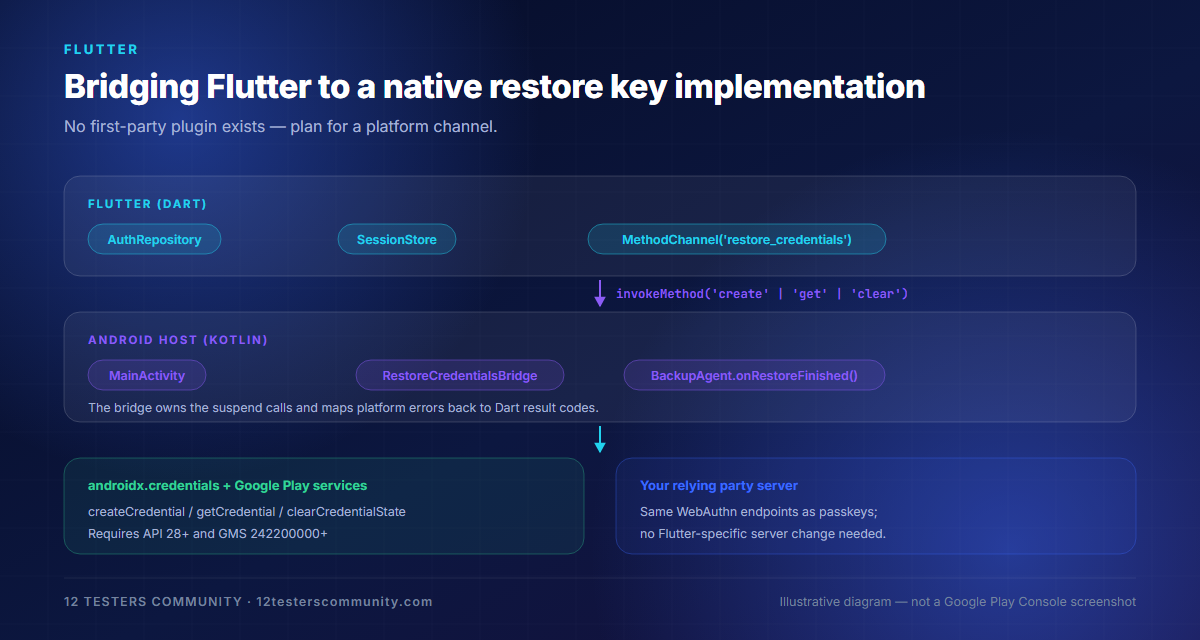
Figure 7 — The shape of a Flutter integration: Dart owns the session state, Kotlin owns the credential.
class RestoreCredentials {
  static const _channel = MethodChannel('12tc/restore_credentials');

  Future restore() async {
    try {
      return await _channel.invokeMethod<bool>('restore') ?? false;
    } on PlatformException catch (e) {
      if (e.code == 'no_credential' || e.code == 'provider_missing') return false;
      rethrow;
    }
  }

  Future<void> syncAfterSignIn() => _channel.invokeMethod<void>('sync');
  Future<void> clearOnSignOut() => _channel.invokeMethod<void>('clear');
}
The Kotlin side registers the channel in MainActivity.configureFlutterEngine, calls into the same RestoreKeyManager shown earlier, and translates NoCredentialException into a stable Dart error code instead of letting a raw exception cross the boundary. Keep the WebAuthn challenge exchange on the Dart side if your HTTP layer lives there — the channel only needs to carry JSON strings in and out.
Firebase Authentication and FCM after a device migration
This is where expectations most often exceed reality. Restore Credentials restores your app's own sign-in state. It does not restore a Firebase Authentication session, and it does not restore an FCM registration token. Both need explicit work.
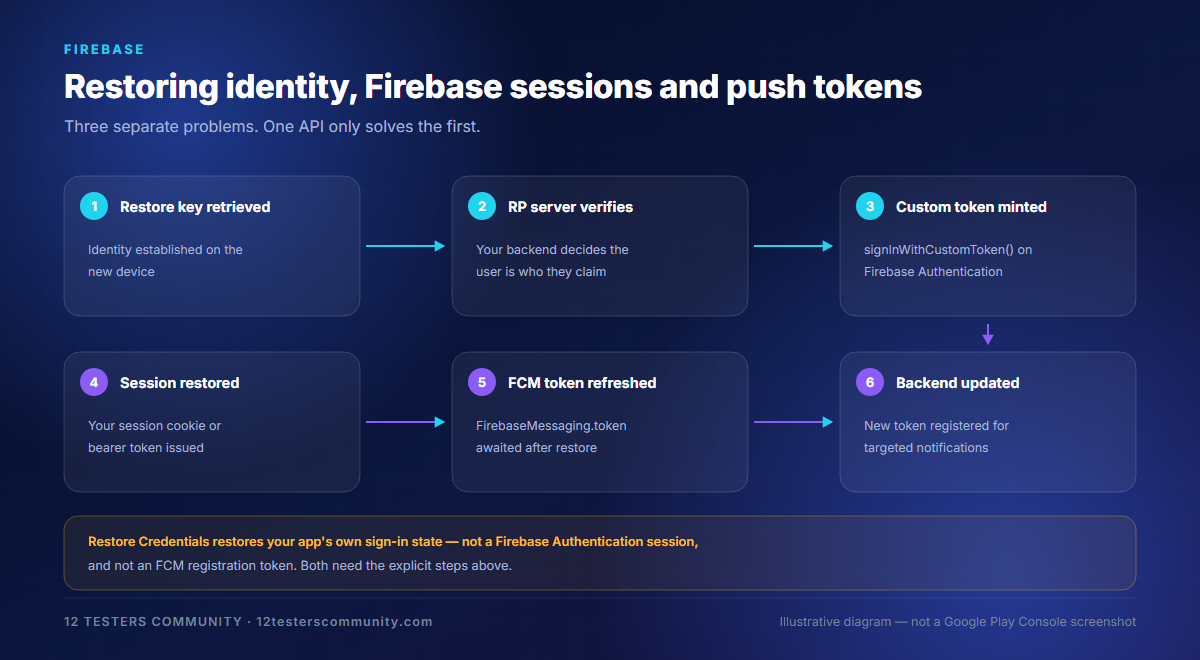
Figure 8 — Three separate problems: identity, Firebase session, push token.
If your primary identity provider is Firebase Authentication, the clean pattern is to keep your backend as the relying party and treat a verified assertion as a login event. Your backend can then mint a Firebase custom token and the client exchanges it:
val session = backend.createSession(restoreCredential.authenticationResponseJson)

FirebaseAuth.getInstance()
    .signInWithCustomToken(session.firebaseCustomToken)
    .await()

val fcmToken = FirebaseMessaging.getInstance().token.await()
backend.registerFcmToken(fcmToken, deviceId = session.deviceId)
Register the fresh FCM token as soon as the session exists — inside onRestoreFinished() if you restore there, or immediately after the foreground fallback signs in. Google notes that permissions, including notification permission, are restored by the backup and restore services, so you can send notifications to a restored user without asking them to open the app first. That only helps if your backend knows the new token.
Security, privacy and the limits of what was restored
Restore Credentials is an authentication primitive. Treat it like one.
| Risk | Mitigation |
|---|---|
| Assertion replay | Single-use challenges with a short TTL, consumed on verification |
| Wrong relying party | Validate rpIdHash and origin against your own domain |
Over-broad uv = false | Allow it only for credentials flagged as restore keys |
| Stale key after revocation | Delete server-side and call clearCredentialState() on the device |
| Leaked marker | Exclude has_synced_restore_credential from both backup paths |
| Multi-account confusion | One key per app: create it for the primary or last active account |
| Managed profile restrictions | Expect no credential; fall back to standard sign-in |
| Treated as authorisation | Restore identity first, request scopes just-in-time, step up when risk demands |
Table 8 — Security risks and their mitigations.
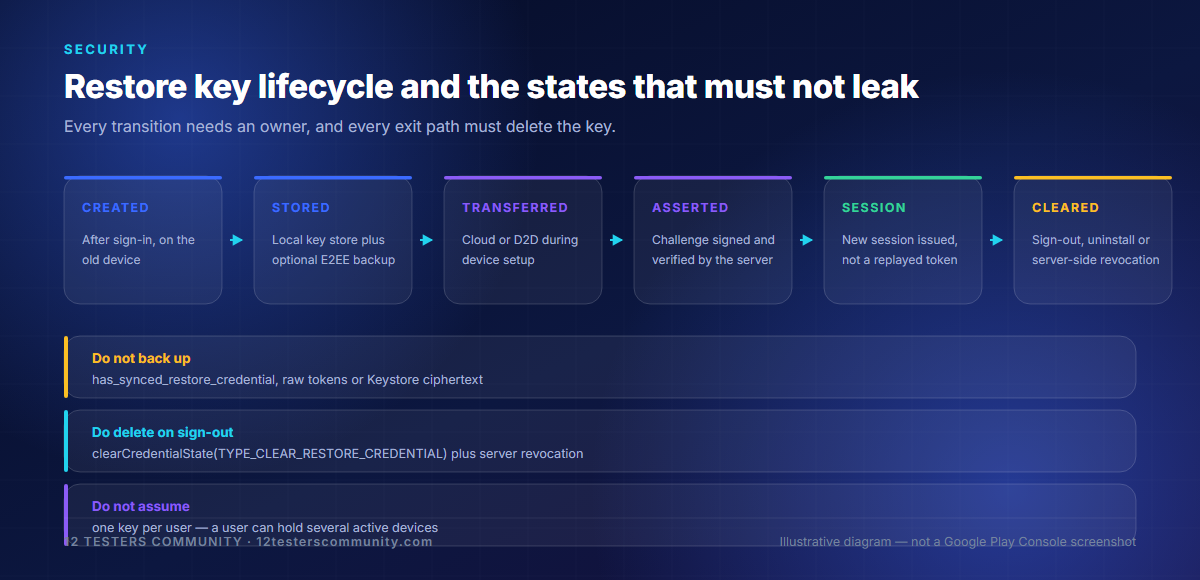
Figure 9 — Every state has an owner, and every exit path must delete the key.
Two clarifications worth stating plainly. First, device-to-device transfer is strong proof of possession — Google's guidance says an additional MFA step should not be required after a D2D restoration, while a cloud restore may justify step-up depending on your risk model. Second, restoring an identity does not restore authorisation: no OAuth scopes, no elevated roles, no bypassed MFA policy. If your app needs consent for a Google Drive scope, ask for it in context, later.
One limitation deserves an explicit sentence in your release notes: Restore Credentials supports one account per app. Multi-account apps must choose which account gets the key, and accept that the others will need a normal sign-in on the new device.
Testing: both transports, both tiers, both failure paths
Android Studio's Backup and Restore tool is the fastest way to exercise the flow. Prerequisites are specific: Android Studio Otter (2025.2.1) or newer, a device or emulator with a Google Play system image and Play services 242200000+, a signed-in Google Account with a screen lock configured, and a debuggable build. Cloud testing additionally requires android:allowBackup="true"; device-to-device testing does not.
| Scenario | Expected result | Pass criteria |
|---|---|---|
| Fresh install, no key | Standard sign-in screen | No crash, no empty session |
| Cloud restore with valid key | Silent sign-in | User lands signed in before the UI paints |
| D2D transfer with valid key | Silent sign-in | Same, with allowBackup both true and false |
allowBackup="false", foreground only | Restore on first launch | Fallback path signs in without a login wall |
| No screen lock, cloud backup | E2eeUnavailableException | Retry writes a D2D-only key |
| Expired or replayed challenge | Verification rejected | No session issued |
| User signs out | Key cleared | Next launch shows sign-in |
Offline during onRestoreFinished() | Foreground fallback recovers | Signed in once connectivity returns |
| Old Google Play services | Provider configuration exception | Graceful fallback, no crash |
| Managed work profile | No credential available | Standard sign-in, no loop |
| FCM token after restore | New token registered | Push received without opening the app |
Table 9 — Test matrix. Run the cloud and D2D columns separately; they fail differently.
For continuous integration, bmgr on a physical device or headless emulator covers the mechanics (bmgr backupnow, reinstall, bmgr restore), and the androidx.test.backup JUnit 5 host tests can drive both CLOUD_ENCRYPTED and DEVICE_TO_DEVICE transport modes. What no automated suite fully reproduces is the real setup wizard on a second physical device — reserve manual passes for that.
Common errors and how to read them
| Error or symptom | Likely cause | Fix |
|---|---|---|
E2eeUnavailableException | No cloud backup or no screen lock | Retry with isCloudBackupEnabled = false |
CreateRestoreCredentialDomException | Malformed creation options JSON | Validate against the WebAuthn JSON shape |
IllegalArgumentException | Empty JSON or non-Base64URL user.id | Encode the user handle as Base64URL |
NoCredentialException | No key on this device | Show the standard sign-in screen |
| Provider configuration exceptions | Missing or old Google Play services | Fall back silently; do not block the app |
IllegalArgumentException on retrieval | Restore option combined with another option | Send one request per credential type |
| No restore after migration | Marker copied as true | Exclude it from backup rules |
| Restore works, no push | FCM token not refreshed | Fetch and register the token after restore |
| Key still works after logout | clearCredentialState() never called | Clear on every sign-out path |
| Verification always fails | rpId or origin mismatch | Match domain and scheme exactly |
| Verification fails only for restore | Verifier requires uv = true | Accept uv = false for restore keys |
Table 10 — Troubleshooting reference. Symptom first, cause second.
A practical implementation roadmap
| Phase | Work | Done when |
|---|---|---|
| 1 · Audit | Map every sign-in path, session store and backup setting | You know where the marker and tokens live |
| 2 · Server | Add or reuse WebAuthn registration and assertion endpoints | Restore keys can be stored and verified |
| 3 · Client | Integrate Credential Manager and create keys after sign-in | A key exists for every signed-in user |
| 4 · Restore | Two-tier retrieval: BackupAgent plus launcher fallback | Both paths sign the user in |
| 5 · Backup | Exclude the marker and tokens; decide on allowBackup | No stale marker survives a migration |
| 6 · Exit | Sign-out and revocation clear the credential everywhere | Cleared key cannot authenticate |
| 7 · Adjacent | Firebase custom token and FCM re-registration | Push arrives before first launch |
| 8 · Test | Cloud and D2D on real devices, API 28 and current | Matrix in Table 9 passes |
| 9 · Monitor | Log restore success, fallbacks and verification failures | You can see compliance in production |
Table 11 — Roadmap. Phases 2 and 5 are the ones teams skip.
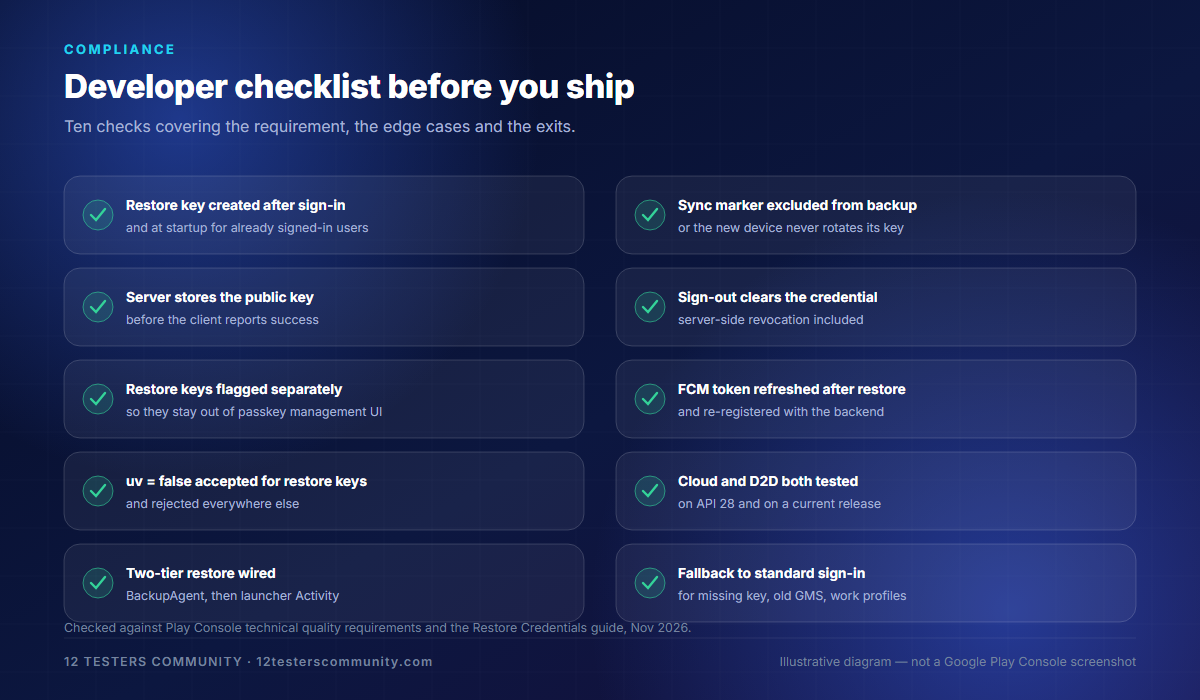
Figure 10 — The checklist to run before you ship.
If you also publish on Play under the broader 2027 quality programme, sequence this work alongside the February 2027 memory and DEX thresholds rather than after them; both touch release engineering, and the memory, bitmap and DEX guide covers the other half of that calendar. A round-up of the surrounding deadlines sits in our October 2026 policy update breakdown.
Frequently asked questions
What exactly is Google Play Zero-Tap Sign-In?
It is the Play Console technical quality requirement that an app supporting user sign-in restore that sign-in automatically when the user moves to a new Android device. The Android Restore Credentials API is the mechanism Google expects you to use.
When does the requirement take effect?
From April 2027. Google announced it on 26 August 2026 and states that apps not meeting the requirement may see reduced visibility and publishing capabilities.
Does every Android app need Restore Credentials?
No. Apps with no user accounts are outside the scope, as are apps whose users were signed out, guests, games for now, and permanently private enterprise device management apps.
My app has optional login. Am I covered?
Yes, for users who are signed in. Create a restore key for them like any other signed-in user, but never fabricate a session for someone who was not signed in.
Does it apply to Flutter apps?
The requirement applies to the published app, not to the framework. A Flutter app must still satisfy it, which today means bridging to Credential Manager through a platform channel or a community plugin.
Is a restore key the same as a passkey?
No. Both are WebAuthn credentials and can share server-side verification, but a restore key is created silently, requires no user verification at assertion time, and should be flagged so it never appears in passkey management UI.
Does it work without Cloud Backup?
Device-to-device transfer works, because Play services moves the key pair independently of android:allowBackup. Cloud restoration is what fails when the user opts out of backup or has no screen lock.
Is device-to-device transfer supported?
Yes, over cable or Wi-Fi during setup. Google describes it as strong proof of possession, so an extra MFA step should not be required after a D2D restoration.
Does it restore a Firebase Authentication session?
No. You must exchange a verified assertion for a Firebase custom token and call signInWithCustomToken().
Are FCM tokens restored automatically?
No. Fetch a fresh token with FirebaseMessaging.getInstance().token.await() and register it with your backend after the restoration.
Does Zero-Tap Sign-In bypass MFA?
It does not perform or bypass MFA. The API handles authentication only; whether to require step-up is your policy decision, and authorisation scopes are unaffected.
What happens when the user signs out?
You must delete the restore credential with clearCredentialState() using TYPE_CLEAR_RESTORE_CREDENTIAL, clear the local marker, and invalidate the session server-side.
Are games included?
Games are currently out of scope while Google prepares dedicated guidance for 2027. Single-account games are encouraged to adopt the API voluntarily.
Does it work on Android 8 and older?
No. Restore Credentials requires Android 9 (API level 28) or higher, plus Google Play services 242200000 or higher.
Can I keep using Block Store?
Only if the integration was completed and in production on or before 30 September 2026 and it successfully restores sign-in state. Newer or different integrations do not satisfy the requirement.
How do I test this without two phones?
Use Android Studio's Backup and Restore tool with one emulator: back up, uninstall, reinstall, restore. Use a Google Play system image with Play services 242200000+, and a screen lock for cloud tests.
Conclusion
The April 2027 requirement is not a UI polish task. It is a small, well-specified piece of identity architecture: create a key when a user signs in, let the platform move it, verify an assertion on the other side, and delete it on the way out. The parts that decide whether it works are unglamorous — a marker excluded from backup, a verifier that accepts uv = false only for restore keys, a foreground fallback for the devices where background restore never runs.
Start with the audit: find every place a session begins and ends, and every file that survives a migration. Then build the server path, because no client-side cleverness rescues a backend that trusts an unverified claim. Test both transports on real devices, and log the fallbacks so you can prove compliance later rather than assert it.
If you want the shorter conceptual overview before diving into code, our companion piece on Zero-Tap Sign-In and session restoration covers the same requirement without the implementation detail. Teams still working through Play's testing requirements before production access should pair this with the closed testing complete guide, the push notification testing checklist for the FCM side, and the target API level requirements if your targetSdk is behind.
Further reading and research references
Official Google documentation — the sources for every policy claim and code shape in this article, verified 12 November 2026:
- Play Console technical quality requirements — Zero-tap sign-in restoration: the requirement text, exceptions, form-factor scope and the FAQ used for Tables 1 and 2.
- About Restore Credentials: the feature overview, benefits, multi-account and profile limits, and the supported platform envelope.
- Implement Restore Credentials with Credential Manager: the creation, retrieval and clearing code, the
allowBackupsemantics, and the marker warning. - Test Restore Credentials: the Android Studio prerequisites and the two-tier testing guidance behind Table 9.
- Back up user data with Auto Backup:
dataExtractionRules, the 25 MB quota, and the E2EE behaviour on Android 9+. - Android Developers Blog, 26 August 2026: the announcement that introduced the April 2027 Zero-Tap Sign-In requirement.
- How Uber is reducing manual logins by 4M per year: the production case study and the five-week A/B experiment cited in the introduction.
Standards and research — specifications that define what a restore key actually is:
- W3C Web Authentication (WebAuthn) Level 3 — the normative definition of the creation options, request options, authenticator data and assertion verification that Restore Credentials reuses. Relevance: everything your server validates comes from this document, including the
uvflag that restore keys return as false. - FIDO Alliance specifications overview — the CTAP and WebAuthn profile documents that govern the authenticator side of public-key credentials. Relevance: explains why a private key that never leaves the device is a stronger restoration primitive than a copied bearer token.
- NIST SP 800-63B (Digital Identity Guidelines, revision 4) — authentication assurance levels, verifier requirements and the distinction between authentication and authorisation. Relevance: the framing for why a restored identity still needs in-context authorisation and possible step-up.
A note on academic coverage: peer-reviewed studies specific to Credential Manager restore keys do not yet exist in meaningful numbers, because the API is recent. Rather than cite plausible-sounding papers that do not address the mechanism, this article relies on the normative specifications above. If you are researching this area formally, the W3C WebAuthn issue tracker and the FIDO Alliance's technical working groups are where the relevant design discussion currently lives.
All technical statements were verified against the sources listed above on 12 November 2026. Google has stated that further detail on the requirement and its exceptions will be published in the coming months; re-check Play Console before you finalise scope decisions.